Wireshark
Wireshark is a packet sniffer and protocol analyzer for real-time network monitoring capable of intercepting traffic from a wide variety of wired and wireless sources.
- previously called Ethereal
- GUI-based
- open-source
- there is a CLI version called
tshark - contains many filtering, sorting, and analysis tools
- Ideal for diagnosing network issues or analyzing security incidents
- capable of parsing the headers and payloads of hundreds of network protocols
- https://www.wireshark.org/
Usage
- Choose an interface to listen on
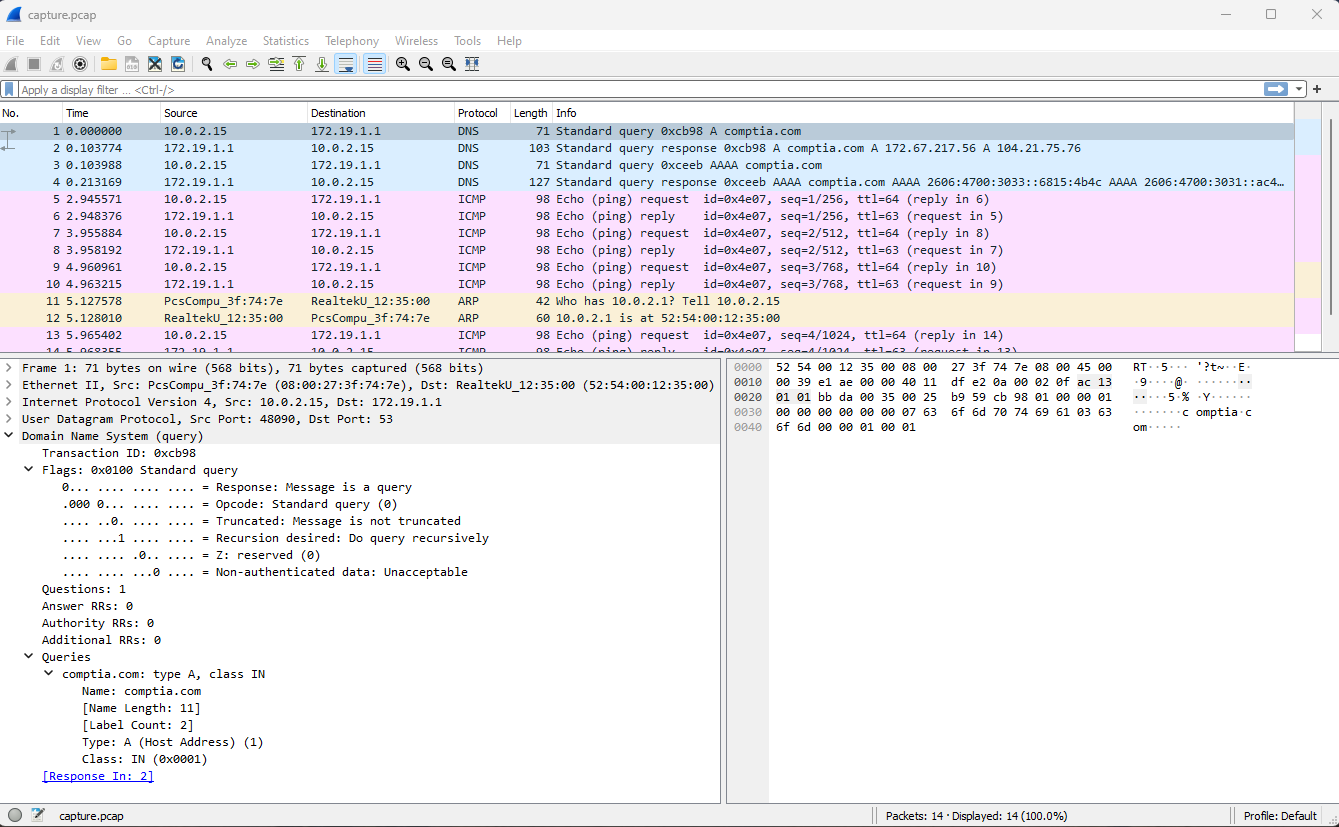
- output is displayed in a three-pane view
- top pane shows each frame
- bottom-left pane shows the fields from the currently selected pane
- bottom-right pane shows the raw data from the frame in hex and ASCII
- can apply a capture filter or filter the output using the same expression syntax as
tcpdump - can save output to a
.pcapfile - can load a
.pcapfile for analysis - supports display filters that can be applied to a live capture or capture file
- can adjust coloring rules
- control the row shading and font color for each frame
- Follow TCP Stream context command reconstructs the packet contents for a TCP session
Info
he PCAP file format has some limitations, which has led to the development of PCAP Next Generation (PCAPNG).
- Wireshark now uses PCAPNG by default
tcpdumpcan process PCAPNG too