Wireless Surveys and Heat Maps
Factors to consider when designing a wireless network:
- range
- interference
- signal strength
- number of devices in close proximity
- device density
- how much devices move
- special traffic requirements
- voice or video conferencing
A wireless survey is documentation about a location for the purposes of building an ideal wireless infrastructure; it often contains optimum locations for wireless antenna and access point placement to provide the required coverage for clients and identify sources of interference.
- aka site survey
- area served by a single AP is referred to as a basic service area (BSA)
- area where stations can roam between access points to stay connected to the same ESSID is an extended service area (ESA)
- wireless site survey ensures that these areas are properly sized
- used to measure signal strength and channel usage throughout the area to cover
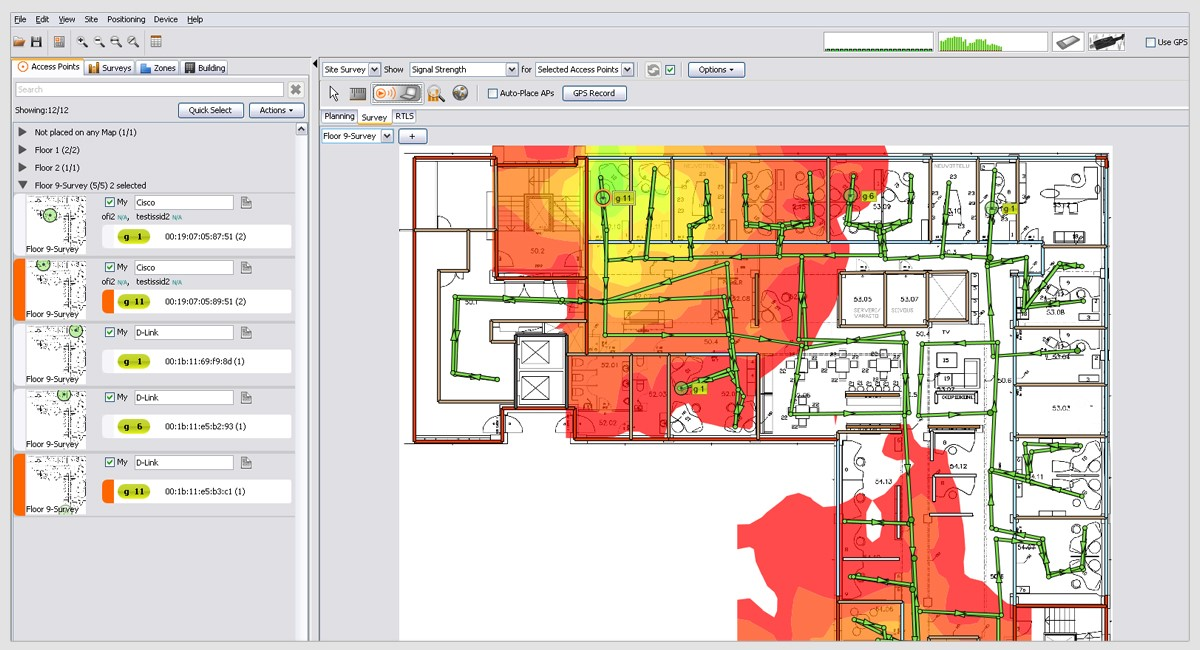
A heat map In a Wi-Fi site survey, is a diagram showing signal strength and channel utilization at different locations.
Conduct a Survey
- examining the blueprints or floor plans of the premises
- understand the layout and to identify features that might produce radio frequency interference (RFI)
- can be backed up by a visual inspection
- can be backed up by a visual inspection
- need obtain plans that show the locations of available ports
- Each AP mounting point needs a network port and power jack
- create a new plan on which you will mark the basic service areas and associated APs and booster antennae
- place APs:
- close enough together to avoid dead zones
- areas where connectivity is difficult or data transfer rates are below an acceptable tolerance level
- far enough apart that
- one AP does not interfere with another
- that one AP is not overutilized and a nearby one underutilized
- close enough together to avoid dead zones
- place APs:
- place and test each AP
- use a laptop with a wireless adapter and a wireless survey tool to
- record signal strength and supported data rate at various points in the intended BSA
- heat map shows areas with
- strong signal in greens and yellows
- oranges and reds where signal strength drops off
- Neighboring APs should be configured with non-overlapping channels
- avoid interference
- may need to adjust AP transmit power to size its BSA appropriately
- use a laptop with a wireless adapter and a wireless survey tool to
Info
- network design may need different power levels for different bands
- e.g.,
- lower power on the 2.4 GHz band to reduce its range and make it more likely that clients will connect on the 5 GHz band
- Alternatively, may configure band steering, or use different ESSIDs for 2.4 GHz and 5 GHz networks