Remote Desktop Protocol (RDP)
Remote Desktop Protocol (RDP) is an application protocol for operating remote connections to a host using a graphical interface.
- by Microsoft
- uses TCP port 3389
- can specify permissions to connect to the server via RDP
- can configure encryption on the connection
- RDP authentication and session data is always encrypted
- uses:
- remote administration of Windows server or client
- publish software applications on a server
- rather than locally on each client
- remote desktop gateway facilitates access to:
- virtual desktops
- or individual apps running on the network servers
- Alternatives to Remote Desktop:
- TeamViewer
- Virtual Network Computing (VNC)
- XRDP is an open-source implementation of RDP
- runs an RDP server on a Linux host
Limitation
Only one person can be signed in at any one time.
- starting an RDP session locks the local desktop
- if local user logs in, the remote user is disconnected
Info
Linux, macOS, iOS, and Android clients can connect to an RDP server on a Windows machine.
- mstsc client software is available to multi-OS
Connect to a Server via Remote Desktop
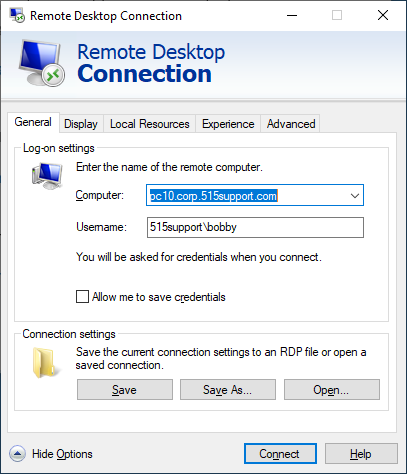
- open the Remote Desktop Connection shortcut or run
mstsc.exe - Enter server’s IP address or fully qualified domain name (FQDN)
- Choose whether to trust the server connection
- Inspect certificates
- Define credentials for the remote host
- For a domain account, format is
Domain\Username - For a local account, format is
.\UsernameorHost\Username
- For a domain account, format is
RDP Server and Security Settings
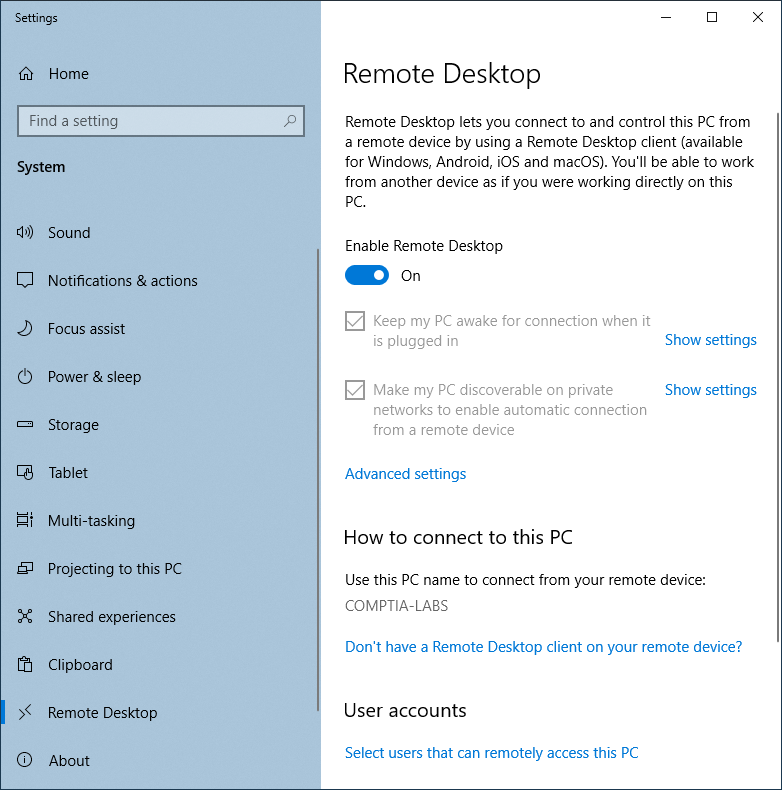
- Not enabled by default
- Access Remote Desktop settings in Settings app
- User accounts
- select users to define which users can connect remotely
- users in local administrators group are allowed by default
- can select from local accounts database or from the domain
- Advanced settings:
- enable older RDP clients to connect
- require RDP clients that support Network Level Authentication (NLA)
- NLA protects the RDP server against DoS attacks
- Without NLA,
- system configures a desktop before user logs on
- a user can create multiple pending connections to crash the system
- With NLA, user is authenticated before system commits any resources
- RDP server compromised by malware is vulnerable to stolen user credentials
- protect with:
- RDP Restricted Admin (RDPRA) Mode
- Remote Credential Guard
- learn more
- protect with:
Info
A secure administrative workstation (SAW) is a computer with a very low attack surface running the minimum possible apps used solely for remote management.
- used to protect privileged account credentials
- do not use low-trust computers for remote access