VLAN Routing
- traffic between VLANs must be routed
- various ways to do this:
- Subinterfaces
- Switch virtual interfaces (SVI)
Subinterfaces
- deploy a router with a single interface (one-armed router or router on a stick) connected to a trunk port on the switch
- the trunk port carries all the VLAN-to-VLAN traffic that must be routed
- router’s physical interface is configured with multiple subinterfaces
- each one is configured with a specific VLAN ID and IP address
- subinterfaces act as the default gateway for its VLAN/subnet
- router forwards inter-VLAN traffic between subinterfaces
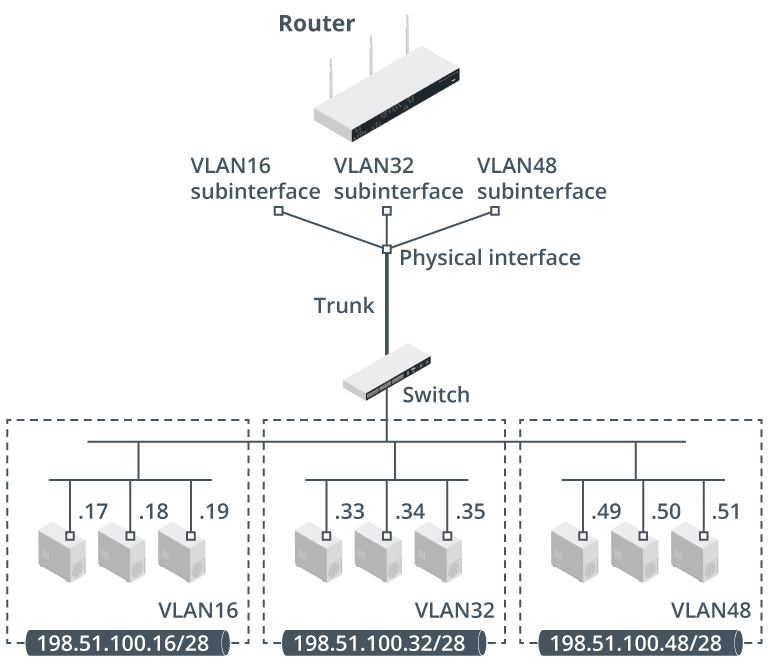
Configuring Subinterfaces for VLANs
VLAN 16 on interface G0:
interface G0.16encapsulation dot1Q 16ip address 198.51.100.30 255.255.255.0
Tip
- choice of default gateway is by convention
- many orgs use the first available host address
- in above example, we’re using the last available address
- to focus attention on how many address are available in the subnet
- key is to apply the convention consistently across the network
Info
- it’s not necessary for a router to have a single physical interface
- this is just a conventional example
- could have multiple physical interfaces, each with subinterfaces connected to different switches
- could also have a WAN interface
Switch Virtual Interfaces (SVI)
- Passing traffic between a router appliance and the switch over a trunk link is relatively inefficient
- does not scale well to tens of VLANs
- enterprise networks usually deploy layer 3 switches in the core and distribution layers
- layer 3 switch is optimized for routing between VLANs
- can use static and dynamic routing to identify which VLAN a packet with a given destination IP address should be forwarded to
- layer 3 switch is optimized for routing between VLANs
- with layer 3 switches, each VLAN can be assigned a switch virtual interface (SVI) to act as the default gateway
SVI Configuration
For the topology shown above, but configured with SVI instead:
- rather than router + layer 2 switch, using layer 3 instead
interface VLAN16ip address 198.51.100.30 255.255.255.0- hosts in the VLAN would be configured with
198.51.100.30as the default gateway
Important
- layer 3 switch could also be configured with subinterfaces
- any port on a layer 3 switch can be designated as routed rather than switched using the
no switchportcommand- to distinguish the concepts independently of device types,
- an SVI is bound to a VLAN and doesn’t require a physical interface
- like configuring a virtual router for the virtual LAN
- a subinterface is bound to a physical interface and then allocated a VLAN ID