Universal Serial Bus (USB) Cables
The Universal Serial Bus (USB) is the standard means of connecting most types of peripheral devices to a computer.
- USB peripheral device functions are divided into classes
- human interface (keyboards and mice)
- mass storage (disk drives)
- printer
- audio device
- etc.
A USB is managed by a host controller.
- Each host controller supports multiple ports attached to the same bus
- could be up to 127 connected devices per controller, but to overcome the limitations of sharing bandwidth, most PC motherboards provision multiple USB controllers, each of which has three or four ports
USB Standards
- There have been several iterations of the USB standard
- Each version introduces better data rates
- A version update may also define new connector form factors and other improvements
- USB 2.0 HighSpeed standard specifies a data rate of 480 Mbps shared between all devices attached to the same host controller
- The bus is half-duplex, meaning that each device can send or receive, but not at the same time
- USB 3.x introduced new connector form factors and upgraded transfer rates
- each are full-duplex, so a device can send and receive simultaneously
USB 3.2 deprecated some of the older terms used to describe the supported transfer rate:
| Standard | Speed | Connectors | Legacy Designation |
|---|---|---|---|
| USB 3.2 Gen 1 SuperSpeed USB | 5 Gbps | USB-A, USB-B, USB-C, USB Micro | USB 3.0 |
| USB 3.2 Gen 2x1 SuperSpeed USB 10 Gbps | 10 Gbps | USB-A, USB-C, USB Micro | USB 3.1 SuperSpeed+ |
| USB 3.2 Gen 2x2 SuperSpeed USB 20 Gbps | 2 x 10 Gbps | USB-C |
Info
USB 3 controllers feature two sub-controllers.
- One controller handles SuperSpeed-capable devices
- the other supports legacy HighSpeed, FullSpeed, and LowSpeed USB v1.1 and v2.0 devices
- Consequently, legacy devices will not slow down SuperSpeed-capable devices
USB Connector Types
USB 2
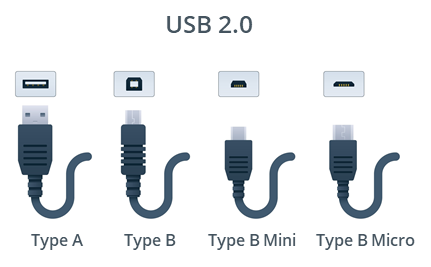
The connector form factors specified in USB 2 are as follows:
- Type A
- For connection to the host and some types of peripheral device
- connector and port are shaped like flat rectangles
- connector should be inserted with the USB symbol facing up
- Type B
- For connection to large devices such as printers
- The connector and port are square, with a beveled top
- Type B Mini
- A smaller peripheral device connector
- This type of connector was seen on early digital cameras but is no longer widely used
- Type B Micro
- An updated connector for smaller devices, such as smartphones and tablets
- distinctively flatter than the older mini type of connector
Info
A USB cable can feature Type A to Type A connectors or can convert from one type to another (Type A to Type B or Type A to Type B Micro, for instance).
USB 3
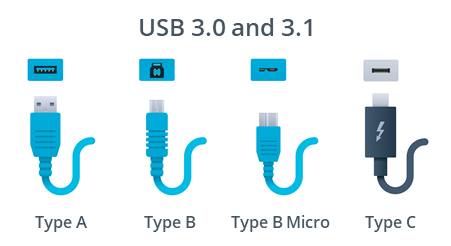
- In USB 3, there are new versions of the Type A, Type B, and Type B Micro connectors with additional signaling pins and wires
- USB 3 receptacles and connectors often have a blue connector tab or housing to distinguish them
- USB 3 Type A connections are physically compatible with USB 1.1 and 2.0 connections
- Type B/Type B Micro connections are not
- E.g. could plug a USB 2 Type A cable into a USB 3 Type A port, but you could not plug a USB 3 Type B cable into a USB 2 Type B port
- Type B/Type B Micro connections are not
- USB 3.1 defines the USB-C connector type
- intended to provide a single, consistent hardware interface for the standard
- connector is reversible
- connector design is also more robust than the earlier miniB and microB types
- USB-C can use the same type of connector at both ends, or you can obtain USB-C to USB Type A or Type B converter cables
Cable Length
- maximum cable length:
- LowSpeed devices = 3 meters
- FullSpeed and HighSpeed = 5 meters
- SuperSpeed-capable cables ~= 3 meters is recommended
- do not have an official maximum length
- Vendors may provide longer cables, however, results might be limited past the max recommended length
Power
- As well as a data signal, the bus can supply power to the connected device
- Most USB Type A and Type C ports can be used to charge the battery in a connected device
Info
- Basic USB ports can supply up to about 4.5 watts, depending on the version
- A power delivery (PD)–capable port can supply up to 100 watts, given suitable connectors and cabling.