Thermal Printer Imaging Process & Maintenance
Thermal printer is a general term for any device that uses a heating element to create the image on the paper.
- several types of thermal printers
- use significantly different technologies
- intended for different uses
- most common type is the direct thermal printer
- Portable or small form factor direct thermal transfer printers
- used for:
- high-volume barcode and label printing
- to print receipts
- typically support 200–300 dpi
- some models able to print one or two colors
- Print speeds are measured in inches per second
- used for:
Direct Thermal Printer Imaging Process
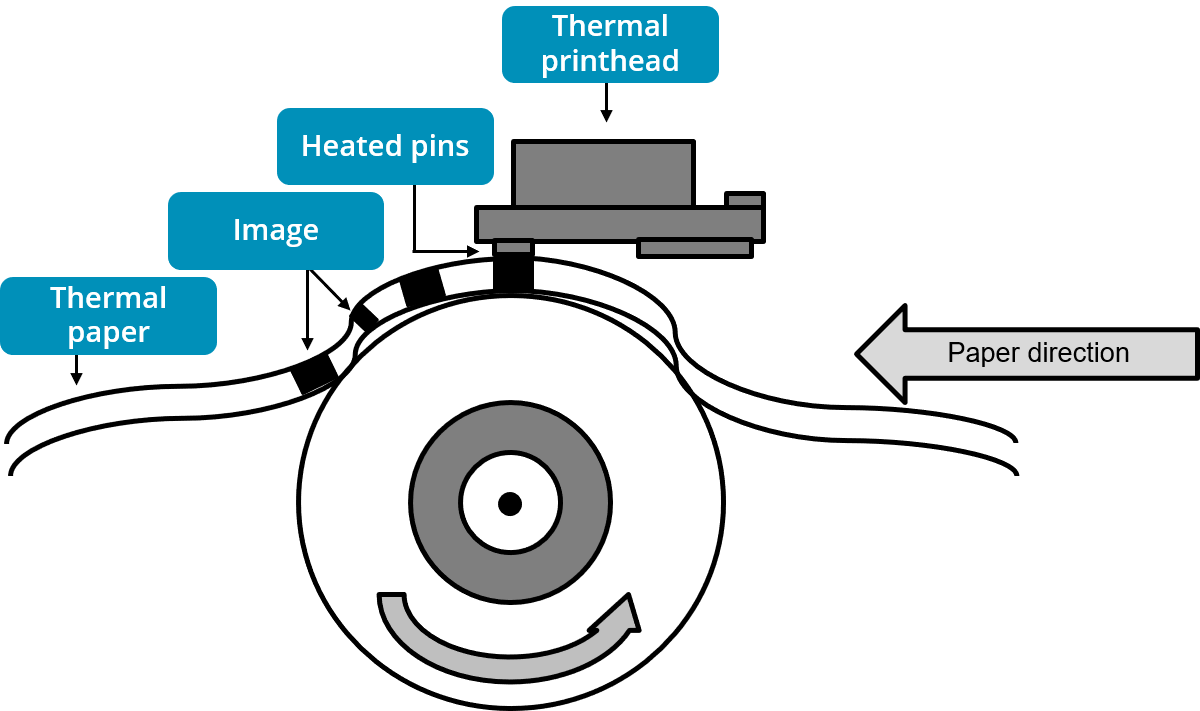
- require special thermal paper that contains chemicals designed to react and change color as it is heated by the heating element within the printer to create images
- In the feed assembly
- paper is friction-fed through the print mechanism by a stepper motor turning a rubber-coated roller
- Paper and labels may be fanfold or roll format
Direct Thermal Printer Maintenance Tips
- When replacing the paper roll
- need to obtain the specific size and type for the brand and model of thermal printer you are using
- simple process
- open the printer case
- insert the roll, keeping the shiny, heat-sensitive print side facing outward
- ensure that the end of the paper is held in place by the print head when closing the case again
- Each receipt is separated by ripping the paper across serrated teeth
- can lead to a buildup of paper dust in the printer
- lead to bits of paper debris becoming lodged in the mechanism if a clean slice is not made and bits of leftover paper fall into the printer
- Use a vacuum or soft brush to remove any paper debris
- Label printers can end up with sticky residue inside the printer
- if not loaded correctly, they can separate from the backing while being fed through the printer
- ensure users know how to properly load the labels and how to clean up if labels get stuck inside the printer
- Use a swab and appropriate cleaning fluid, such as isopropyl alcohol (IPA), to clean the print head or any sticky residue inhibiting the feed mechanism
- can often purchase cleaning cards to feed through the printer to clean the print head safely