System RAM and Virtual Memory
How Memory Works
CPU
- The CPU works by processing the instructions generated by software (processes) in a pipeline
- Instructions that are at the top of the pipeline are stored in the CPU’s registers and cache
- The CPU only has a small amount of cache, however
- Consequently, the operation of the CPU must be supported by additional storage technologies
- Enter, RAM
System Memory (RAM)
- When a process is executed or a data file opened, the image is loaded from the fixed disk into system memory
- Instructions are fetched from system memory and into the CPU’s cache and registers as required
- This process is handled by a memory controller
- System memory is implemented as random-access memory (RAM) devices
- RAM is faster than the flash memory used for SSDs and much faster than an HDD, but it is volatile
- Volatile means the memory device can only store data when it is powered on
- System memory is measured in gigabytes (GB)
- amount of system RAM determines the PC’s ability to work with multiple applications at the same time and to process large files efficiently
- RAM is faster than the flash memory used for SSDs and much faster than an HDD, but it is volatile
Virtual RAM/Virtual Memory
- If there is not enough system RAM, the memory space can be extended by using disk storage
- referred to as a pagefile or swap space
- total amount of addressable memory (system RAM plus swap space) is referred to as virtual memory or virtual RAM
- With virtual memory, the OS assigns memory locations to processes in 4 kilobyte chunks called pages
- memory controller moves inactive pages of memory to the swap space to free up physical RAM
- retrieves pages from the swap space to physical RAM when required by process execution
- An excessive amount of such paging activity will slow the computer down because disk transfer rates are slower than RAM transfer rates
Importance of Virtual Memory
- Virtual memory is not just used to supplement RAM with swap space
- It serves an important function in protecting the operation and integrity of the PC
- Multiple processes can share the RAM device resource as a virtual memory space that is mediated by the operating system
- This is more secure and reliable than allowing each process to use physical RAM devices
Address Space
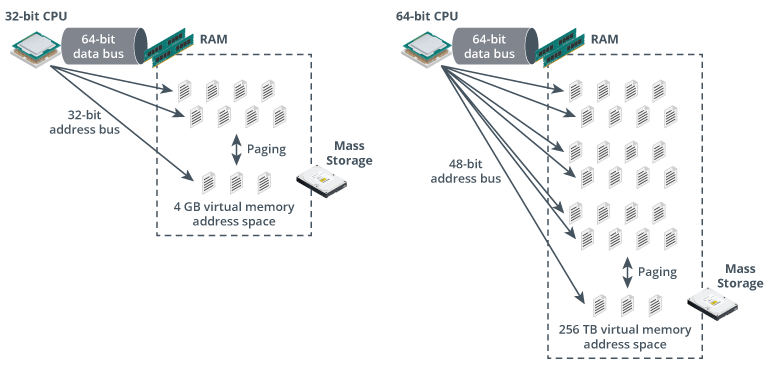
The bus between the CPU, memory controller, and memory devices consists of a data pathway and an address pathway:
- The width of the data pathway determines how much information can be transferred per clock cycle
- In a single channel memory controller configuration, the data bus is usually 64 bits wide
- The width of the address bus determines how many memory locations the CPU can keep track of and consequently limits to the maximum possible amount of physical and virtual memory
- A 32-bit CPU with a 32-bit address bus can access a 4 GB address space
- In theory, a 64-bit CPU could implement a 64-bit address space (16 exabytes),
- but most 64-bit CPUs actually use a 48-bit address bus, allowing up to 256 terabytes of memory