Security Appliance Attributes
- Attributes determine the precise way in which a device can be placed within the network topology
Active vs Passive
A passive security control is one that does not require any sort of client or agent configuration or host data transfer to operate.
- e.g., network traffic can be directed or copied to a sensor and scanned by an analysis engine
An active security control that performs scanning must be configured with credentials and access permissions and exchange data with target hosts.
- requires hosts to be explicitly configured to use the control
- e.g.,
- installing agent software on the host
- or configuring network settings to use the control as a gateway
- e.g.,
- allows for more accurate credentialed scanning
- consumes some host resources
- is detectable by threat actors
Inline Devices and Monitor Methods
Inline device is the placement and configuration of a network security control so that it becomes part of the cable path.
- No changes in the IP or routing topology are required
- device’s interfaces are not configured with MAC or IP addresses
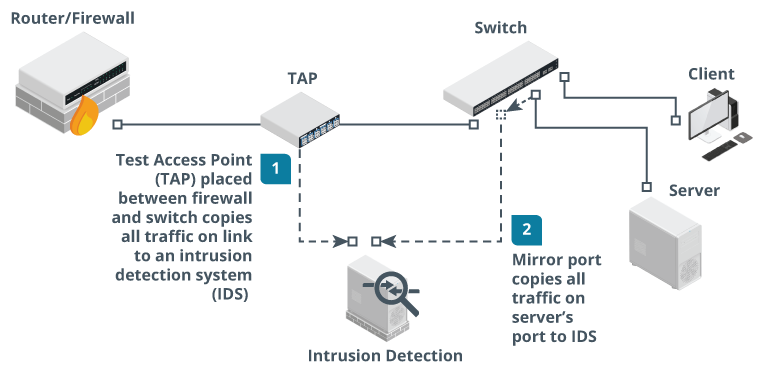
- can copy network traffic to a monitor or sensor
- A monitor that records (or “sniffs”) data from frames as they pass over network media, using methods such as a mirror port or TAP device
- can be configured to receive traffic in two different ways:
Fail-Open vs Fail-Closed
- A security device could enter a failure state for a number of reasons
- hardware failure
- software failure
- configuration issues
- natural disasters
- device can be configured to fail-open or fail-closed:
- fail-open
- ensures continued access to the resource in the event of failure
- prioritizes availability over confidentiality and integrity
- risk:
- threat actor could engineer a failure state to defeat the control
- fail-closed
- blocks access to a resource in the event of failure
- enters the most secure state available
- prioritizes confidentiality and integrity over availability
- risk is system downtime
- fail-open