Sandbox
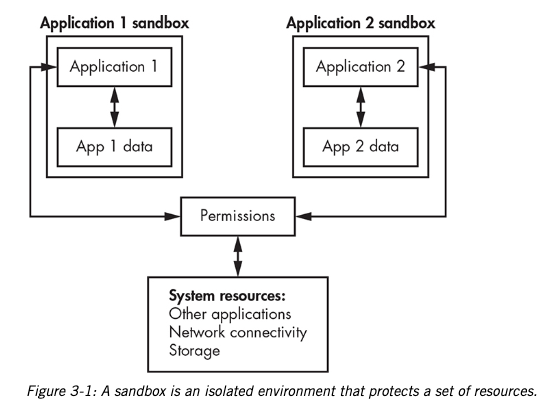
A sandbox is a computing environment that is isolated from a host system to guarantee that the environment runs in a controlled, secure fashion.
- one way to limit access to sensitive applications
- used to prevent their contents from accessing files, memory, and other system resources with which they shouldn’t be interacting
- Communication links between the sandbox and the host are usually completely prohibited
- E.g.,
- Java Virtual Machine (JVM)
- used to run programs written in Java
- web browser tabs
- separates each tab and extension into distinct processes
- iOS and Android use sandboxing to limit each application’s actions
- Virtual machines (VMs) and containers
- Java Virtual Machine (JVM)
Sandboxing in Security Operations
Sandboxing is a technique that isolates untrusted data in a closed virtual environment to conduct tests and analyze the data for threats and vulnerabilities.
- Sandbox environments intentionally limit interfacing with the host environments to maintain the hosts’ integrity
- important in detecting and understanding malware activities via forensic inspection
- offer more than traditional antimalware solutions because they analyze the actions performed by malware after it is activated
- often reveals
- hidden characteristics that avoid detection by conventional analysis
- details useful for detection and forensic activities
Sandbox for Malware Analysis
- sandbox host used for malware analysis should be physically or logically isolated from the main network
- should be only used for malware analysis
- though VMs offer sandbox capabilities,
- there are exploits that target VMs and hypervisors
- ensure host is patched
- control network access
Sandbox Features
To effectively analyze malware, sandboxes should provide the following features:
- Monitor any system changes without direct user interaction.
- Execute known malware files and monitor for changes to processes and services.
- Monitor network sockets for attempted connections, such as using DNS for Command & Control.
- Monitor all system calls and API calls made by programs.
- Monitor program instructions between system and API calls.
- Take periodic snapshots of the environment.
- Record file creation/deletion during the malware’s execution.
- Dump the virtual machine’s memory at key points during execution.
Tools
- Cloud-based Sandboxes:
- Cuckoo Sandbox
- Joe Sandbox
- CrowdStrike’s Hybrid Analysis
- Falcon Sandbox