Router Configuration
- routers serve both to:
- link physically remote networks
- subdivide autonomous IP networks into multiple subnets
- router placement is driven by IP networks and subnets:
- hosts with addresses in the same subnet or IP network must not be separated by a router
- conversely, hosts with addresses in different subnets or IP networks must be separated by a router
Example
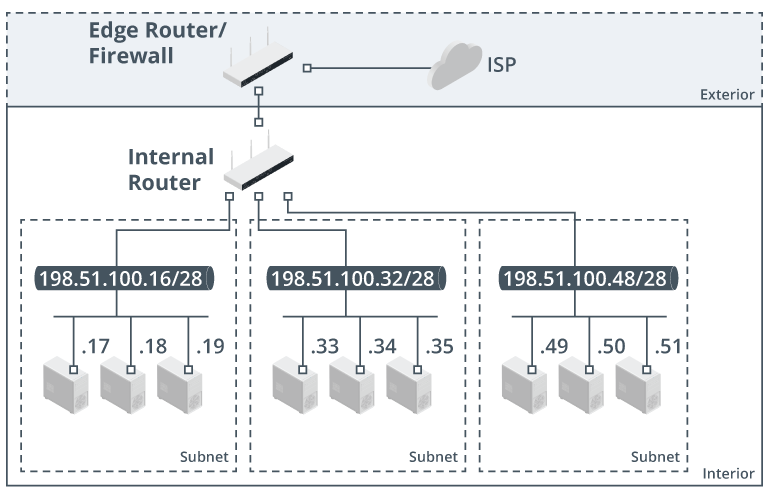
Typical network configuration.
- edge router/firewall provides access to the internet
- traffic between the local subnets is controlled by a separate internal router
- router appliance is configured locally either via:
- a serial connection
- known as a console port
- or remotely over the network via SSH
- SSH can be used to communicate with the router via the IP address of any configured interface
- but since a physical interface can suffer a hardware fault or be temporarily unavailable for a variety of reasons
- it is best practice to create a virtual interface in the router’s OS and assign it an IP address for use in remotely managing the router
- known as a loopback interface
- this is a way of giving the router an internal IP address not connected to any physical network
- therefore not reliant on a specific network link being available
- it is best practice to create a virtual interface in the router’s OS and assign it an IP address for use in remotely managing the router
- a serial connection
- next configuration tasks include:
- Apply an IP configuration to each interface
- configure one or more routing protocols and/or static routes