Packet Forwarding
- when a router receives a packet:
- it reads the destination address in the packet
- looks up a matching destination network IP address and prefix in its routing table
- if there is a match,
- router will forward the packet out of one of its interfaces by encapsulating the packet in a new frame:
- if the packet can be delivered to a directly connected network via an Ethernet interface,
- the router uses ARP (IPv4) or Neighbor Discovery (IPv6) to determine the Data Link layer address of the destination interface
- if the packet can be forwarded via a gateway over an Ethernet interface,
- it inserts the next hop router’s MAC address as the destination address in a new frame
- uses the MAC address of the outgoing interface as the source address
- if the packet can be forwarded via a gateway over another type of interface (e.g., leased line or DSL),
- the router encapsulates the packet in an appropriate frame type
- if the destination address cannot be matched to a route entry,
- the packet is either:
- forwarded via the default route
- dropped and the source host is notified that it was undeliverable
- the packet is either:
- if the packet can be delivered to a directly connected network via an Ethernet interface,
- router will forward the packet out of one of its interfaces by encapsulating the packet in a new frame:
Hop Count
- if the packet is forwarded via a gateway,
- this process is repeated at each router to deliver the packet through the internetwork
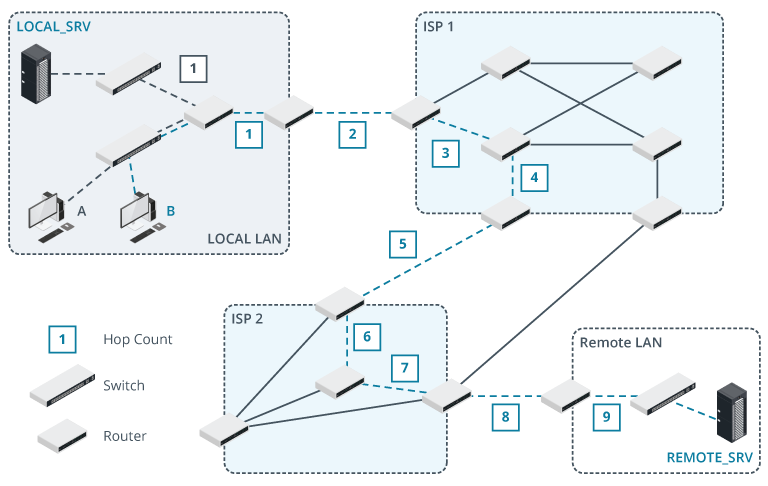
- each router along the path counts as one hop
Example
- Host A takes one hop to communicate with LOCAL_SRV
- via directly connected interface on the LAN router
- switches do no count as hops
- Host B takes 9 hops to communicate with REMOTE_SRV
- traffic routed via two ISP networks
- observer the alternate routes that could be taken
- do any have a lower hop count
Time To Live
- at each router, time to live (TTL) header field is decreased by at least 1
- could be greater if the router is congested
- TTL is nominally the number of seconds a packet can stay on the network before being discarded
- defined as a unit of time (seconds)
- but in practice, it is interpreted as a maximum hop count
- when TTL is 0, the packet is discarded
- prevents badly addressed packets from permanently circulating the network
Info
- In IPv6, the field is named Hop Limit to formalize the face that it is a counter not a timer