Nmap
Nmap (network mapper) is an IP and port scanner used for topology, host, service, and OS discovery and enumeration.
- open-source cross-platform
- used primarily to scan hosts and ports to locate services and detect vulnerabilities
- widely used for IP scanning for auditing and penetration testing
- can use diverse methods of host discovery and fingerprinting
- can be operated from command line or via a GUI (Zenmap)
- a well-configured IDS will be able to detect the vast majority of Nmap scanning techniques
nmap Default Scan
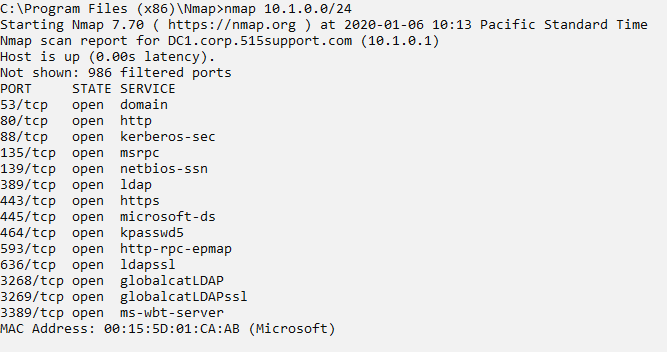
Example Use Cases
- Security analyst can use to review the configuration of a system in the environment
- to look for unauthorized web servers,
- analyst can probe ports 80 and 443 on a network of hosts using Nmap
- Nmap’s build in script-scanning functionality can be used to check for the presence of known vulnerabilities or misconfigurations
Functionality
- search for hosts on a network
- identify the operating systems hosts are running
- detect the versions of the services running on any open ports
Usage
- basic syntax of
Nmapcommand is to give the IP subnet or IP address to scan - default behavior
- is to ping and send a TCP ACK packet to ports 80 and 443 to determine if a host is present
- on a local network segment,
- nmap will also perform ARP and Neighbor Discovery (ND) sweeps
- if host is detected, Nmap performs a port scan against that host to determine which services it is running
- this host fingerprinting can be time consuming on a large IP scope
nmap -snperforms only host discovery (suppresses port scan)--tracerouteswitch can work out hop counts- many options available for custom scans to detect stealthy hosts
Nmap Port Scanning
- probe hosts to enumerate open TCP and UDP ports
Scan Types
- Types of Nmap scanning:
- TCP SYN (
-sS)- referred to as half-open scanning
- stealth scan
- a fast technique as the scanning host requests a connection without acknowledging it
- target’s response to the scan’s SYN packet identifies the port state
- requires Nmap to have privileged access to the network driver to craft packets
- TCP connect (
-sT)- if privileged access is not available, must use OS to attempt a full TCP connection
- less stealthy
- TCP Ack (
-sA)- used to check the filtered state of ports
- whether firewall is blocking a port or not
- used to check the filtered state of ports
- TCP flags
- can scan by setting TCP headers in unusual ways:
- Null scan (
-sN)- sets the header bit to zero
- FIN (
-sF) scan- sends an unexpected FIN packet
- Xmas scan (
-sX)- sets the FIN, PSH, and URG flags
- Null scan (
- was a means of defeating early types of firewalls and IDS
- can scan by setting TCP headers in unusual ways:
- UDP scans (
-sU)- scan UDP ports
- UDP does not use ACKs
- so needs to wait for a response or timeout to determine port state
- can take a long time
- can be combined with a TCP scan
- Port range (
-p)- by default, Nmap scans 1,000 common ports
-pspecifies a port range--exclude-portsto exclude ports- can also use
--top-ports n= number of commonly used ports to scan
- frequency stats for determining how commonly a port is used are stored in the nmap-services config file
- TCP SYN (
Nmap Port States
The results of service discovery will be a list of ports scanned on the target IP and the state detected for each port.
- States identified with a regular TCP scan:
- Open
- An application on the host is accepting connections
- Closed
- port responds to probes (with a reset [RST] packet), but no application is available to accept connections
- Filtered
- Nmap cannot probe the port
- usually because a firewall is silently discarding the probes
- Nmap cannot probe the port
- Open
- Some scans classify port states where the scan is unable to determine a reliable result:
- Unfiltered
- can probe the port but cannot determine whether it is open or closed
- this port state is used with an ACK scan
- purpose of which is to test a firewall ruleset
- Open|Filtered
- Reported by some types of scan (notably UDP and IP protocol) when Nmap cannot determine if the port is open or filtered
- Closed|Filtered
- Reported by TCP Idle scans that cannot determine whether the port is closed or filtered
- Unfiltered
Nmap Fingerprinting
Fingerprinting is the process of identifying an OS or software application from its responses to probes.
- detailed analysis of services on a host
- each OS or application software that underpins a network service responds to probes in a unique way
- allows the scanning software to guess at the software name and version without having privileged access to the host
- used after services/open ports are discovered
-sVor-Aprobes a host more intensively to discover the software or software version operating each port- discovers:
- protocol
- do not assume a port is being used for its well-known application protocol
- nmap can scan traffic to verify whether it matches the expected signature (HTTP, DNS, SMTP, etc.)
- application name and version
- OS type and version
-oto enable OS fingerprinting- or use
-Afor both OS fingerprinting and version discovery
- host name
- device type
- nmap can identify switches, routers, or other network devices
- protocol
- discovers:
- nmap comes with a database of application and version fingerprint signatures
- classified using a standard syntax called Common Platform Enumeration (CPE)
- unmatched responses can be submitted to a web URL for analysis by the community
Nmap Scripting Engine (NSE)
- nmap functionality can be extended using the Nmap Scripting Engine (NSE)
- scripts are written in Lua
- probes can use a default set of scripts with the
-sCor-Aswitches --scriptspecifies scripts by name or category- scripts can do:
- OS detection and platform enumeration
- Windows user account discovery
- Identification of a logged-on Windows user
- Basic vulnerability detection performance
- Probing of web servers to gather HTTP data and identify web applications
- Adding geolocation to traceroute probes
Nmap Output Options
- output scan results can be saved to a file instead of only displayed to the console
- options:
- Normal (
-oN)- Human-readable output directed to a file for analysis later
- XML (
-oX)- Output using XML formatting to delimit the information
- Grepable output (
-oG)- delimits the output using one line for each host and tab, slash, and comma characters for fields
- makes it easier to parse the output using the
grepcommand
- Normal (
Resources
- Documentation
- Nmap Network Scanning Book
- from explaining port scanning basics for novices to detailing low-level packet crafting methods used by advanced hackers
- describes all Nmap features with real world applications
- Free online version of Nmap Network Scanning Book
- half the content of full version