Network Time Protocol (NTP)
- many applications on networks require hosts to be synchronized to the same time
- e.g., authentication/auditing/logging mechanisms, scheduling applications, backup software
- Network Time Protocol (NTP) enables synchronization of time-dependent applications
- works over UDP port 123
- capable of millisecond precision
- top-level NTP servers (stratum 1) obtain the Coordinated Universal Time (UTC) via a direct physical link to an accurate clock source
- clock source could be an atomic clock accessed over GPS
- stratum 2 is an NTP server that synchronizes time with a stratum 1 server over a network
- each stratum level represents a step away from the accurate clock source over a network link
- lower stratum servers act as:
- clients of the stratum 1 servers
- servers or time sources to lower stratum NTP servers or client hosts
- lower stratum servers act as:
- most switches and routers can be configured to act as time servers to local client hosts
- this function is typically performed by network directory servers
- best to configure each of these devices:
- with multiple reference time sources (at least 3)
- establish them as peers to allow NTP algorithm to detect drifting or obviously incorrect time values
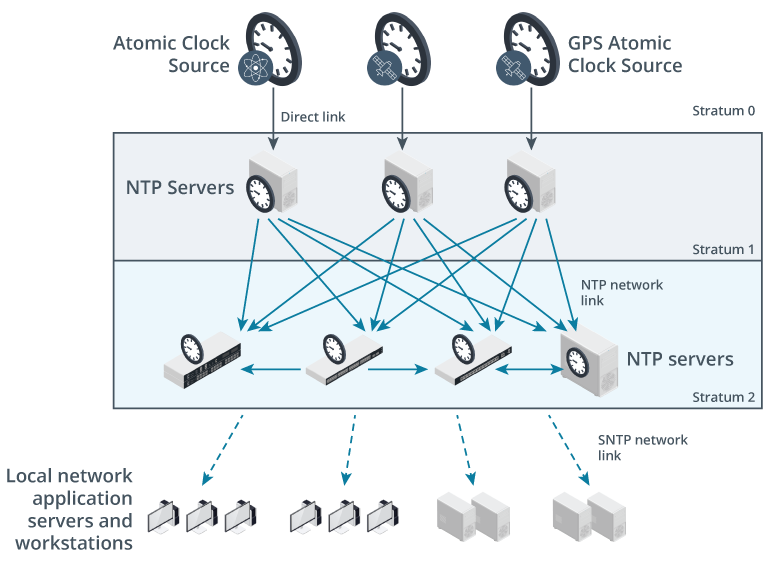
- client hosts usually obtain the time by using a modified form of the Simple NTP (SNTP) protocol
- works over the same port as NTP
- host that supports only SNTP cannot act as a time source for other hosts
- in Windows, Time Service can be configured by using the
w32mcommand- in Linux, ntp package is configured via
/etc/ntp.conf
- in Linux, ntp package is configured via
Time Drift
Time Drift is when a system’s clock begins to deviate from the source clock.
- NTP uses two methods to deal with time drift:
- Slew method
- if time is off by only a few seconds, NTP adjusts the time a few milliseconds at a time to get it back on track
- is a slower, methodical method of correcting time
- risk of problems is much less
- Slam method
- if the time is off by more than a few seconds, and slewing will take too long, NTP will hard reset the time
- is quick and immediate fix,
- but can cause some programs to not function properly
- Slew method
- if server or host is configured with incorrect time, it may not be able to access network services
- auth and other security mechanisms will often fail if time is not synced
- errors are likely to be generic failure or invalid token type messages
- auth and other security mechanisms will often fail if time is not synced
- always rule out time sync as an issue early in troubleshooting
Info
if a local stratum 1 server cannot be implemented on the local network,
- the time source can be configured using one or more public NTP server pools
- e.g., time.google.com, time.windows.com, time.apple.com, time.nist.gov, or pool.ntp.org
Securing NTP
- to mitigate risks from unauthorized time sources or manipulation of sync data,
- NTP can be protected using TLS
- Network Time Security (NTS)
- works over TCP port 4460
- NTS servers may also support ports 3443 and 4443