Multi-channel System Memory
- In the 2000s, the increasing speed and architectural improvements of CPU technologies led to memory becoming a bottleneck to system performance
- To address this, Intel and AMD developed a dual-channel architecture for DDR memory controllers
- Dual-channel was originally used primarily on server-level hardware but is now a common feature of desktop systems and laptops
Single-channel memory means that there is one 64-bit data bus between the CPU, memory controller, and RAM devices.
With a dual-channel memory controller, there are effectively two 64-bit pathways through the bus to the CPU.
- 128 bits of data can be sent per transfer rather than 64 bits
- requires support from the CPU, memory controller, and motherboard but not from the RAM devices
- Ordinary RAM modules are used
- There are no “dual-channel” DDR memory modules
Info
DDRx memory is sold in “kits” for dual-channel use, but there is nothing special about the modules themselves other than being identical.
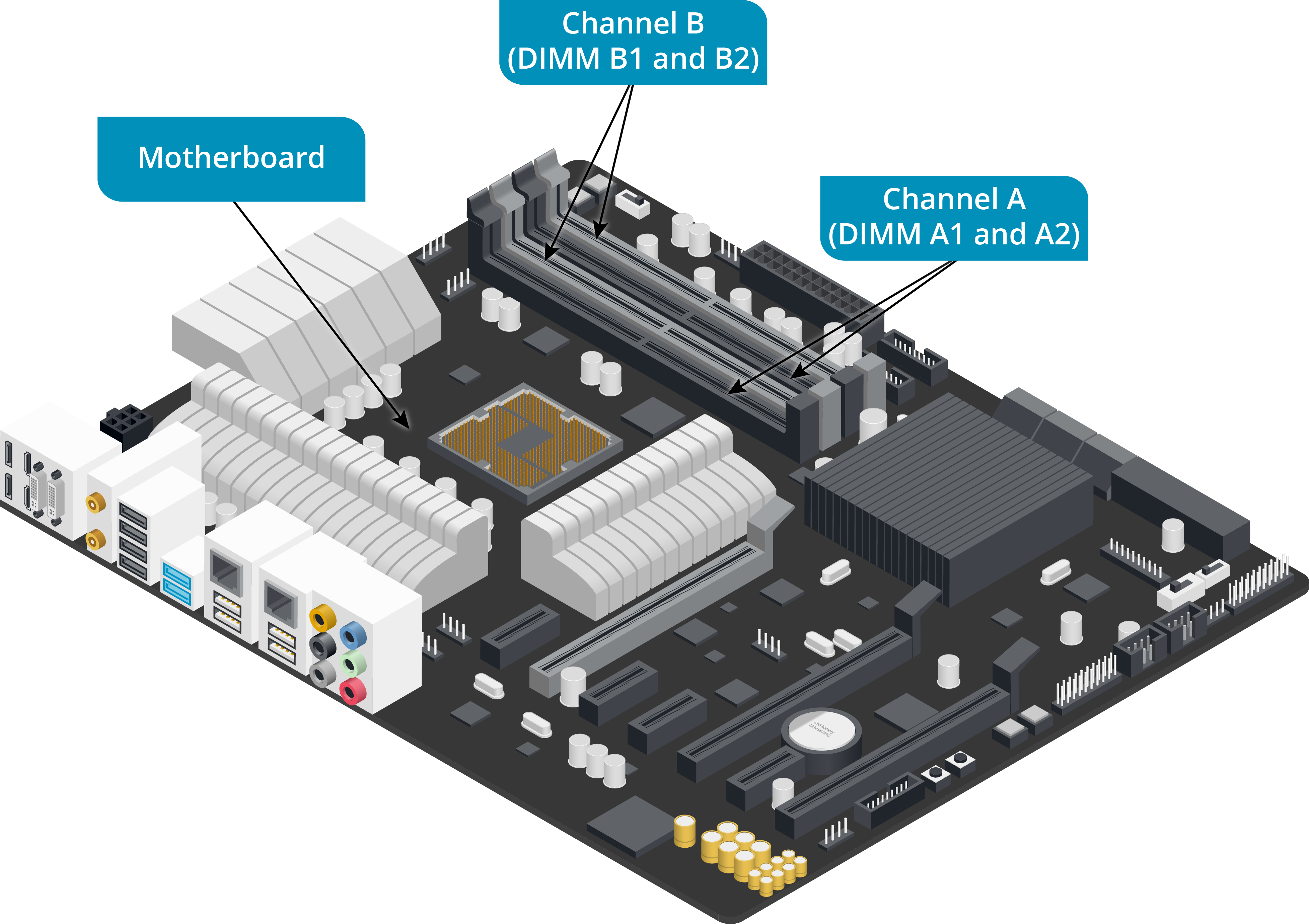
- When configuring a dual-channel system:
- consult the system documentation to identify the appropriate slots to use
- E.g.,
- a dual-channel motherboard might have four DIMM slots arranged in color-coded pairs
- Each pair represents one channel
- channel A might be color-coded orange and channel B color-coded blue
- Each slot in a pair represents one of the two sockets in the channel (A1 and A2, for instance)
- E.g.,
- consult the system documentation to identify the appropriate slots to use
- If only two 4 GB modules are available, to enable dual-channel:
- modules must be installed in socket 1 of each channel (A1 and B1, for instance)
- This pair of modules should be identical in terms of clock speed and capacity
- other characteristics, such as timings and latency, should be identical too
- If they are not, the lowest (worst performing) values are used
- Dual-channel mode may also need to be enabled via the PC firmware’s system setup program
Dual-Channel Labelling
- no consistent approach to this labelling and color-coding
- Some vendors use the same color for each channel, and some use the same color for each socket number
- Some motherboards might require socket 1 to be populated first
- others might recommend using socket 2 first
- Consult the system documentation before proceeding
- Depending on the motherboard and firmware settings, adding an odd number of modules or adding DIMMs that are not the same clock speed and size will have different outcomes.
- A configuration with mismatched modules may cause the system to operate:
- in single-channel mode
- in a dual-channel mode with the spare module disabled
- or in flex mode
- flex mode means that if A1 contains a 2 GB module and B1 contains a 6 GB module,
- dual-channel mode will be enabled for 2 GB of memory and the remaining 4 GB from the module in B1 will work in single-channel mode
- flex mode means that if A1 contains a 2 GB module and B1 contains a 6 GB module,
- A configuration with mismatched modules may cause the system to operate:
- Some CPUs and supporting chipsets have triple- or quadruple-channel memory controllers
- In these architectures, if the full complement of modules is not installed, the system will revert to as many channels as are populated
DDR5 RAM
- DDR5 introduces a different type of data bus
- Each memory module has two channels of 32 bits
- When installed in a dual channel memory controller configuration, this becomes four 32-bit channels
- this architecture distributes the load on each RAM device better
- supports better density (more gigabytes per module)
- reduces latency
- works better with the multi-core features of modern CPUs.