Mass Storage Devices
Non-volatile storage devices hold data when the system is powered off.
- referred to as mass storage
- use magnetic, optical, or solid-state technology to store data
A mass storage device installed as an internal component is referred to as a fixed disk.
- produced in a number of standard widths:
- 5.25 inches
- 3.5 inches
- 2.5 inches
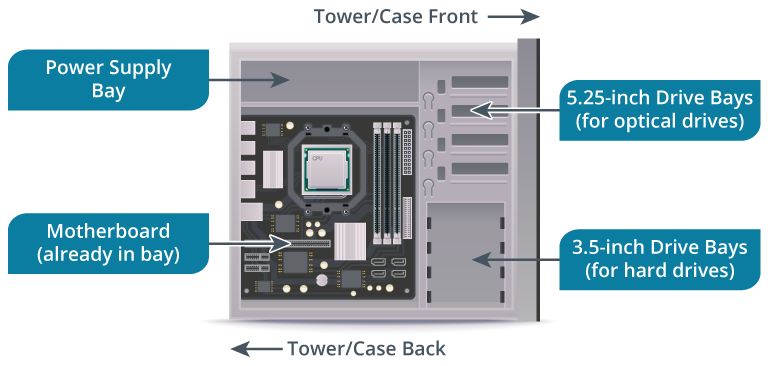
- computer chassis has several drive bays to fit these form factors
- bays with a 5.25-inch width are provided with removable panels so that they can be used with devices that have removable media
- DVD drives and smart card readers
- fixed disk is typically installed to a drive bay using a caddy
- screw the drive into the caddy, then screw the caddy into the drive bay
- can also allow you to fit a drive of a different size to the bay
- Some caddies use rails so that you can pull the drive out without having to open the case
- Removable mass storage devices and removable media allow data to be archived and transferred between PCs
- External storage devices are also used for:
- backup and data transfer
- to provide a drive type not available as an internal unit
- an external hard drive is typically connected via a USB or Thunderbolt port
- common mass storage drive vendors
- Seagate
- Western Digital
- Hitachi
- Fujitsu
- Toshiba
- Samsung
Several factors impact the choice of mass storage devices:
- Reliability
- concerns both the risk of total device failure and the risk of partial data corruption
- Reliability and expected lifespan are rated by various statistics that are different for each technology type
- Performance
- evaluate performance for the type of data transfer that the device will use predominantly
- E.g., read and write performance have different characteristics
- are also differences between
- sequential access (reading data from the same “block” as might happen when transferring a large file)
- and random access (reading data from different locations on the drive or transferring lots of small files)
- data throughput measured in MB/s or GB/s
- the number of input/output operations per second (IOPS) that can be achieved by a device for different kinds of data transfer operations
- evaluate performance for the type of data transfer that the device will use predominantly
- Use
- Examples of how storage is used include
- running an OS
- hosting a database application
- streaming audio/video data
- as removable media
- and for data backup and archiving
- use cases have different cost, reliability, and performance considerations
- Examples of how storage is used include