Link Aggregation and NIC Teaming
Link aggregation means combining two or more separated cabled links into a single logical channel.
- E.g.,
- single network card adapter and cable segment might support 1 Gbps
- bonding this with another adapter and cable segment gives the link 2 Gbps
- can be used in an uplink between two switches or between a switch and a router or between two routers
Info
- from the host end, this is called NIC teaming
- at switch end, it can be called port aggregation
- Cisco calls it an EtherChanel
- bonding is also widely substituted for aggregation
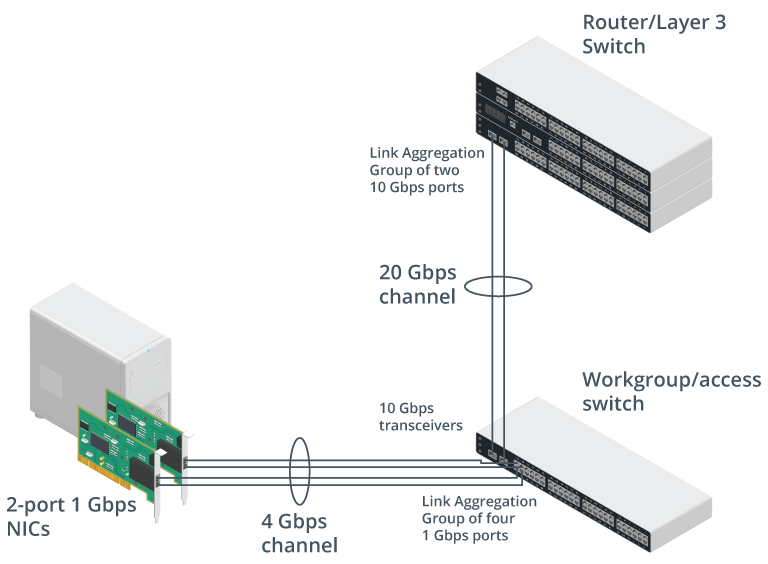
- link aggregation can provide redundancy
- if one link is broken, the other still works
- cost effective
- E.g., four-port Gigabit Ethernet card may not match bandwidth of 10 GbE but costs less
Info
- link aggregation is only fully redundant if the business function does not depend on the full speed of the bonded link
- full redundancy is achieved when the total bandwidth equals the sum of the bandwidths of all individual links
- typically implemented using IEEE 802.3ad/802.1ax standard
- 802.3ad bonded interfaces are described as link aggregation group (LAG)
- 802.3ad defines the Link Aggregation Control Protocol (LACP)
- used to detect configuration errors and recover from failure of one of the physical links
Configure LACP on a Cisco Switch
Group the first four Gigabit interfaces into a single channel with ID 2:
interface range GigabitEthernet0/1-4channel-group 2 mode active- the following commands configure two 10G interfaces into channel group with ID 1:
interface range 10GigabitEthernet1/1-2channel-group 1 mode passive- on the router/layer 3 switch, the channel should be set to active:
interface range 10GigabitEthernet0/1-2channel-group 1 mode active
NOTE
- optionally, both sides can be configured as active
- if both sides are set to passive, no bonded channel will be created
- Channel ID on each side does not have to match, but is easier to manage the connection if it is the same on both switches