Laser Print Imaging Process
- Laser printers are one of the most popular printer technologies for office applications
- inexpensive (both to buy and to run)
- quiet
- fast
- produce high-quality output that does not smear or fade
- both grayscale and color models
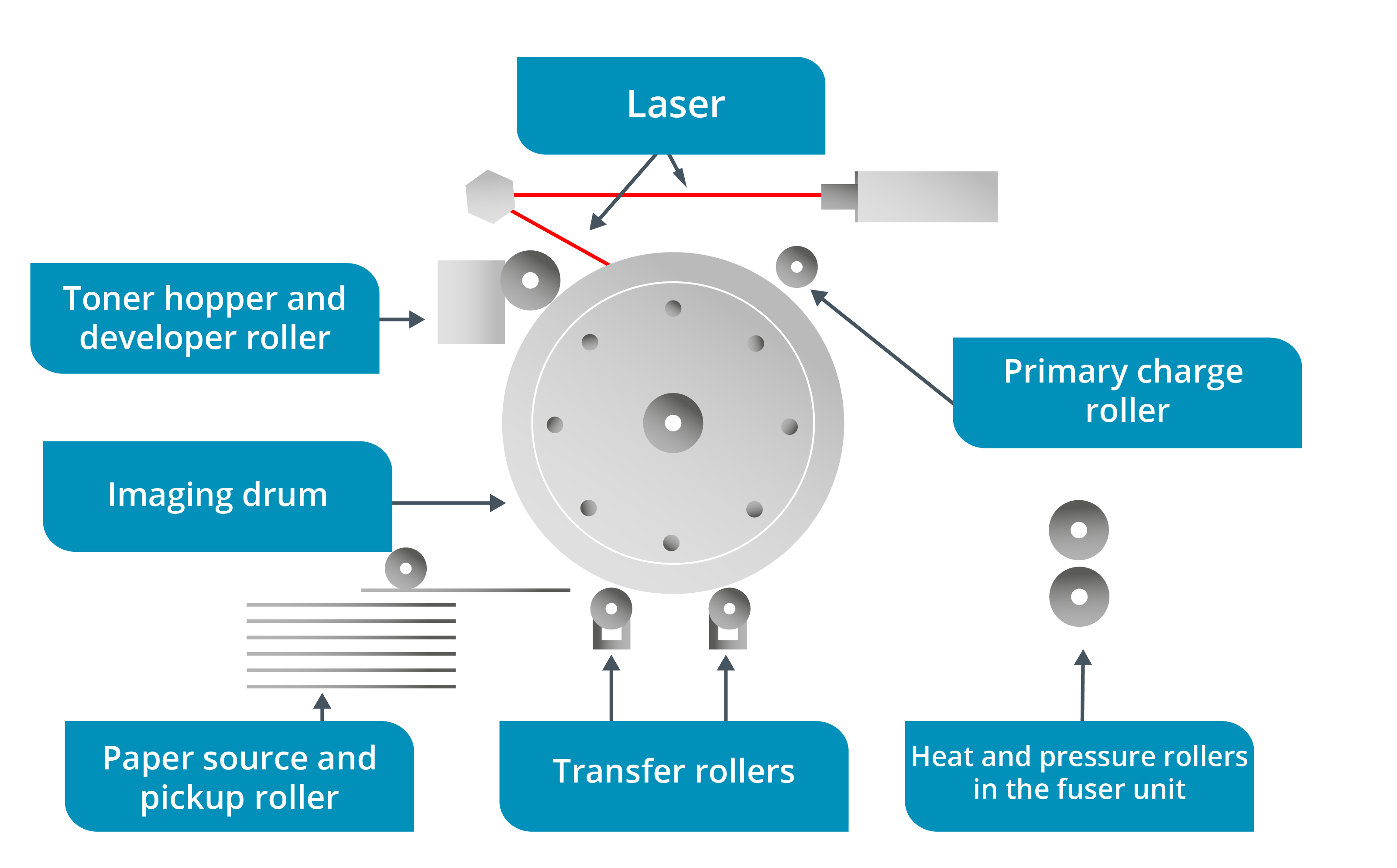
Processing Stage
- laser printers produce output as a series of dots
- OS driver encodes the page in a page description language and sends it to the print device
- in the processing stage
- printer’s formatter board processes the data to create a bitmap (or raster) of the page
- stores it in the printer’s RAM
Charging Stage
- imaging drum is conditioned by the primary charge roller (PCR)
- is a metal roller with a rubber coating powered by a high voltage power supply assembly
- PCR applies a uniform -600 V electrical charge across the drum’s surface
Exposing Stage
- surface coating of the photosensitive imaging drum loses its charge when exposed to light
- In the exposing stage
- laser receives the image information
- fires a short pulse of light for each dot in the raster to neutralize the charge that was applied by the PCR
- pulsing light beam is reflected by a polygonal mirror through a system of lenses onto the rotating photosensitive drum
- drum ends up with a series of raster lines with charge/no-charge dots that represent an electrostatic latent image of the image to be printed
Developing Stage
- Laser toner is composed of a fine compound of dyestuff and either wax or plastic particles
- is fed evenly onto a magnetized developer roller from a hopper
- developer roller is located very close to the photosensitive drum
- toner carries the same negative charge polarity as the drum
- means that, under normal circumstances, there would be no interaction between the two parts
- However, once areas of charge have been selectively removed from the photosensitive drum by the laser
- the toner is attracted to them and sticks to those parts of its surface
- the drum, now coated with toner in the image of the document, rotates until it reaches the paper
Info
The imaging drum, PCR, developer roller, and toner hopper are provided as components within a toner cartridge.
Transferring Stage
- transferring stage moves the toner from the drum onto the print media
- paper transport mechanism includes components such as gears, pads, and rollers that move the paper through the printer
- Pickup components lift a single sheet of paper from the selected input tray and feed it into the printer
- To do this, a pickup roller turns once against the paper stack, pushing the paper into a feed and separation roller assembly
- assembly is designed to allow only one sheet to pass through
Info
A printer will have a number of automatic trays and a manual tray. The manual feed tray uses a separation pad rather than rollers.
- When the paper reaches the registration roller
- a signal tells the printer to start the image development process
- When the drum is ready, the paper is fed between the imaging drum and the high voltage transfer roller
- transfer roller applies a positive charge to the underside of the paper
- causes the toner on the drum to be attracted to the paper
- As the paper leaves the transfer assembly, a static eliminator strip (or detac corona) removes any remaining charge from the paper
- done to avoid the paper sticking to the drum or curling as it enters the fuser unit
Fusing Stage
- From the transfer assembly, the paper passes into the fuser assembly
- fuser unit squeezes the paper between a hot roller and a pressure roller so that the toner is melted onto the surface of the paper
- hot roller is a metal tube containing a heat lamp
- has a Teflon coating to prevent toner from sticking to it
- pressure roller is typically silicone rubber
- hot roller is a metal tube containing a heat lamp
Info
- The entire laser printer cycle takes place in one smooth sequence,
- but since the circumference of the drum that processes the image is smaller than a sheet of paper, the early stages must be repeated 2–4 times (according to size) to process a single page
Duplex Printing and Paper Output Path
- When the paper has passed through the fuser,
- if a duplexing assembly unit is installed
- it is turned over and returned to the developer unit to print the second side
- Otherwise, the paper is directed to the selected output bin using the exit rollers
- If there is no auto duplex unit
- user can manually flip the paper stack
- When manual duplex mode is selected for the print job
- printer pauses after printing the first side of each sheet
- user must then take the printed pages and return them (without changing the orientation) to the same input paper tray
- resume the print job
- if a duplexing assembly unit is installed
Color Laser Printers
- use separate toner cartridges for each additive CMYK color
- can use different processes to create the image
- Some may use four passes to put down each color in turn
- others combine the colored toner on a transfer belt and print in one pass