Fan Cooling Systems
Components in a computer system emit heat because of some degree of resistance when electrical current passes through them.
Without a cooling solution, this heat will raise the temperature of each component and increase the ambient temperature inside the case.
- Excessive temperatures can cause the components to malfunction or even damage them
- particularly affects CPUs
- all CPUs require cooling to keep the temperature within an acceptable operational range
Info
As well as the CPU, components such as memory modules and graphics adapters also require cooling solutions.
Heat Sinks and Thermal Paste
A heat sink is a block of copper or aluminum with fins.
- fins expose a larger surface area to the air around the component to achieve a cooling effect by convection
The heat sink is affixed to the surface of the chip using thermal paste to ensure the best transfer of heat by eliminating small air gaps.
- thermal pad performs a similar function
- pad is a compound that is solid at room temperature but softens when heated
- easier to apply but does not always perform as reliably
- various mechanisms for clamping a CPU heat sink to the motherboard
- retaining clip or push pins
- Push pins can be released and reset for insertion by making a half turn with a screwdriver
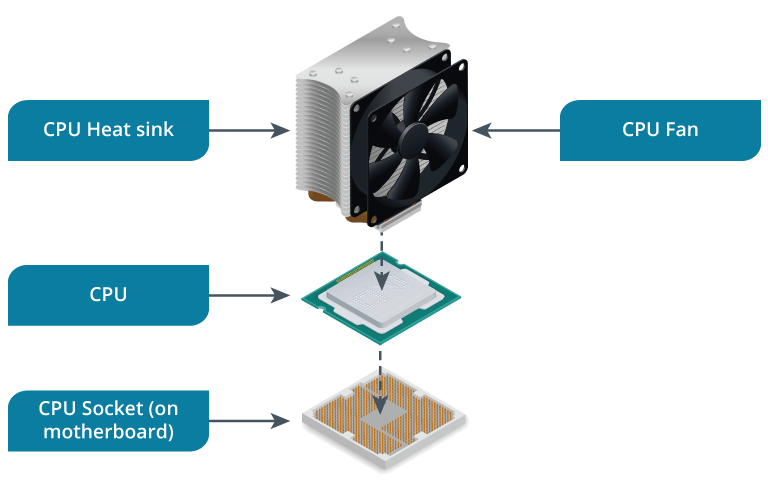
- A heat sink is a passive cooling device
- Passive cooling means that it does not require extra energy (electricity) to work.
- To work well, a heat sink requires good airflow around the PC
- important to try to keep “cable clutter” to a minimum and to ensure that spare adapter slots are covered by blanking plates.
Fans
Many PCs have components that generate more heat than can be removed by passive cooling. A fan improves airflow, which helps to dissipate heat
- used for the power supply and chassis exhaust points
- fan system will be designed to
- draw cool air from the low vents in the front of the case over the motherboard
- expel warmed air from the fan positioned at the top of the back of the case
- Most heat sinks are fitted with fans to improve their cooling performance
- fan’s power connector must be plugged into a motherboard fan power port
- Thermometer sensors are used at each fan location to set an appropriate speed and to detect whether a fan has failed
- Some chassis designs incorporate a plastic shroud or system of baffles to cover the CPU and channel the flow of air
- shroud is usually attached to the case using plastic clips
- Both fans and heat sinks become less effective if dust is allowed to build up
- should be cleaned periodically, either manually with a soft brush and/or compressed air or using a vacuum cleaner approved for use with PCs