Dynamic Host Configuration Protocol (DHCP)
A DHCP server can be used to allocate an appropriate IP address and subnet mask (plus other settings) to any host that connects to the network and requests address information.
DHCP Scope
A scope is the range of addresses that a DHCP server can offer to client hosts in a particular subnet.
- should exclude any addresses that have been configured statically
- E.g., LAN address of a SOHO router is typically
192.168.0.1- is also the address used by the DHCP server running on the router
- E.g., LAN address of a SOHO router is typically
Example
If the scope is defined as
192.168.0.100to192.168.0.199, that allows for 100 dynamically addressed hosts on the local network.
DHCP Leases
- host is configured to use DHCP by specifying in its TCP/IP configuration that it should automatically obtain an IP address
- All communications are sent using UDP
- the server listening on port 67 and the client on port 68
- Process:
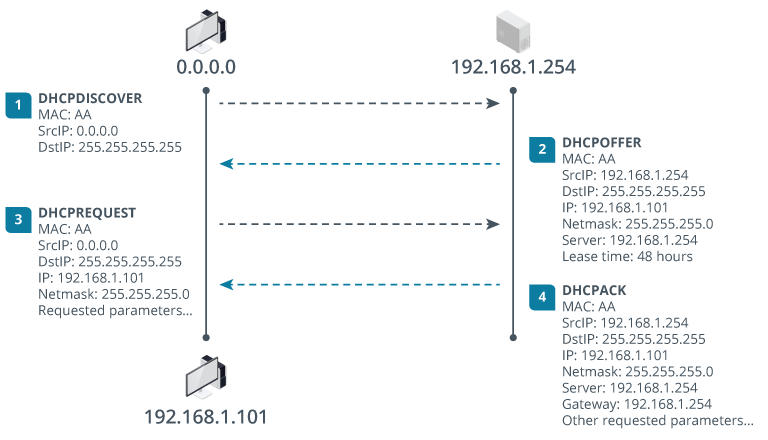
- When a DHCP client initializes, it broadcasts a DHCPDISCOVER packet to find a DHCP server
- Presuming it has an IP address available, the DHCP server responds to the client with a DHCPOFFER packet
- containing the address and other configuration information, such as default gateway and DNS server addresses
- client may choose to accept the offer using a DHCPREQUEST packet that is also broadcast onto the network
- Assuming the offer is still available, the server will respond with a DHCPACK packet
- client broadcasts an ARP message to check that the address is unused:
- If so, it will start to use the address and options
- if not, it declines the address and requests a new one
Info
The DHCP client communicates with the server using broadcast communications so there is no need to configure a DHCP server address in the client configuration.
- The DHCP server must be configured with a static IP address
- IP address is leased by the server for a limited period only
- client can attempt to renew or rebind the lease before it expires
- If the lease cannot be renewed, the client must release the IP address and start the discovery process again
- can change IP address information on the DHCP server
- clients will update themselves automatically when they seek a new lease (or a new lease can be requested manually)
DHCP Reservations
- often useful for a host to use the same IP address
- Servers, routers, printers, and other network infrastructure can be easier to manage if their IP addresses are known
- One option is to use static addressing for these appliances, but this is difficult to implement
- Another option is to configure the DHCP server to reserve a particular IP address for each device
- DHCP server is configured with a list of the MAC addresses of hosts that should receive the same IP address
- When it is contacted by a host with one of the listed MAC addresses, it issues a lease for the reserved IP address
Info
- Some operating systems send a different unique identifier than a MAC address by default
- The identification method should be configured appropriately on the client so that the server has the correct information