Disk Management (diskmgmt.msc)
The Disk Management (diskmgmt.msc) console displays a summary of any fixed and removable disks—hard disk drives (HDDs), solid state drives (SSDs), and optical drives—attached to the system.
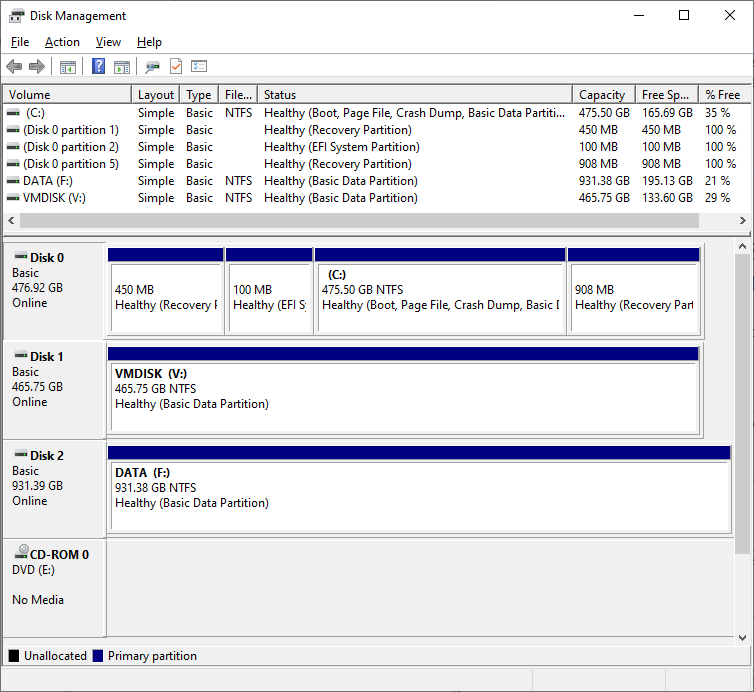
Drives, Volumes, and Partitions
Partitions are configured on HDDs and SSDs.
Volume is a logical storage unit made available to the OS
- could be 1:1 mapping of partition and volume
- could be made with RAID with one volume on multiples devices and partitions
Drive is a volume that is mapped to a letter.
- also refers to hardware storage device itself
Operating System Disk
- Disk 0 holds the operating system
- contains 3 volumes
- system volume – contains the operating system files
- has drive letter
C:
- has drive letter
- boot volume – contains files used to boot the OS
- typically uses EFI boot system
- no drive letter
- Recovery partitions – contain tools to repair damaged installation or return to factory state
- contains either:
- PC vendor’s tools
- Microsoft’s Windows Recovery Environment (WinRE)
- no drive letter
- contains either:
- system volume – contains the operating system files
Info
You cannot format or delete system or boot partitions.
- boot partition must be formatted as NTFS
- system partition must be formatted FAT32
Disk and Partition Tasks Supported
- Initializing disks—initialize a disk with a partition style
- 2 partition styles
- Master boot record (MBT)
- Globally Unique ID (GUID) Partition Table (GPT)
- 2 partition styles
- Partitioning—Each disk must be configured with at least one partition.
- right-click on an area of unpartitioned space
- Formatting—A new partition must be written with a file system to allow Windows to write and read files
- can reformat existing partitions
- deletes all files from volume
- choose file system type, volume label, and allocation unit size
- can reformat existing partitions
- Repartitioning
- expand existing partitions if unpartitioned space exists
- shrink or remove partitions
- Configuring dynamic disks—Dynamic volumes use multiple devices to implement some type of software RAID redundancy
- this is now deprecated feature
- use Storage Space feature instead