Most networks must authenticate and authorize clients before allowing them to connect to fileshares and mail servers
This security requirement is met by configuring an access control system to prevent unauthorized users (and devices) from connecting
E.g.,
In a Windows workgroup, the access control method is a simple password, shared with all authorized users
Enterprise networks use directory servers to maintain a centralized database of user accounts and authenticate the subjects trying to use those accounts
These protocols allow a user to authenticate once to access the network and gain authorization for all the compatible application servers running on it
referred to as single sign-on (SSO)
Lightweight Directory Access Protocol
Network resources can be recorded as objects within a directory
directory is a type of database, where an object is like a record and things that you know about the object (attributes) are like fields
Most directories are based on the X.500 standard
Lightweight Directory Access Protocol (LDAP) is a TCP/IP protocol used to query and update an X.500 directory
widely supported in current directory products
Windows Active Directory or the open source OpenLDAP
uses TCP and UDP port 389 by default
Authentication, Authorization, and Accounting
Network clients can join the network using multiple types of access devices, including switches, access points, and remote access VPN servers
Storing copies of the network directory and authentication information on all these access devices would require each device to do more processing and have more storage
also increases the risk that this confidential information could be compromised
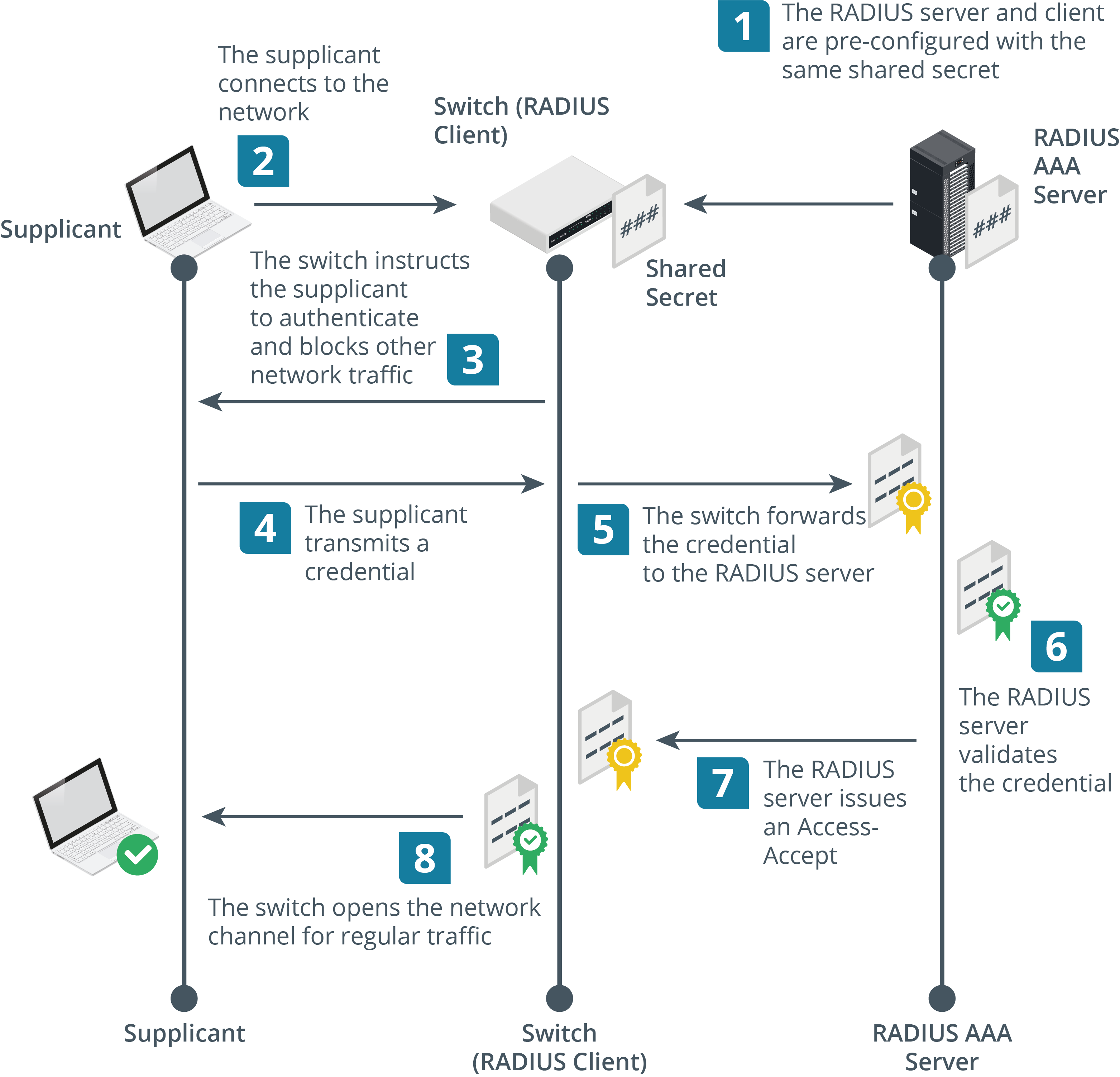
An authentication, authorization, and accounting (AAA) server is one that consolidates authentication services across multiple access devices
uses the following components:
Supplicant
device requesting access, such as a user’s PC or laptop
Network access server (NAS) or network access point (NAP)
Network access appliances, such as switches, access points, and VPN gateways
also referred to as “AAA clients” or “authenticators”
AAA server
authentication server, positioned within the local network
the network access appliances do not have to store any authentication credentials
simply act as a transit to forward this data between the AAA server and the supplicant
AAA is often implemented using a protocol called Remote Authentication Dial-in User Service (RADIUS)