each end host must be configured with a default gateway so that it can communicate with remote hosts
host’s routing table should contain an entry for 0.0.0.0/0 that uses the router’s IP address as the path
if there is no entry for this, check that the default gateway is configured
If host cannot contact remote networks,
verify you can ping the default gateway address
if default gateway is up, verify its configuration
if configuration is faulty, it is likely multiple hosts will have connectivity problems
default route can be configured on a router
might be used as the path to a service provider’s routers to contact external networks
misconfigured default routes or propagating default routes to other routers can be the cause of routing loops
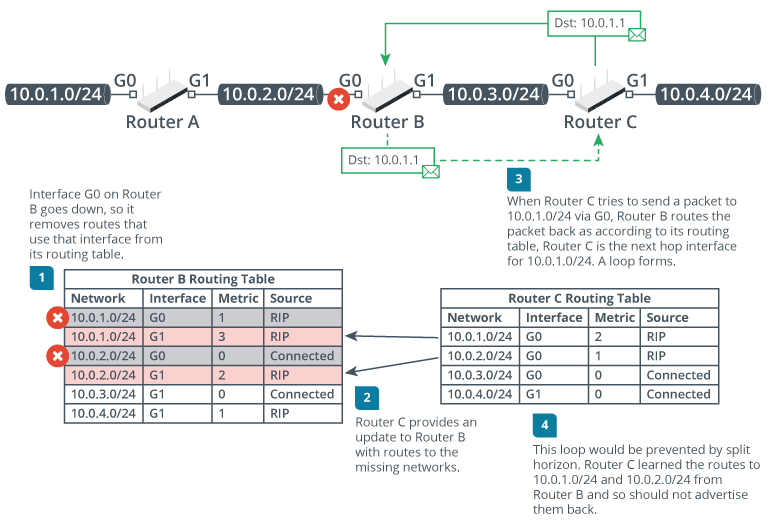
occurs when two routers use one another as the path to a network
packets caught in a routing loop circle around until the TTL expires
one symptom of routing loop:
routers generate ICMP Time Exceeded error messages
Routing protocols use various mechanisms to prevent loops
e.g., distance vector protocols us the following mechanisms:
maximum hop count
if the cost exceeds a certain value (16 in RIP), network is deemed unreachable
a poison route is one advertised with hop count of 16
can provide an explicit failure notice to other routers
holddown timer
if a node declares a network unreachable, its neighbors start holddown timer
any updates about that route received from other nodes are discarded for the duration of the timer
designed to ensure that all nodes have converged information about an unreachable network
split horizon
prevents a routing update from being copied back to the source
in example above,
would prevent Router C from sending an update about a route to Router A via Router B to Router B
link state protocols try to ensure that each node has a consistent view of the network through continual, timely updates flooded to all nodes in the routing domain
a loop in a link state routing domain typically indicates that:
updates are not being propagated correctly
use traceroute to diagnose a routing loop by looking for IP addresses that appear multiple times in the output