Database Management
Structured Query Language (SQL)
Structured Query Language (SQL) is the standard query language of relational databases.
- SQL statements are grouped into five sublanguages
Sublanguages
Data Definition Language (DDL) defines database structure.
- MySQL documentation: Data Definition Statements
- e.g.,
CREATE TABLE City (
   ID INTEGER,
   Name VARCHAR(15),
   Population INTEGER
);
Data Query Language (DQL) retrieves data.
- MySQL documentation: Data Manipulation Statements
- e.g.,
SELECT Name
FROM City
WHERE Population > 15000;
Data Manipulation Language (DML) inserts, updates, and deletes data.
- MySQL documentation: Data Manipulation Statements
- e.g.,
INSERT INTO City
VALUES (100, 'Geneva', 206000);
Data Transaction Language (DTL) manages transactions.
- MySQL documentation: Transactional and Locking Statements
- e.g.,
START TRANSACTION;

COMMIT;
Data Control Language (DCL) specifies user access to data.
- MySQL documentation: Database Administration Statements
- e.g.,
CREATE USER 'jordan';

GRANT ALL ON sakila.actor
TO 'jordan';
Language Elements
- SQL is built from language elements
- Literal
- Explicit value such as a character string or number
- String literals are enclosed in either single or double quotes
- e.g.,
'Maria',"Hellow world!",129,80.3
- Keyword
- Word with a special meaning for the language processor
- defined by the database system
- e.g.,
SELECT,INSERT,INTEGER
- Identifier
- Name of a database object, such as a column, table, or database
- specified by the programmer
- e.g.,
City,FirstName,Population
- Expression
- Sequence of literals, identifiers, and operations that evaluate to a single value
- e.g.,
Population > 100 OR Name = 'Tokyo'
- Comment
- Text that is ignored by the language processor
- Single-line comments begin with
--followed by a space - Multi-line comments are enclosed in
/*and*/
- Literal
Statement
A statement is a complete, executable instruction, ending with a semicolon.
- consists of one or more clauses
- Each clause begins with a keyword, followed by additional language elements
- Line breaks within a statement are ignored
- good practice is to write each clause on a separate line
- String literals are always case-sensitive
- Keywords and identifiers are not case-sensitive
Syntax Definitions
- MySQL syntax definitions use the following notation:
UPPERCASEtext indicates SQL keywordslowercasetext indicates an identifier or expression provided by the user- can be placeholder for a complex construction, defined elsewhere
- Square brackets
[]enclose an optional language element - Curly braces
{}enclose a series of alternative language elements, separated by vertical bars - Ellipsis
...indicates that the preceding language element may be repeated - Parentheses
()and commas are literal symbols- appear in SQL statements exactly as written in the syntax definition
SQL Standard
The SQL standard specifies the official syntax and behavior of SQL statements.
- published jointly by the:
- American National Standards Institute (ANSI)
- International Organization for Standardization (ISO)
- initially published in 1986
- latest version has 16 parts
- 11 are active and 5 were either never released or withdrawn
- A part is a formal specification of syntax and behavior
Managing Databases
A database system instance is a single executing copy of a database system.
- personal computers usually run one instance of a database system
- clouds usually run multiple instances of a database system
- each instance usually contains multiple system and user databases
Database SQL Commands
CREATE DATABASE DatabaseName creates a new database.
DROP DATABASE DatabaseName deletes a database, including all tables in the database.
USE DatabaseName selects a default database for use in subsequent statements.
The SHOW statement provides information about databases, tables, and columns:
SHOW DATABASESlists all databases in the database system instanceSHOW TABLESlists all tables in the default database- optional clause
FROM DatabaseNamelists tables in a named database
- optional clause
SHOW COLUMNS FROM TableNamelists all columns in the TableName table of the default databaseSHOW CREATE TABLE TableNameshows theCREATE TABLEstatement for the TableName table of the default database
Tables
- All data in a relational database is structured in tables:
- A table has a name, a fixed sequence of columns, and a varying set of rows.
- A column has a name and a data type.
- A row is an unnamed sequence of values. Each value corresponds to a column and belongs to the column’s data type.
- A cell is a single column of a single row.
- table must have at least one column but any number of rows
- A table without rows is called an empty table
- a table is also called a relation
Rules Governing Tables
- Exactly one value per cell
- A cell may not contain multiple values
- Unknown data is represented with a special
NULLvalue
- No duplicate column names
- Duplicate column names are allowed in different tables, but not in the same table
- No duplicate rows
- No two rows may have identical values in all columns
- No row order
- Rows are not ordered
- organization of rows on a storage device never affects query results
- called data independence
- allows database administrators to improve query performance without affecting results
CREATE TABLE and DROP TABLE Statements
The CREATE TABLE statement creates a new table by specifying the table name, column names, and column data types.
- fails if the named table already exists
- to avoid failure, use the optional clause
IF NOT EXISTS
- to avoid failure, use the optional clause
The DROP TABLE statement deletes a table, along with all the table’s rows, from a database.
- fails if the named table does not exist
- to avoid failure, use the optional clause
IF EXISTS
- to avoid failure, use the optional clause
Syntax: CREATE and DROP
CREATE TABLE [IF NOT EXISTS] TableName (
Column1 DATA_TYPE,
Column2 DATA_TYPE,
…
ColumnN DATA_TYPE
);
DROP TABLE [IF EXISTS] TableName;
TRANSPOSE
Transpose is an operation on a table in which rows become columns, and columns become rows.
- important operation for mathematical matrices, but is not commonly applied to tables
ALTER TABLE Statement
The ALTER TABLE statement adds, deletes, or modifies columns on an existing table.
- specifies the table name followed by a clause that indicates what should be altered
ALTER TABLE clause | Description | Syntax |
|---|---|---|
ADD | Adds a column | ALTER TABLE TableName ADD ColumnName DataType; |
CHANGE | Modifies a column | ALTER TABLE TableName CHANGE CurrentColumnName NewColumnName NewDataType; |
DROP | Deletes a column | ALTER TABLE TableName DROP ColumnName; |
Data Types
A data type is a named set of values from which column values are drawn.
Categories
- Integer
- represent positive and negative integers
- multiple types that vary on the number of bytes allocated
- e.g., SMALLINT
- Decimal
- represent numbers with fractional values
- vary by number of digits after the decimal point and maximum size
- syntax:
DECIMAL(M digits, D digits after decimal) - e.g., FLOAT and DECIMAL
- Character
- represent textual characters
- CHAR = fixed string of characters
- VARCHAR = variable length string specified to a max size
- Date and time
- represent date, time, or both
- some include a time zone or specify a time interval
- e.g., DATE, TIME, DATETIME, TIMESTAMP
- Binary
- store data exactly as the data appears in memory or computer files, bit for bit
- e.g., BLOB, BINARY, VARBINARY, and IMAGE
- Spatial
- store geometric information, such as lines, polygons, and map coordinates
- e.g., POLYGON, POINT, and GEOMETRY
- new and vary greatly across database systems
- Document
- contain textual data in a structured format such as XML or JSON
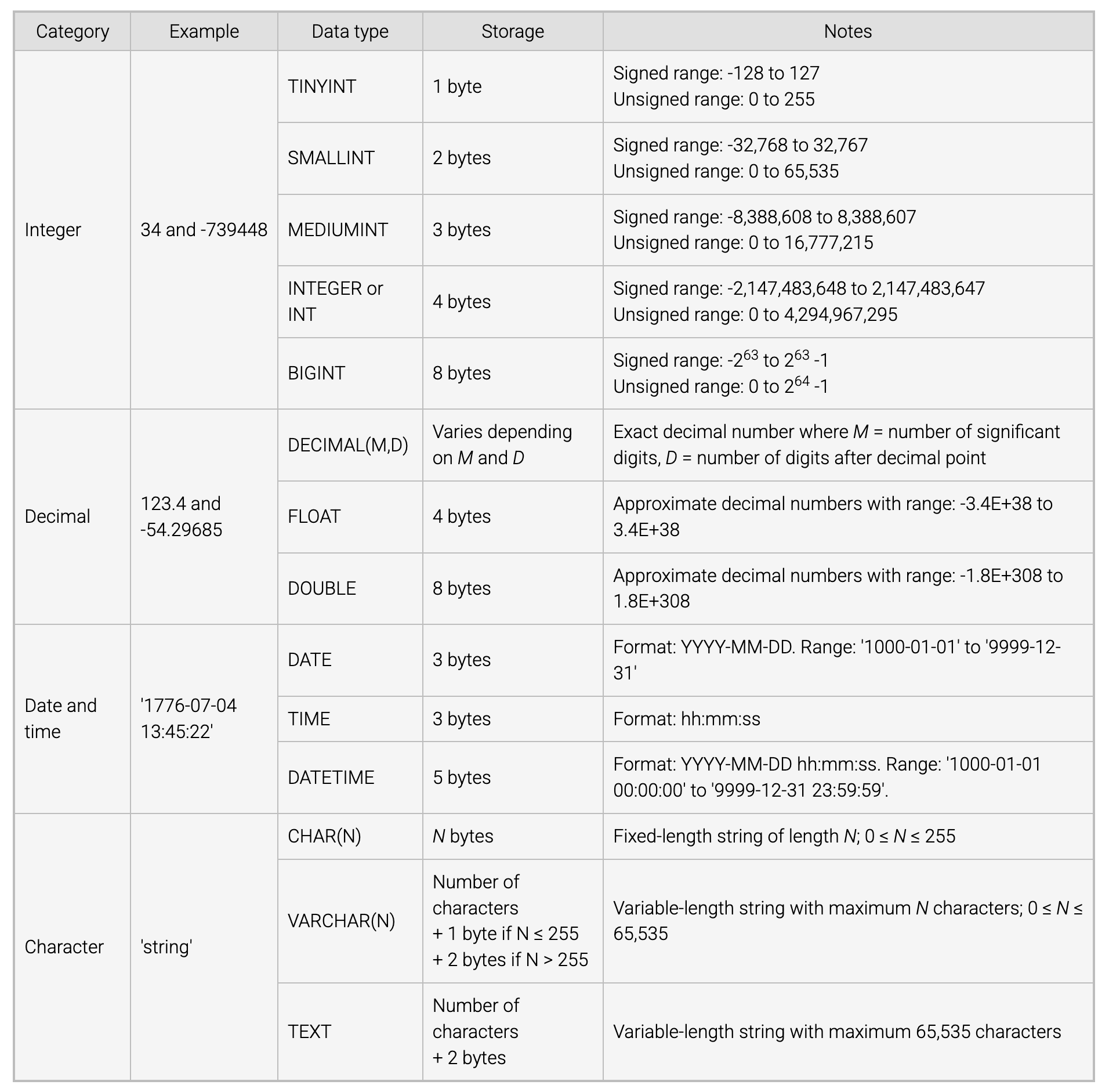
MySQL Data Types
- Most databases allow integer and decimal numbers to be signed or unsigned
- A signed number may be negative
- An unsigned number cannot be negative
- data types vary in storage requirements:
- Character data types use one or two bytes per character
- Integer data types use a fixed number of bytes per number
- Unsigned data types can store larger numbers than the signed version of the same data type
- To minimize table size,
- data type with the smallest storage requirements should be used
My SQL Data Types
Null Values
NULL is a special value that represents either unknown or inapplicable data.
- not the same as zero or blank
- some columns should never contain a
NULLNOT NULLconstraint prevents a column from having aNULLvalue- follows after the column name and data type in a
CREATE TABLEstatement
- follows after the column name and data type in a
Inserting, Updating, and Deleting Rows
INSERT Statement
The INSERT statement adds rows to a table.
- has two clauses:
INSERT INTOclause names the table and columns where data is to be addedVALUESclause specifies the column values to be added- may list any number of rows in parentheses to insert multiple rows
Syntax
INSERT [INTO] TableName (Column1, Column2, ...)
VALUES (Value1, Value2, ...);
Example
INSERT INTO Employee (ID, Name, Salary)
VALUES (2538, 'Lisa Ellison', 45000);
Default Values
A default value may be specified for a column.
- optional
DEFAULTkeyword and default value follow the column name and data type in aCREATE TABLEstatement - Columns may be omitted from an
INSERTstatement- When omitted, a column is assigned a
NULLvalue - If the
NOT NULLconstraint is specified on the column, the insert is rejected
- When omitted, a column is assigned a
Update Statement
The UPDATE statement modifies existing rows in a table.
- uses the
SETclause to specify the new column values - optional
WHEREclause specifies which rows are updated- Omitting the
WHEREclause results in all rows being updated
- Omitting the
Syntax
UPDATE TableName
SET Column1 = Value1, Column2 = Value2, ...
WHERE condition;
Example
UPDATE Employee
SET Name = 'Tom Snead',
  BirthDate = '2000-03-15'
Where ID = 5384;
Delete Statement
The DELETE statement deletes existing rows in a table.
FROMkeyword is followed by the table name whose rows are to be deleted- optional
WHEREclause specifies which rows should be deleted- Omitting results in all rows in the table being deleted
Syntax
DELETE FROM TableName
WHERE condition;
Truncate Statement
The
TRUNCATEstatement deletes all rows from a table.
- nearly identical to a
DELETEstatement with noWHEREclause except for minor differences that depend on the database system.- Syntax:
TRUNCATE TABLE TableName;
Primary Keys
A primary key is a column, or group of columns, used to identify a row.
- must be unique and not
NULL - identified by a bullet (●) preceding the primary key in table diagrams
- is usually left-most column
Composite Primary Keys
A simple primary key consists of a single column.
A composite primary key consists of multiple columns.
- must be:
- Unique
- Not NULL
- Minimal
- All primary key columns are necessary for uniqueness
- enclosed in parentheses
- e.g.,
(ColumnA, ColumnB)
- e.g.,
Primary Key Constraint
The primary key constraint in a CREATE TABLE statement names the table’s primary key.
- ensures that a column or group of columns is always unique and non-null
- primary key column definition usually appears first
- followed by other column definitions and the primary key constraint
Auto-increment Columns
An auto-increment column is a numeric column that is assigned an automatically incrementing value when a new row is inserted.
AUTO_INCREMENTkeyword defines an auto-increment column- follows the column’s data type in a
CREATE TABLEstatement
- follows the column’s data type in a
- Integer primary keys are commonly implemented as auto-increment columns
- in MySQL, may be applied only to primary key columns
Foreign Keys
A foreign key is a column, or group of columns, that refer to a primary key.
- data types of the foreign and primary keys must be the same
- does not have to be unique
- values may be
NULL - value that is not
NULLmust match some value of the referenced primary key
Composite Foreign Keys
- foreign key that refers to a composite primary key must also be composite
- All columns of a composite foreign key value must either:
- match some primary key value
- or be
NULL
Special Cases
- Multiple foreign keys may refer to the same primary key
- foreign key may refer to the primary key of the same table
Foreign Key Constraint
- foreign key constraint is created with a foreign key clause in the
CREATE TABLEstatement - syntax:
FOREIGN KEY (ColumnName) REFERENCES TableName (ColumnName) - usually follows all column definitions, but can be created at any point in the CREATE TABLE statement
Syntax
CREATE TABLE TableName (
…
FOREIGN KEY (ColumnName) REFERENCES TableName (ColumnName),
…
);
Referential Integrity
Referential integrity is a relational rule that requires foreign key values are either fully NULL or match some primary key value.
- fully
NULLmeans all columns areNULL - cannot be partially
NULL - relational databases must always obey referential integrity
Referential Integrity Violations
- 4 ways to violate referential integrity:
- A primary key is updated
- A foreign key is updated
- A row containing a primary key is deleted
- A row containing a foreign key is inserted
- primary key inserts and foreign key deletes never violate referential integrity
Referential Integrity Actions
- referential integrity violations can be corrected manually or automatically
- databases automatically correct referential integrity violations in 4 ways:
- RESTRICT rejects an insert, update, or delete that violates referential integrity
- SET NULL sets invalid foreign keys to
NULL - SET DEFAULT sets invalid foreign keys to the foreign key default value
- CASCADE propagates primary key changes to foreign keys
- if a primary key is deleted, rows containing matching foreign keys are deleted
- if a primary key is updated, matching foreign keys are updated to the same value
ON UPDATE and ON DELETE Clauses
- MySQL only supports
RESTRICTfor foreign key inserts and updates - MySQL supports all 4 actions for primary key updates and deletes
- actions are specified in optional
ON UPDATEandON DELETEclauses of theFOREIGN KEYconstraint- followed by one of the 4 actions
- actions are specified in optional
- MySQL has limitations on primary key updates and deletes:
RESTRICTis applied when theON UPDATEorON DELETEclause is omittedSET NULLcannot be used when a foreign key is not allowedNULLvaluesSET DEFAULTis not supported in some MySQL configurations
Exmaple
CREATE TABLE Department (
   Code TINYINT UNSIGNED,
   Name VARCHAR(20),
   ManagerID SMALLINT UNSIGNED,
   PRIMARY KEY (Code),
   FOREIGN KEY (ManagerID) REFERENCES Employee(ID)
      ON DELETE SET NULL
      ON UPDATE CASCADE
);
Constraints
A constraint is a rule that governs allowable values in a database.
- are based on relational and business rules
- implemented with special keywords in a
CREATE TABLEstatement - database auto-rejects statements that violate a constraint
- e.g.,
NOT NULLDEFAULTPRIMARY KEYFOREIGN KEY
Column and Table Constraints
A column constraint govern values in a single column.
- appears after the column name and data type in a
CREATE TABLEstatement - e.g.,
NOT NULL
A table constraint governs values in one or more columns.
-
appears in a separate clause of a
CREATE TABLEstatement -
e.g.,
FOREIGN KEY -
some constraints can be either column or table constraints
- e.g.,
PRIMARY KEYcan appear either in the column declaration or a separateCREATE TABLEclause- on a composite column, must be defined as a table constraint
- e.g.,
UNIQUE Constraint
The UNIQUE constraint ensures that values in a column, or group of columns, are unique.
- when applied to a single column,
- may appear either in the column declaration or a separate clause
- when applied to a group of columns,
- is a table constraint and must appear in a separate column
- MySQL creates an index for each
UNIQUEconstraint- index stores the values of the unique column in sorted order
- when new values are inserted or updated,
- MySQL searches the index to quickly determine if the new value is unique
CHECK Constraint
The CHECK constraint specifies an expression on one or more columns of a table.
- constraint is violated when the expression is
FALSE - satisfies when the expression is
TRUEorNULL - when expression contains one column,
CHECKmay appear either in the column declaration or a separate clause
- when expression contains multiple columns,
- is a table constraint and must be a separate clause
CHECK Constraint
CREATE TABLE Department (
Code TINYINT UNSIGNED,
Name VARCHAR(20),
ManagerID SMALLINT,
AdminAssistID SMALLINT,
Size VARCHAR(6) CHECK (Size IN (‘small’, ‘medium’, ‘large’)),
PRIMARY KEY (Code),
CHECK (ManagerID >= 1000 AND ManagerID <> AdminAssistID)
);
Constraint Names
The CONSTRAINT keyword is used to name a table constraint.
- syntax:
CONSTRAINT name declaration- if no name provided, database generates a default name
- names appear in error messages when violated
- most column constraints cannot be named
- except for
CHECK
- except for
Adding and Dropping Constraints
Add or drop constraints with the ALTER TABLE TableName followed by ADD, DROP, or CHANGE clause.
- unnamed constraints are added or dropped with a
CHANGEclause:CHANGE CurrentColumnName NewColumnName NewDataType [ConstraintDeclaration]
- named constraints are added with an
ADDclause:ADD [CONSTRAINT ConstraintName] PRIMARY KEY (Column1, Columne2 ...)ADD [CONSTRAINT ConstraintName] FOREIGN KEY (Column1, Column2 ...) REFERENCES TableName (Column)ADD [CONSTRAINT ConstraintName] UNIQUE (Column1, Column2 ...)ADD [CONSTRAINT ConstraintName] CHECK (expression)
- named constraints are dropped with a
DROPclause:DROP PRIMARY KEYDROP FOREIGN KEY ConstraintNameDROP INDEX ConstraintName(drops UNIQUE constraints)DROP CHECK ConstraintNameDROP CONSTRAINT ConstraintName(drops any named constraint)
- dropping a table fails when a foreign key constraint refers to the table’s primary key
- before dropping the table, the foreign key constraint or the foreign key table must be dropped