Computer Hardware
Motherboard
Motherboard is the main circuit board of a computer.
- contains soldered components and sockets/slots
- Holds CPU, RAM, ROM, and connectors for i/o devices
Expansion slots are sockets on the motherboard where expansion cards can be installed.
- Common types of expansion cards include graphics, sound, and network cards
Expansion card is a printed circuit board that can be inserted into an electrical connector or expansion slot on a computer motherboard, backplane, or riser card to add functionality to a computer system via the expansion bus.
Central Processing Unit (CPU)
CPU (central processing unit) is responsible for processing all computer program instructions.
- speed at which the processor processes information is measured in gigahertz (GHz)
3 Components of CPU
- Arithmetic logic unit (ALU), which contains circuitry that performs operations on data (such as addition and subtraction);
- Control unit, which contains the circuitry coordinating the machine’s activities
- Processor register, which contains data storage cells called registers.
Registers are high-speed storage areas in the CPU.
- All data must be stored in a register before it can be processed
- serve as temporary holding places for data being manipulated by the CPU
- hold the inputs to the ALU and store the results
To perform an operation on data stored in the main memory, the control unit:
- transfers the data from the main memory into the registers,
- informs the ALU which registers hold the data,
- activates the ALU, and
- tells the ALU which register should receive the result.
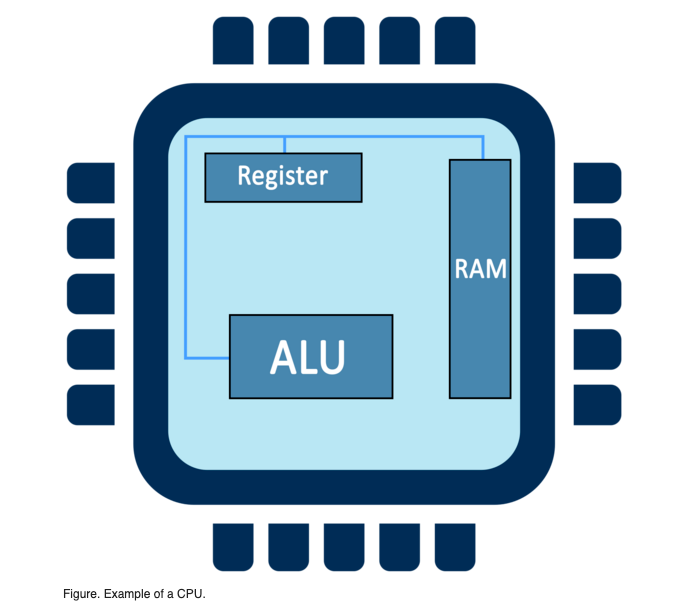
Types of Registers
| Name | Function |
|---|---|
| Memory address register (MAR) | Holds the memory location of data that needs to be accessed |
| Memory data register (MDR) | Holds data that is being transferred to or from memory |
| Accumulator (AC) | Holds the ALU results |
| Program counter (PC) | Holds the address of the next program instruction to be executed |
| Current instruction register (CIR) | Holds the current instruction during processing |
Random Access Memory (RAM)
RAM (random-access memory) temporarily stores information created by programs in a way that makes this data immediately accessible.
- also called primary memory
- found in memory slots of motherboard
- RAM is ephemeral, meaning data stored in RAM is lost when the computer is powered off
- RAM is split into partitions
- Each partition consists of an address and its contents, all in binary form
- The address uniquely identifies every location in the memory
Read-only memory (ROM) stores instructions for crucial system activities, including booting and initializing different computer components.
Buses
Buses or bus lines are the wires that serve as electrical roadways, transmitting information between the CPU and other components.
- size of the bus is related to the amount of data that can be transmitted at once
- Instructions are sent through the bus lines to the CPU
- include how to process the data and which component to use
- instructions are split and sent through three different types of buses:
- address buses
- data buses
- control buses
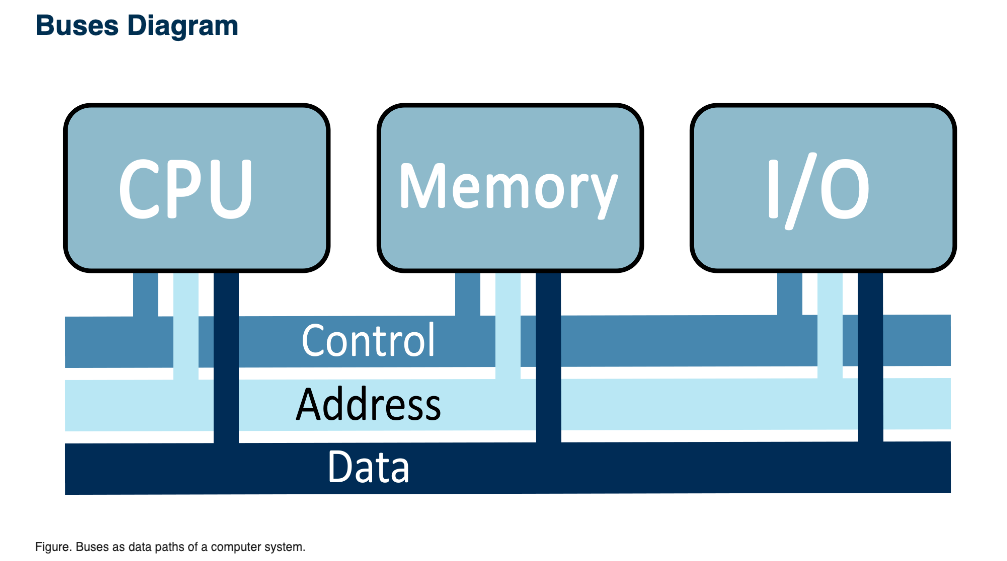
| Address bus | Carries the destination address of where the data is assigned to be processed |
| Data bus | Carries data between the processor, the memory unit, and the input/output devices |
| Control bus | Carries control signals (commands) from the CPU (and status signals from devices); controls and coordinates all activities within the computer system |
Expansion bus is a computer bus that moves information between the internal hardware of a computer system (including the CPU and RAM) and peripheral devices. It is a collection of wires and protocols that allows for the expansion of a computer.
System Unit
The system unit, also known as a tower or chassis, encases the various computer components.
- often used to differentiate between the computer and its peripheral devices
The system clock sends out a pulse of electricity at regular intervals.
- electronic components of the computer need these electric pulses in order to operate
- more pulses = faster computer
- One instruction gets processed per pulse
- Multiple processing units and a higher clock speed increase the processing speed of the computer system
- system speed commonly is measured in two primary measurements:
- megahertz (MHz), which converts to millions of pulses per second
- gigahertz (GHz), which converts to billions of pulses per second
Ports are sockets that allow cables to be plugged in without opening the system unit.
- E.g., serial, parallel, and Universal Serial Bus (USB) ports
Secondary Storage
Secondary storage devices hold data and information permanently.
A bit is the smallest unit of storage that is set to 0 or to 1.
- need to be combined to create a useful representation of data or information
- A group of eight bits forms a byte.
- contains enough information to store a single character, such as the letter “M”
| Unit | Equivalent in Bytes |
|---|---|
| 1 kilobyte (KB) | 2^10 or 1,024 bytes |
| 1 megabyte (MB) | 2^20 or 1,048,576 bytes |
| 1 gigabyte (GB) | 2^30 or 1,073,741,824 bytes |
| 1 terabyte (TB) | 2^40 or 1,099,511,627,776 bytes |
| 1 petabyte (PB) | 2^50 or 1,125,899,906,842,624 bytes |
Hard drive is a storage device responsible for storing permanent and temporary data.
- 2 types
- HDD (hard disk drives): write binary data onto spinning magnetic disks
- SSD (solid-state drives): stores data using static flash memory chips
Graphics Processing Unit
GPU (graphics processor unit) processes huge batches of graphic data.
Peripheral Devices
Peripheral devices are various units that support input and output functions.
Input devices translate data into a form that the computer can understand.
Output devices translate information into a form that humans can understand.