Complex Queries
Selecting Rows
Operators
An operator is a symbol that computes a value from one or more other values, called operands.
- arithmetic operators compute numeric values from numeric operands
- comparison operators computer logical values
TRUEorFALSE- may be numeric, character, or other data types
- logical operators compute logical values from logical operands
- A unary operator has one operand
- A binary operator has two operands
- most operands are binary
- logical operator is not unary
- arithmetic operator can be unary or binary
Common Operators
Type Operator Description Example Value Arithmetic +Adds two numeric values 4 + 37Arithmetic -(unary)Reverses the sign of one numeric value -(-2)2Arithmetic -(binary)Subtracts one numeric value from another 11 - 56Arithmetic *Multiplies two numeric values 3 * 515Arithmetic /Divides one numeric value by another 4 / 22Arithmetic %(modulo)Divides one numeric value by another and returns
the integer remainder5 % 21Comparison =Compares two values for equality 1 = 2FALSEComparison !=<>Compares two values for inequality 1 != 21 <> 2TRUEComparison <Compares two values with < 2 < 2FALSEComparison <=Compares two values with ≤ 2 <= 2TRUEComparison >Compares two values with > '2019-08-13' > '2021-08-13'FALSEComparison >=Compares two values with ≥ 'apple' >= 'banana'FALSELogical ANDReturns TRUE only when both values are TRUE TRUE AND FALSEFALSELogical ORReturns FALSE only when both values are FALSE TRUE OR FALSETRUELogical NOTReverses a logical value NOT FALSETRUE
Expressions
An expression is a string of operators, operands, and parentheses that evaluates to a single value.
- operands can be column names or fixed values
- value can be any data type
- e.g.,
Salary > 34000 AND Department = 'Marketing' - operators are evaluated in order of operator precedence
- expressions may evaluate to
NULL
Operator Precedence
Precedence Operators 1 -(unary)2 ^3 */%4 +-(binary)5 =!=<><=>=6 NOT7 AND8 OR
SELECT Statement
The SELECT statement selects rows from a table.
- has a select clause and a from clause
FROMclause specifies the table from which rows are selectedSELECTclause specifies expressions separated by commas
- returns a set of rows, called the results table
Syntax
-- SELECT with expressions
SELECT Expression1, Expression2, …
FROM TableName;
— SELECT with column names
SELECT Column1, Column2, …
FROM TableName;— SELECT with asterisk
SELECT *
FROM TableName;
LIMIT Clause
MySQL has a LIMIT clause that limits the number of rows returned by a SELECT statement.
Example
SELECT *
FROM City
LIMIT 100;
WHERE Clause
A condition is an expression that evaluates to a logical value.
- A
SELECTstatement has an optionalWHEREclause that specifies a condition for selecting rows- follows the
FROMclause
- follows the
Syntax
SELECT Expression1, Expression2, ...
FROM TableName
WHERE Condition;
Null Arithmetic and Comparisons
- when operators have a
NULLoperand,- the result is
NULL
- the result is
- when a
WHEREclause evaluates toNULL, row is not selected
IS NULL Operator
- comparison operators cannot be used to select
NULLvalues - use
IS NULLandIS NOT NULLoperators to selectNULLvalues
NULL Logic
- Expressions can be
TRUE,FALSE, orNULL NULLindicates the value of the expression is uncertain- value of logical expressions is contained in truth tables
MySQL Truth Table
x y x AND y x OR y TRUE NULL NULL TRUE NULL TRUE NULL TRUE FALSE NULL FALSE NULL NULL FALSE FALSE NULL NULL NULL NULL NULL —
x NOT x NULL NULL
Special Operators and Clauses
IN Operator
The IN operator is used in a WHERE clause to determine if a value matches one of several values.
Example
SELECT *
FROM CountryLanguage
WHERE Language IN ('Dutch', 'Kongo', 'Albanian');
BETWEEN Operator
The BETWEEN operator provides an alternative way to determine if a value is between two other values.
- Syntax:
value BETWEEN minValue AND maxValue - is equivalent to
value >= minValue AND value <= maxValue - is valid for
CHARandVARCHARdata types
LIKE Operator
The LIKE operator, when used in a WHERE clause, matches text against a pattern using the two wildcard characters % and _.
%matches any number of characters- e.g.,
LIKE 'L%t'matches “Lt”, “Lot”, “Lift”, and “Lol cat”
- e.g.,
_matches exactly one character- e.g.,
LIKE 'L_t'matches “Lot” and “Lit” but not “Lt” and “Loot”
- e.g.,
- performs:
- case-insensitive pattern matching by default
- case-sensitive pattern matching if followed by the
BINARYkeyword
- can escape the wildcard characters with
\(backslash)LIKE 'a\%'matchesa%
DISTINCT Clause
The DISTINCT keyword is used with a SELECT statement to return only unique or ‘distinct’ values.
Example
SELECT DISTINCT Language
FROM CountryLanguage
WHERE IsOfficial = 'F';
ORDER BY Clause
The ORDER BY clause orders selected rows by one or more columns in ascending (alphabetic or increasing) order.
DESCkeyword orders rows in descending order- order by multiple columns by listing with commas
Example
SELECT *
FROM CountryLanguage
ORDER BY Language [DESC]; -- brackets are optional
Simple Functions
A function operates on an expression enclosed in parentheses, called an argument, and returns a value.
- can have multiple arguments, separated by commas
- operates on and evaluates to specific data types
- can appear in
SELECTclause orWHEREclause
Numeric Functions
- numeric functions operate on, and evaluate to, integer and decimal data types
Common Numeric Functions
Function Description Example ABS(n) Returns the absolute value of n SELECT ABS(-5);
returns 5LOG(n) Returns the natural logarithm of n SELECT LOG(10);
returns 2.302585092994046POW(x, y) Returns x to the power of y SELECT POW(2, 3);
returns 8RAND() Returns a random number between 0 (inclusive) and 1 (exclusive) SELECT RAND();
returns 0.11831825703225868ROUND(n, d) Returns n rounded to d decimal places SELECT ROUND(16.25, 1);
returns 16.3SQRT(n) Returns the square root of n SELECT SQRT(25);
returns 5
String Functions
String functions manipulate string values.
Common String Functions
Function Description Example CONCAT(s1, s2, …) Returns the string that results from concatenating the string arguments SELECT CONCAT('Dis', 'en', 'gage');
returns ‘Disengage’LOWER(s) Returns the lowercase s SELECT LOWER('MySQL');
returns ‘mysql’REPLACE(s, from, to) Returns the string s with all occurrences of from replaced with to SELECT REPLACE('This and that', 'and', 'or');
returns ‘This or that’SUBSTRING(s, pos, len) Returns the substring from s that starts at position pos and has length len SELECT SUBSTRING('Boomerang', 1, 4);
returns ‘Boom’TRIM(s) Returns the string s without leading and trailing spaces SELECT TRIM(' test ');
returns ‘test’UPPER(s) Returns the uppercase s SELECT UPPER('mysql');
returns ‘MYSQL’
Date and Time Functions
Date and time functions operate on DATE, TIME, and DATETIME data types.
Common Date and Time Functions
Function Description Example CURDATE()
CURTIME()
NOW()Returns the current date, time, or date and time in 'YYYY-MM-DD','HH:MM:SS', or'YYYY-MM-DD HH:MM:SS'formatSELECT CURDATE();
returns ‘2019-01-25’SELECT CURTIME();
returns ‘21:05:44’SELECT NOW();
returns ‘2019-01-25 21:05:44’DATE(expr)
TIME(expr)Extracts the date or time from a date or datetime
expression exprSELECT DATE('2013-03-25 22:11:45');
returns ‘2013-03-25’SELECT TIME('2013-03-25 22:11:45');
returns ‘22:11:45’DAY(d)
MONTH(d)
YEAR(d)Returns the day, month, or year from date d SELECT DAY('2016-10-25');
returns 25SELECT MONTH('2016-10-25');
returns 10SELECT YEAR('2016-10-25');
returns 2016HOUR(t)
MINUTE(t)
SECOND(t)Returns the hour, minute, or second from time t SELECT HOUR('22:11:45');
returns 22SELECT MINUTE('22:11:45');
returns 11SELECT SECOND('22:11:45');
returns 45DATEDIFF(expr1, expr2)
TIMEDIFF(expr1, expr2)Returns expr1 - expr2 in number of days or time
values, given expr1 and expr2 are date, time, or datetime valuesSELECT DATEDIFF('2013-03-10', '2013-03-04');
returns 6SELECT TIMEDIFF('10:00:00', '09:45:30');
returns 00:14:30
Aggregate Functions
An aggregate function processes values from a set of rows and returns a summary value.
- common ones:
COUNT()counts the number of rows in the setMIN()finds the minimum value in the setMAX()finds the maximum value in the setSUM()sums all the values in the setAVG()computes the arithmetic mean of all the values in the set
- appear in a
SELECTclause and process all rows that satisfy theWHEREclause condition
GROUP BY Clause
GROUP BYclause consists ofGROUP BYkeyword- and one or more columns
- query computes the aggregate function separately, and returns one row, for each group
- appears between the
WHEREclause, if any, and theORDER BYclause SELECTclause may not contain columns with more than one value per group
HAVING Clause
The HAVING clause is used with the GROUP BY clause to filter group results.
- optional
- follows
GROUP BYclause - precedes
ORDER BYclause
Aggregate Functions and NULL Values
- aggregate functions ignore
NULLvalues - arithmetic operators return
NULLwhen either operand isNULL- so may produce unexpected results with aggregate functions
- e.g.,
SUM(Salary) + SUM(Bonus)≠SUM(Salary + Bonus)- assuming some null values
Join Queries
A join is a SELECT statement that combines data from two tables, know as the left table and right table, into a single result.
- combined by comparing columns from the left and right tables
- usually using
=operator - columns must have comparable data types
- usually using
- can compare any columns, but is usually a foreign key and a primary key
A natural join combines two tables by automatically matching columns that share the same name and have compatible data types.
- eliminates duplicate columns from the result set
- producing a streamlined table that contains only one copy of each matched column
Prefixes and Aliases
- when duplicate column names appear in a join query, the names must be distinguished with a prefix
- is the table name followed by a period
- e.g.,
TableName.ColumnName
- e.g.,
- is the table name followed by a period
- to simplify prefixes, column names can be replaced with an alias
- follows the column name, separated by an optional
ASkeywordSELECT ColumnName AS alias
- follows the column name, separated by an optional
Example
SELECT Department.Name AS Team,
       Employee.Name AS Supervisor
FROM Department, Employee
WHERE Manager = ID;
Inner and Full Joins
A join clause determines how a join query handles unmatched rows.
- 2 common join clauses:
INNER JOIN- selects only matching left and right table rows
FULL JOIN- selects all left and right table rows, regardless of match
- unmatched left table rows appear with
NULLvalues in right table columns and vice versa
- join clause appears between
FROMclause andONclauseFROMclause specifies left tableINNER JOINorFULL JOINspecifies right tableONclause specifies the join columns- optional
WHEREclause followsON
- MySQL does not support
FULL JOIN
Example
SELECT Department.Name AS Team,
		Employee.Name AS Supervisor
FROM Department
INNER JOIN Employee
ON Manager = ID
Left and Right Joins
LEFT JOIN selects all left table rows, but only matching right table rows.
RIGHT JOIN selects all right table rows, but only matching left table rows.
An outer join is any join that selects unmatched rows.
- includes left, right, and full joins
Alternative Join Queries
- inner joins can be written without a
JOINkeyword - outer joins can be written with a
UNIONkeyword instead
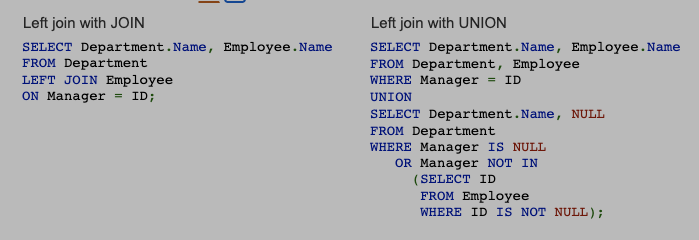
UNION combines the results of two SELECT clauses into one result table.
- for a left join,
- one
SELECTreturns matching rows - another returns unmatched left table rows
- one
- for a right join,
- one
SELECTreturns matching rows - another returns unmatched right table rows
- one
- for a full join,
- three
SELECTclauses are necessary - one returns matching rows
- another returns unmatched left table rows
- a third return unmatched right table rows
- the three results are merged with two
UNIONkeywords
- three
- using
JOINis better practice thanUNION- because union is more complex and difficult to understand
Example
Equijoins, Self-Joins, and Cross-Joins
Equijoins
An equijoin compares columns of two tables with the = operator.
- most joins are equijoins
- non-equijoin compares columns with an operator other than
=
Self-Join
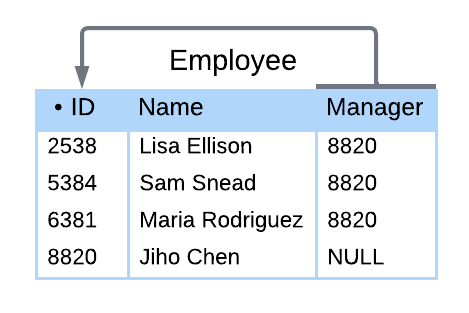
A self-join joins a table to itself.
- can compare any columns of a table,
- as long as the columns have comparable data types
- aliases are necessary to distinguish left and right tables
Example
A is the left table’s alias, and B is the right table’s alias
A.Nameis the Name column of the left table, representing the employee
B.Nameis the Name column of the right table, representing the employee’s managerresult shows employees along with each employee’s manager
SELECT A.Name, B.Name
FROM Employee A
INNER JOIN Employee B
ON B.ID = A.Manager;
Result
A.Name B.Name Lisa Ellison Jiho Chen Sam Snead Jiho Chen Maria Rodriguez Jiho Chen
Cross-Joins
A cross-join combines two tables without comparing columns.
- uses a
CROSS JOINclause without anONclause - As a result, all possible combinations of rows from both tables appear in the result
Example
IPhone
Model Price X 1100 XR 800 Storage
Gigabytes Price 64 0 128 100 256 200 SELECT Model, Gigabytes, IPhone.Price + Storage.Price FROM IPhone CROSS JOIN Storage;Result
Model Gigabytes IPhone.Price + Storage.Price X 64 1100 XR 64 800 X 128 1200 XR 128 900 X 256 1300 XR 256 1000
View Tables
Creating Views
Views restructure table columns and data types without changes to the underlying database design.
- may want to have different views for different departments/roles
A view table is a table name associated with a SELECT statement, called the view query.
The CREATE VIEW statement creates a view table and specifies the view name, query, and, optionally, column names.
- If column names are not specified,
- column names are the same as in the view query result table
CREATE VIEW Statement Syntax
CREATE VIEW ViewName [ ( Column1, Column2, ... ) ]
AS SelectStatement;
Querying Views
Base tables are always source tables, created as tables rather than as views
A table specified in the view query’s FROM clause is called a base table.
- view table data is not normally stored
- instead, when a view table appears in a SQL statement
- the view query is merged with the SQL query
- database executes the merged query against base tables
A materialized view is a view for which data is stored at all times.
- Whenever a base table changes,
- the corresponding view tables can also change,
- so materialized views must be refreshed
- To avoid the overhead of refreshing views,
- MySQL and many other databases do not support materialized views
Advantages of Views
- Protect sensitive data
- view can exclude sensitive columns but include all other columns
- Authorizing users and programmers to access the view but not the underlying table protects the sensitive data
- Save complex queries
- can reference the view without writing the SELECT statement
- Save optimized queries
Inserting, Updating, and Deleting Views
Using views in INSERT, UPDATE, and DELETE statements is problematic:
- Primary keys
- If a base table primary key does not appear in a view,
- an insert to the view generates a
NULLprimary key value
- an insert to the view generates a
- primary keys may not be
NULL, so the insert is not allowed
- If a base table primary key does not appear in a view,
- Aggregate values
- A view query may contain aggregate functions
- One aggregate value corresponds to many base table values
- An update or insert to the view may create a new aggregate value,
- which must be converted to many base table values
- The conversion is undefined,
- so the insert or update is not allowed
- Join views
- In a join view, foreign keys of one base table may match primary keys of another
- A delete from a view might delete
- foreign key rows only,
- or primary key rows only,
- or both the primary and foreign key rows
- The effect of the join view delete is undefined and therefore not allowed
WITH CHECK OPTION Clause
When WITH CHECK OPTION is specified, the database rejects inserts and updates that do not satisfy the view query WHERE clause.
- Instead, the database generates an error message that explains the violation
Background
- Databases that allow view updates face one particularly bothersome behavior
- A view insert or update may create a row that does not satisfy the view query
WHEREclause- In this case, the inserted or updated row does not appear in the view table
- From the perspective of the database user, the insert or update appears to fail even though the base tables have changed
WITH CHECK OPTION Syntax
CREATE VIEW ViewName [ ( Column1, Column2, ... ) ]
AS SelectStatement
[ WITH CHECK OPTION ];