Working with Time in Splunk
Searching with Time
- Time in Splunk
- when an event is ingested, its timestamp is stored in the
_time field
- used to create the event timeline in the Splunk user interface
- time field is stored with the event in the index prior to search time
- timestamps are expressed in:
- timestamps are translated to human readable time during Search
- all events are sorted by time
- time is most efficient filter
- timestamp is adjusted to user’s local time zone set in account settings
- Timeline
- shows events by time for the search results
- can click the timeline to filter events
- does not rerun the search
- can select a time range on the timeline
- can zoom to a selection of the timeline
- Time Range Picker
- presets
- relative
- real-time
- date range
- date & time range
- advanced
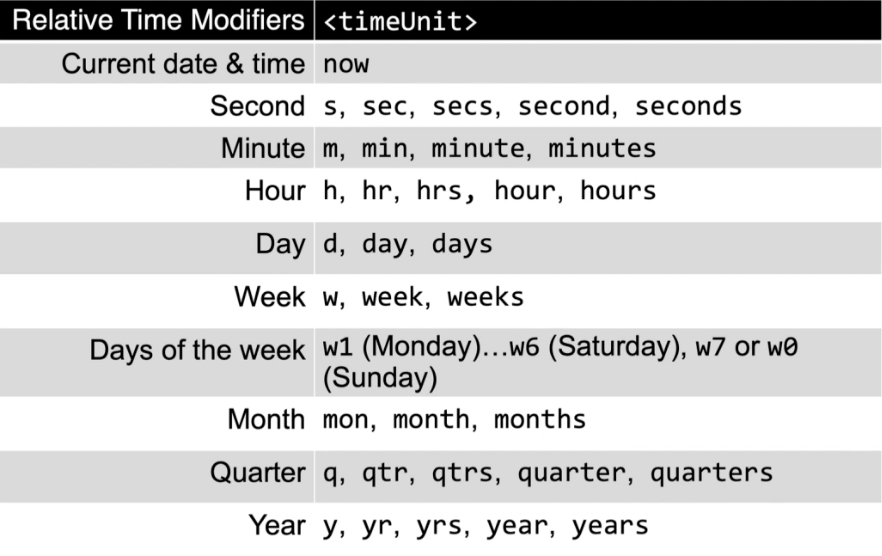
- specify time unit abbreviations
- used in Earliest and Latest time modifiers
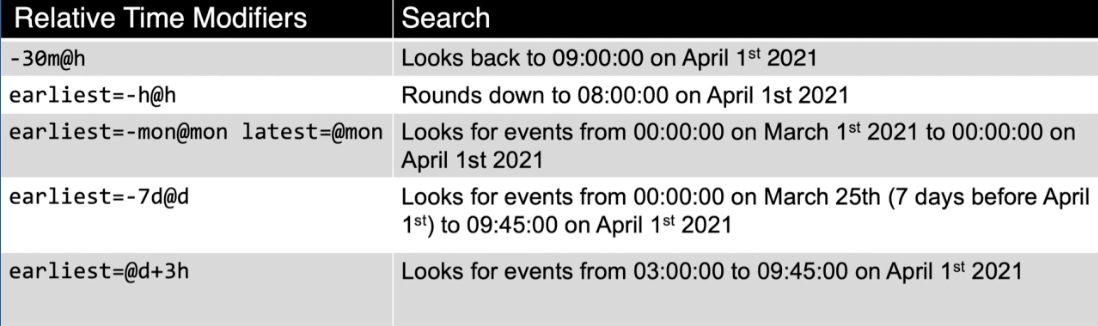
- syntax=
[+|-]<timeInt><timeUnit>@<timeUnit>
<timeInt><timeUnit> time amount expressed as an integer and unit e.g., 3h@timestamp snaps to the specified time unit
- always rounds down to the nearest specified unit
- time range specified in search takes precedence over time range picker
- Default time fields
date_<timeUnit>
- reflects time from raw events
- only generates for events where Splunk is able to generate a timestamp
- all events have a value for time, but not all source events have a timestamp value in them
| bin command buckets numerical values into discrete sets or bins
span sets the scale/size of each bin
| eval calculates an expression and puts the value to a new or pre-existing field
- supports many functions
- can format time with this
- Date and Time functions
now() returns the time a search was startedtime() returns the value the time an event was processed by eval commandrelative_time()
- returns an epoch timestamp relative to a supplied time
| eval field1 = relative_time(x, y)x is a number, representing desired time in epoch secondsy is a relative time specifier
Using Time Commands
| timechart performs statistical aggregations against time
_time is always the x-axisspan option controls time buckets- best visualized as a:
| timewrap used to display the output of the timechart command so that each time period is a separate series
- allows comparing specific time periods to each other
- syntax:
| timewrap [<int>]<timesscale>
- e.g., compare the number of password failures this week over the number of password failures last week over time
index=security sourcetype=linux_secure "failed password" earliest=-14d@d latest=@d
| timechart span=1d count as Failures
| timewrap 1w
Working with Time Zones