Rolling Back Data with TCL
- when working with
BEGIN TRANSACTION, you can leverage theROLLBACKTCL command- This command performs an “undo” that allows you to reverse your most recent changes
- because they have not yet been committed
- This command performs an “undo” that allows you to reverse your most recent changes
- this command will only undo changes you’ve made since the last
COMMIT ROLLBACKstatement is designed to run in parts, not to be executed all at once- lets us confirm the changes we are going to make
- allows us to confirm they are made
- then if they are accurate, we can commit them
- If they are inaccurate, we can roll them back
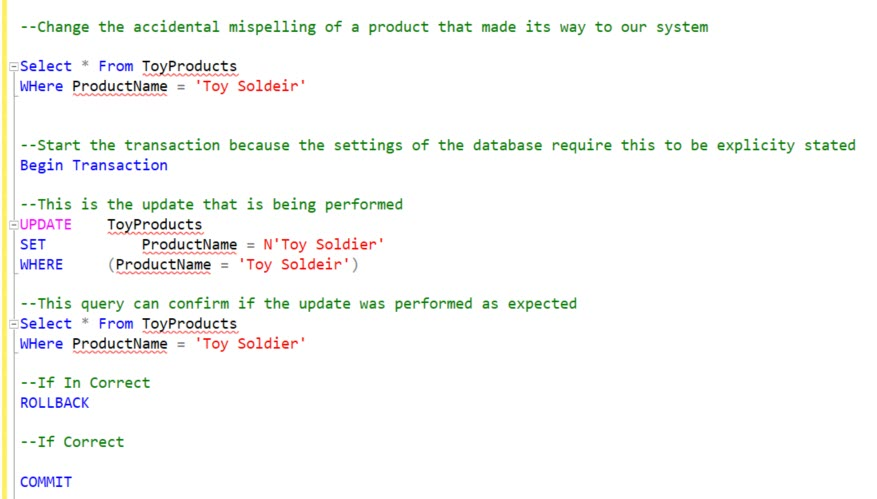
- The screenshot below shows our use of
ROLLBACKwhen updating the toy company database:
Example
- first
SELECTpulls all the fields from ToyProducts that have a product name of “Toy Soldeir”
- This product name was initially misspelled
- the query will show us the record that needs to be fixed
- then begin the process with
BEGIN TRANSACTION- use the UPDATE statement to update the product name with the corrected spelling of Toy Soldier
- While we are still in the transaction, we can query again to confirm the correction is made
- If it’s correct, we run
COMMIT- if not correct, can run
ROLLBACK
SAVEPOINTallows you to save a certain state to return to later- can be coupled with a
ROLLBACK - allows you to roll back to the
SAVEPOINTwithout rolling back the entire transaction
- can be coupled with a
- note that you may not always have a
SAVEPOINTin your transaction- whether or not you do will depend greatly on what you are trying to accomplish with the script and process you are working with