Projects in Controlled Environments (PRINCE2)
PRojects IN Controlled Environments (PRINCE2) is a process-based project management methodology that aims to control the project management process by pre-defining clear project phases, roles, and tasks.
- project management standard for the United Kingdom government
- aims to control project management processes by:
- creating clear project phases
- clearly defining roles and responsibilities
- predefining tasks to manage the project life cycle
- includes more upper management involvement than other methodologies do
- helps the organization manage resources and lower risk
- uses seven principles, seven themes, and seven processes to move the project forward by defining the approach, artifacts, and activities that do so
Roles and Responsibilities
- Team member
- help the PM by supervising the teams and managing the quality of outputs
- typically for large project teams
- Project board
- accountable for a project
- authorizes resources and funding, supports the PM, and is ultimately responsible for the project
- includes three roles:
- executive
- senior user
- senior supplier
- Executive
- a member of upper management and represents a business perspective
- the deciding member of the project board
- own the project’s business case
- Each project board has one executive
- Senior user
- represents the customer’s perspective
- project board will have one or more senior users
- Senior supplier
- represents the supplier or implementation partner’s perspective
- One or more senior suppliers sit on the project board
Structure
- PRINCE2’s structure forms under four integrated elements:
- principles
- themes
- processes
- and tailoring to suit the needs of the project environment
Principles
- seven principles represent the philosophy and best practices of PRINCE2
- Continued business justification
- projects update the business case throughout the project’s life
- project is continually evaluated to ensure that it is still a good decision to pursue it
- Learn from experience
- lessons learned or continual improvement process helps teams learn from their own experience and other projects
- team maintains a lessons log and reports on lessons learned throughout a project
- can also view the lesson reports from other projects
- Defined roles and responsibilities
- creates clarity for team members
- leads to faster decision-making and reduced friction
- team has a shared understanding of who does what
- Manage by stages
- breaks projects into two or more phases
- the boundaries between phases serve as checkpoints for the project board
- PMs handle the day-to-day management duties
- project board reviews a project when it is ready to move from one stage to the next
- breaks projects into two or more phases
- Manage by exception
- sets performance tolerances for the standard project performance metrics: time, cost, quality, scope, benefits, and risk
- tolerance defines the acceptable range of performance
- clarify the PM’s authority by providing flexibility to address minor performance issues instead of escalating every overage
- PM handles decisions as long as the project stays within the predefined tolerances
- exception occurs when the project exceeds a tolerance
- PM escalates exceptions to the project board
- Focus on products
- team understands and agrees on the product’s definition and quality requirements
- Tailor to suit the product
- PMs adapt PRINCE2 elements to fit a specific project’s size, scope, and requirements
- Organizations adapt the PRINCE2 framework to meet scaling requirements, industry standards, and company needs
Themes
- seven themes represent the PM’s knowledge areas
- principles are the ideals, themes are what you do with them
- Business case
- use the business case to provide continued business justification
- Organization
- define and document the roles and responsibilities
- Quality
- define product quality to help the team focus on the product
- Plans
- maintain a project plan, and measure project performance
- Risk
- document and manage risks throughout the project
- Change
- track changes, and obtain approval before adding them to the plan
- Progress
- regularly track and measure the project’s progress so you can keep the project on track and address exceptions immediately
Processes
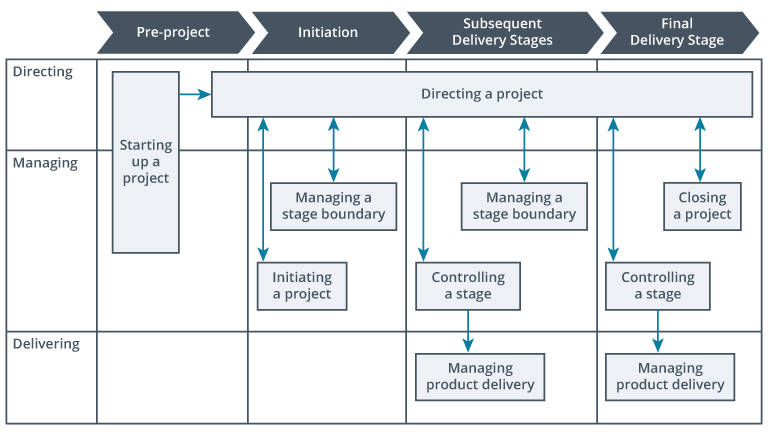
- seven processes represent the activities and their purpose throughout a project’s life cycle
- Starting up
- initiate the business and determine a project’s viability
- Initiating
- define the project’s aspects: scope, costs, time scales, risk, quality, and benefits.
- Directing
- the product board provides oversight, including approving the project at stage boundaries
- project board decides when a project is ready to close
- Controlling a stage
- this stage includes the PM’s day-to-day activities
- PM breaks the project into tasks and oversees progress
- They respond to and escalate issues when they arise
- Managing delivery
- PM measures the project’s performance
- also verify quality and obtain approvals of completed work
- Managing a stage boundary
- PM prepares project updates and updates the project plan
- project board reviews the project data and decides if it should advance to the next stage or not
- project team captures lessons learned
- Closing
- PM completes closing materials, turns over completed work, and closes the project
Strengths
- Any project type of any size can benefit from PRINCE2’s adaptability
- easy to learn the processes
- built on continuous improvement principles
- project results reflect that constant growth
- requires high levels of communication
- stakeholders are rarely surprised by the project’s progress
Weaknesses
- extensive documentation required in the model can cause some teams to become bogged down
- requires organizational buy-in to support certain elements, such as the project control board
Use Cases
- good fit for:
- Process-focused organizations that rely on documentation
- Executives looking for a way to keep projects aligned and maintain an understanding of projects
- not good for:
- companies that do not emphasize documentation