Endpoint Hardening
Operating System Security
- Operating system security encompasses many practices that aim to protect against unauthorized access, data breaches, malware infections, and other security threats
- Applicable security concepts:
- access controls
- authentication mechanisms
- secure configurations
- application security
- secure coding
- patch management
- endpoint protection
- user awareness training
- monitoring
Hardening describes changing an operating system or application to make it operate securely.
- need for hardening must be balanced against functional requirements and usability
- hardening can often negatively impact how applications work or interoperate
- Best practice baselines play a critical role in device hardening
- provide a standard set of guidelines or checklists for configuring devices securely
- offer a starting point for systems administrators to ensure that devices are configured according to industry security standards
- essential principle is of least functionality
- a system should run only the protocols and services required by legitimate users and no more
- reduces the potential attack surface
- elements to assess and secure:
- Interfaces
- provide a connection to the network
- may have more than one interface
- may be wired and wireless interfaces or a modem interface
- If any of these interfaces are not required,
- they should be explicitly disabled
- rather than simply left unused
- Services
- provide a library of functions for different types of applications
- some support local features of OS and installed applications
- others support remote connections
- Unused services should be disabled
- Application service ports
- allow client software to connect to applications over a network
- should be disabled or blocked at a firewall if remote access is not required
- Be aware that a server might be configured with a nonstandard port
- malware may try to send nonstandard data over an open port
- An intrusion detection system should detect network data that does not conform to the expected protocol format
- Persistent storage
- holds user data generated by applications, plus cached credentials
- Disk encryption is essential to data security
- Self-encrypting drives can be used so that all data at rest is always stored securely
- Interfaces
- establish a maintenance cycle for each device
- keep up to date with new security threats and responses for the particular software products that you are running
Workstations
- Workstations operate at the frontline of an organization’s activities
- present unique concerns regarding endpoint hardening compared to other devices
- generally have a large attack surface
- Due to the varied tasks and numerous applications associated with workstation use
- Hardening practices to minimize this attack surface include:
- removing unnecessary software
- limiting administrative privileges
- strictly managing application installations and updates
- and many other changes
- user-focused security strategies are essential
- regular training and awareness activities
- educate users about threats such as phishing
- promoting secure behaviors such as
- strong password practices
- responsible Internet use
- careful handling of sensitive data
- configure workstation settings for increased security:
- automatic updates
- screen locks
- firewalls
- endpoint protection
- intrusion detection and prevention
- increased logging
- encryption
- monitoring
- and many other protections
- secure peripheral devices, like USB ports
- critical for workstations due to their diverse use and high exposure
- achieved using features of endpoint protection software and the implementation of strict device control policies
- segmentation is crucial to restrict communications and limit the potential for malware or attackers to propagate across the network
Baseline Configuration and Registry Settings
Baseline configuration is settings for services and policy configuration for a network appliance or for a server operating in a particular application role (web server, mail server, file/print server, and so on).
- typical to have separate baselines for desktop clients, file and print servers, DNS servers, application servers, directory servers, and other types of systems
- in Windows, configuration settings are stored in the registry
- On a Windows domain network,
- each domain-joined computer will receive policy settings from one or more group policy objects (GPOs)
- These policy settings are applied to the registry each time a computer boots
- should be relatively little reason for security-relevant registry values to change
- Rights to modify the registry should only be issued to user and service accounts on a least privilege basis
- A host-based intrusion detection system can be configured to alert suspicious registry events
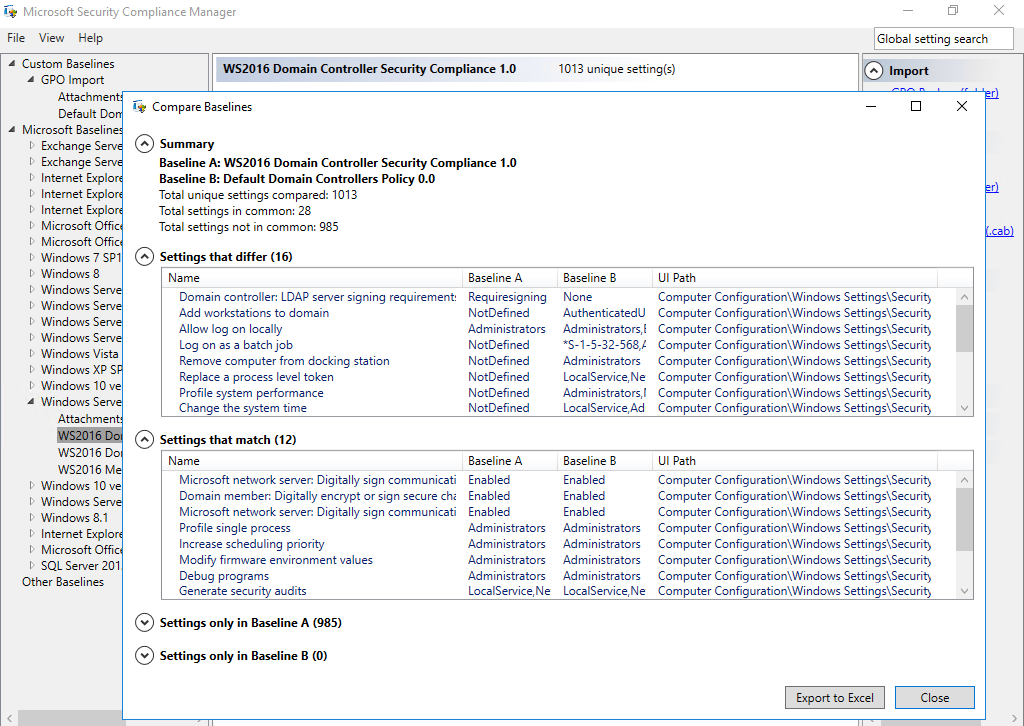
- Baseline deviation reporting means testing the actual configuration of hosts to ensure that their configuration settings match the baseline template
- formerly used Microsoft Baseline Security Analyzer (MBSA)
- now use Security Compliance Toolkit